Forum Discussion

Re: Sims 4 - Game License Invalid

First off, I have not been able to play the Sims 4 in just over a year. Why? This is due to the fact that the EA App has been the most frustrating app for game content. Battle.net has never been so problematic. That being said, I cannot play my one and only EA game. I have the Sims 4 plus several packs/expansions.

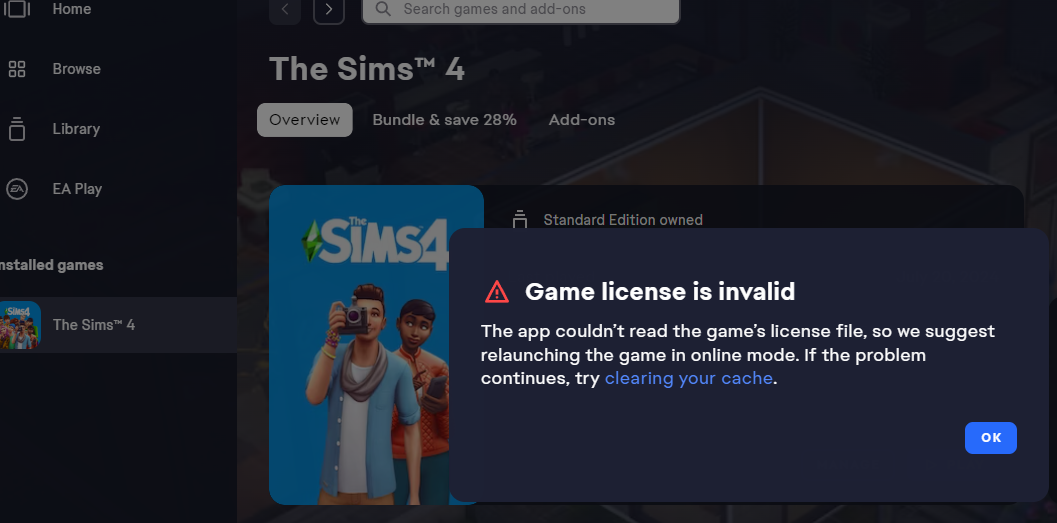
I want definitive step-by-step instructions on how to resolve this. I was able to play through Origin until its shutdown in the spring 2025. I have updated Windows, disabled my firewall and anti-virus protection, ran the EA App and The Sims 4 as administrator, uninstalled and reinstalled the game and the EA App at least 10 times each. I reset my password on EA as well to trigger recent activity on my account. The app shows The Sims 4 installed (I didn't bother with my packs) but cannot launch it without the "invalid license" error.

Version: PC
OS: Windows 11
EA App version: 13.531.0.6044
Games purchased: The Sims 4, Backyard Stuff, Cats & Dogs, Desert Luxe Kit, Get To Work, Holiday Celebration Pack, My First Pet Stuff, Romantic Garden Stuff, Seasons

I have looked at other threads on here for answers. There are apparently none. Can a rep at least confirm that my purchases are still attached to my account? I have no others and The Sims 4 is my only game.

Waiting on response.

5 Replies

  • xXwordsmithXx's avatar
    xXwordsmithXx
    Seasoned Novice
    4 months ago

    So no response after three weeks. I noticed my post has been inserted into a TWO-YEAR-OLD THREAD where it may be overlooked. I attached some things here about my continuing issue. 

  • xXwordsmithXx's avatar
    xXwordsmithXx
    Seasoned Novice
    2 months ago

    A few people have recommended linking my EA account to Steam and launching the game from there. Uninstalled The Sims 4 and the EA App. Checked for any leftover files. Restarted. Downloaded Steam just fine, registered, downloaded The Sims 4 and tried to launch it. It was "preparing game" and automatically downloaded EA App. Steam auto-launched EA App and... "game license is invalid" once again. The game shows up in my Library on Steam and the EA App. Didn't bother to download expacs or stuff packs. The issue lies with the EA App. There is no license folder.


  • Myn2labs's avatar
    Myn2labs
    Seasoned Novice
    2 months ago

    I have had this issue since August 18th. Chatted with support for help. They had non to offer but said they would report iy and the more people with th issue the better chance of it getting fixwd :-(


  • xXwordsmithXx's avatar
    xXwordsmithXx
    Seasoned Novice
    2 months ago

    I followed advice about creating another administrative account on my PC to run The Sims 4. Seemed promising so I went through all the motions. Launched the game through Steam on the new account.

    "Game license is invalid" still appeared. I'll have to find time to go through Chat Support to find help since this is exclusively an EA App or account verification issue (as in, EA App doesn't realize I own the game even though it appears in my library and I have a key).

    Are there any EA staff members out here?

Featured Places

Node avatar for EA app Technical Issues & Bugs

EA app Technical Issues & Bugs

Having issues with the EA app? Join us to report bugs, and find help with downloads, DLCs, purchases, and login errors.Latest Activity: 3 hours ago
8,393 Posts