Forum Discussion

66 Replies
 ridolin2 years agoNew Traveler
I figured it out and meant to post. Or at least, when I managed the settings from inside the EA app to remove the -modpath or whatever it is, it was fine after that.
how did you exactly remove that path? where should i go from ea app
 Nalchic2 years agoHero+Go to personalisation- profile-delete- delete last roster update, or whatever it is called. After that it should be fine.
where is that exactly? in ea app or game files because I couldn’t find anything like that
- Nalchic2 years agoHero+@SoftVOR Launch the game as usual and go to settings, you will see profile there.
should i delete UT SQUAD UPDATE 1?
i deleted and it didn’t help ☹️
can you help us bro? Nothing works
Deleted, but it dont let me pass to UT without downloading it again.
- @ridolin hey bro, could you describe exactly what you did please? :D
 EA_LeonSK2 years ago
EA SPORTS FC™ Team
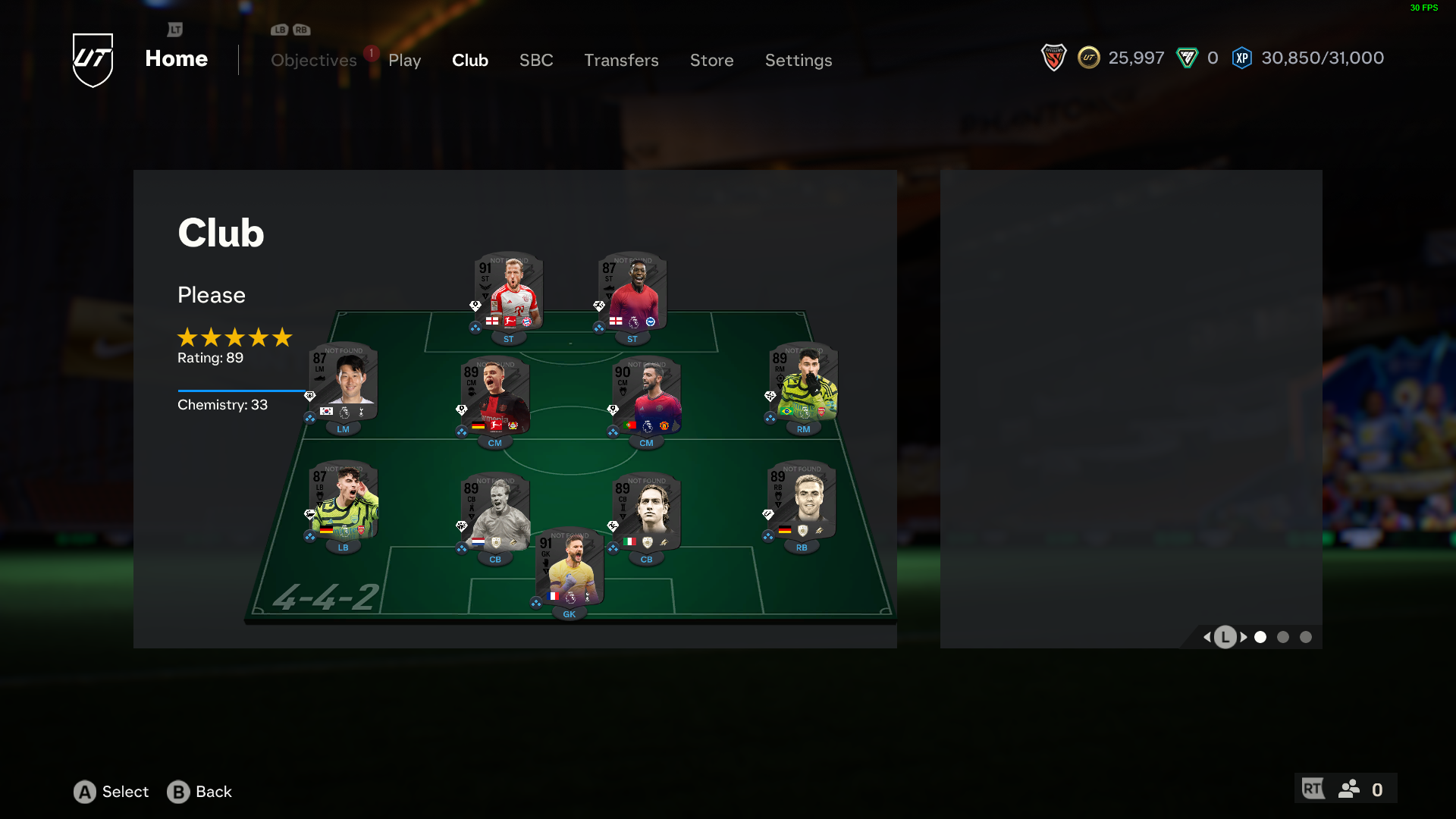
Hey all, I can read many of you have their squad greyed out with all cards showing as "not found".
Please, follow these steps and let us know if you see cards in their correct version:
- Log out from Ultimate Team;
- From the main menu go to Settings > Profile > Delete;
- Choose and remove UT Squads Update;
- Close the game and reopen it;
- Launch Ultimate Team and wait for the squads' update to be completed.
Hello,
I followed the instructions you specified, but the problem persists. @EA_LeonSK
@EA_LeonSK This is not just a staffing issue. We cannot use any area on the ultimate team screen. Even the "select" buttons, "sbc" buttons and many other buttons do not work.
 Arabadey012 years agoRising Novice@EA_LeonSK That still does not work!
- EA_LeonSK2 years ago
@Arabadey01, @hamdi5742 Sorry to read that.
Please try to repair the game:
- From EA App: in your Game Library, click on the three dots and choose Repair, clear the cache (Link), and restart your PC.
- From Steam: right-click the game from the Library, select Properties > Installed Files, and click on Verify Integrity of Game Files. Restart Steam.
If those steps don't help, remove the game, restart your PC, and download and install it again.
Let us know if you can fix the issue with those suggestions.
- ridolin2 years agoNew Traveler
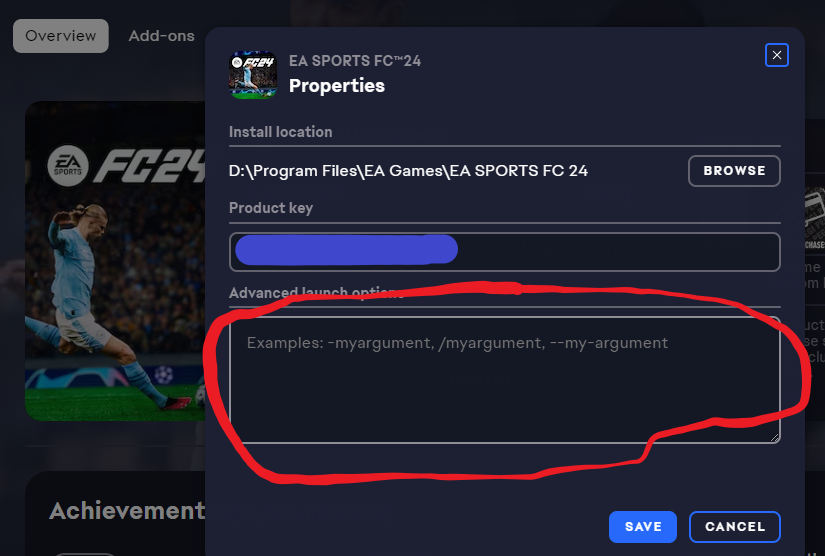
So in the EA app, for FC 24 go to the Manage button. Then View Properties. In the 2nd box it should say Advanced Launch options. Remove everything in that box (NOT he Product key) and click Save.
I've added some images to show you. The bit in red is the one you want to clear out. At least that worked for me.
Good luck,
- Arabadey012 years agoRising Novice@ridolin I am assuming this principle applies to steam as well in it own launch options. I am asking because I have the game through steam.
- ridolin2 years agoNew Traveler
@Arabadey01 wrote:
@ridolinI am assuming this principle applies to steam as well in it own launch options. I am asking because I have the game through steam.Not sure where it is in Steam but I guess there must be a similar option
- Arabadey012 years agoRising Novice
Ok so I found the issue for me. For anyone who sees this, the issue might be as @ridolin said about the advanced launch options box. Anything that is written in that box SHOULD be REMOVED. For Steam go to your library and then right click on EAFC 24 and click PROPERTIES. In the section general you should find "LAUNCH OPTIONS". Remove any text in the box and it should fix the problem.
As for the game through the EA App follow @ridolin's message regarding the game through that launcher. Basically it is the same process as steam in that you go to your library in the EA APP and click on the three dots and then manage and it should show advanced launch options and remove any text again to solve this issue.
I think the issue affects people who have installed mods for EAFC for like enhanced graphics and what not and it is probably not compatible with this new update EA just released. This is my best guess. I hope that this helps people!
I also hope that ea gives us compensation for this bs because I shouldn't have to jump through hurdles for dumb updates. @EA_LeonSK
Good Luck
- Arabadey012 years agoRising Novice
And of course as soon as I get access to my account on pc I can't connect to ultimate team because of high server traffic.
Typical ea, taking money from everyone and can't even bother to fix this damn game.
- @Arabadey01 @ridolin I think my problem was solved with the method you mentioned. I haven't entered any matches yet, but the menus and my squad seem to be fixed.
Thank you very much. - @Arabadey01
I just entered a squad battles game and I was shocked. players do not run to the ball. He leaves the ball in the middle. There is slowness when opening packages and transition scenes. this game is still problematic - EA_LeonSK2 years ago
@hamdi5742, that was a temporary issue that should have already been fixed.
Can you confirm you can play FC 24 now and that the cards show correctly following the steps provided by @Arabadey01?
 gamertinhvo22 years agoRising Hotshot@EA_LeonSK hey answer topic brightness bug ???? its over 2 months ????
I have tried this still no luck it’s been like this for 3 days now


Featured Places