Forum Discussion

12 Replies
 EA_Cade1 year ago
The Sims Team
Heya mykb_x
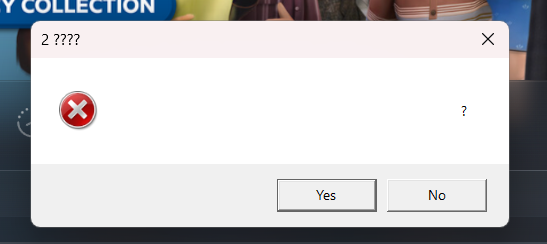
I appreciate you attaching the actual error message, could you also provide us with a DxDiag as well so we can get this looked at further?
We would also like to know if you're playing on EA app, EPIC or Steam, and if your Documents\EA Games directory is writable or read only. (To check if a folder is read-only on Windows, right-click on the folder, select "Properties", and then look for a checkbox labeled "Read-only" in the General tab)Thanks!
 EA_Solaire1 year ago
Community Manager
Hey there mykb_x
In addition to the requested information above, could you please also locate your crash dump and provide those details for us?
You can find this in C:\Users\<username>\Documents\EA Games\The Sims 2 Legacy\Logs
Thank you! mykb_x1 year agoRising Novice
- mykb_x1 year agoRising Novice
EA_Cade
1. This is my DxDiag file
2. I'm playing on Steam
3. The Documents\EA Games folder has the Read-only checkbox ticked
Thank you  Blayer981 year agoNew Ace
Sounds like you may be getting this error? How much space is on your hard drive that you’re currently using?
 mate541 year agoHero (Retired)
mykb_x To my knowledge, the only time The Sims 2 shows a Yes/No prompt is for the "low disk space" error like the one on Blayer98's screenshot, although I am not sure why the text is corrupted in your case.
The error may also appear if OneDrive is involved; I believe OneDrive offers only 5GB of free storage. The Sims 2 and OneDrive are generally not a good combination since syncing user data with OneDrive may lead to neighborhood issues. At best, it could revert your saved files to a previous version or not let you save at all, at worst, it could corrupt the neighborhoods.
If you have OneDrive enabled, I strongly recommend disabling it (if you don't use it for anything else) or changing its settings to stop syncing The Sims 2 files. Puzzlezaddict has a great post on how to either disable OneDrive or prevent it from touching Sims files. Please check out the Managing OneDrive section in this thread:
[Read First] Running Sims 3 in Windows | EA Forums - 8323446
Although these steps are written for The Sims 3, they will work for The Sims 2 as well; the only difference is that The Sims 2 user files are located in Documents\EA Games instead of Documents\Electronic Arts. Make sure to create a backup before making any changes, just like the post recommends.
- mykb_x1 year agoRising Novice
There’s 103GB of free space available on my hard drive.😟
- mykb_x1 year agoRising Novice
mate54 I don’t have OneDrive on my computer anymore, but I have 103GB of free space left. Could that be an issue?
- EA_Cade1 year ago
Heya mykb_x
Apologies for the delay, are you still seeing this error now?
- mykb_x1 year agoRising Novice
EA_Cadeyes 😢
Featured Places