A way out launch issue
I bought a way out through steam and every time I try and launch it, it just launches the EA app and not the game. I’ve tried just starting it from the EA app but that still doesn’t open the game. i’ve uninstalled and reinstalled both the game and the ea app and I’ve unlinked and relinked my steam account but it’s still not working163Views1like2Comments
🎉 Huge milestone for Hazelight Studios! 🎉
Over 50 MILLION copies sold across their games -- an incredible achievement and a testament to the power of co-op storytelling. Hazelight Studios @HazelightGames OVER 50 MILLION COPIES SOLD!!! We're stunned and amazed how many fans have enjoyed our games 🤯😍 A Way Out: 13 Million It Takes Two: 30 Million Split Fiction: 7 Million Your love and support keeps us going and we can't wait to show you our fourth game... 😉 View original post on X ▶ Watch video Hazelight has consistently delivered unique, co-op-first experiences that bring players together in ways few games do. From daring prison escapes to heartfelt adventures, their games have carved out a truly special place in the industry. Massive congratulations to the team -- and to everyone in this community who’s played, shared, and supported these titles along the way. 💬 Which Hazelight game was your favourite, and who did you play it with? Excited to see what their fourth game will bring 👀245Views6likes1Comment
why does EA keep ignoring the existence of Alice?
I'm asking this without any intention to be offensive but why ea keep making slop dlc for the sims (I say this as a regular player of the sims) and keep releasing games of fifa but denies to do something related w Alice, I've seen a lot of fans yearning for another game and I'm sure that another game from that franchise will do very good but they keep doing slop content and it's so confusing and frustrating, I wish they would say why they keep ignoring their consumers37Views0likes1Comment
Comunidad de Medal of Honor (SOUTH AMERICA-BOLIVIA)
Hola a todos, Soy parte de una comunidad activa de Medal of Honor en Bolivia. Actualmente organizamos torneos pequeños, pero queremos llevar nuestra competitividad al siguiente nivel y enfrentarnos a jugadores de otros países. Nuestro principal desafío es el ping, lo que nos dificulta jugar en igualdad de condiciones con otras comunidades. Aunque el juego ha evolucionado, seguimos disfrutando de la versión Breakthrough, donde aún quedan grupos competitivos a nivel mundial, como el clan MLs. Nos encantaría contar con su apoyo para organizar un torneo internacional y seguir disfrutando juntos de este increíble juego. ¿Hay alguna manera en la que puedan ayudarnos a hacerlo realidad? ¡Gracias por su atención y esperamos sus respuestas! [Editado: Imagen eliminada ya que contenía información personal]56Views0likes0Comments
"In Sync" achievement for "A Way Out" issue
Hi all, I am a PC player (Steam) looking for the "In Sync" achievement for "A Way Out". For some reason none of keyboard keys get registered ("1, 2 and 3" required to hit) when playing musical instruments. Any idea what to do? Many thanks for your helpSolved149Views1like2Comments
A way Out Friend Invite EA App Not Available
Hello i Have Problem With EA App On A Way out Game When i Search For it in App Not Showing And When Friend Invite Me To Give Me Access it's Say Game Not Available Friend Have Steam Verison i Owned The Game On PS4 And i Don't Want To Buy it Again i Have Reinstall The EA App And Clear Cache Same Issue Maybe You Can Try To Search For The Game in App it's Not Showing How i Can Fix The Problem?184Views0likes2Comments
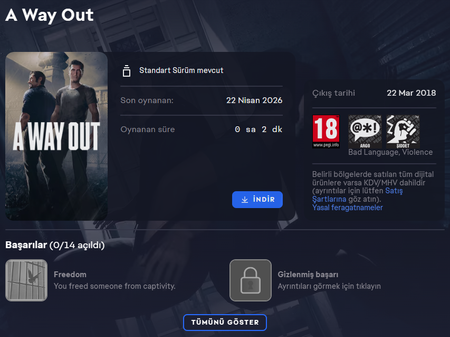
A Way Out shows as Standard Edition but launches Friend Pass version
Hello, I own the Standard Edition of A Way Out and it appears correctly in my EA library as a purchased game. However, when I try to download and launch it, the game only opens as the Friend Pass version instead of the Standard Edition. I have attached a screenshot showing that the Standard Edition is listed in my library. Could you please help me resolve this issue?151Views0likes1Comment
Request for Arabic Subtitles
Dear EA and Hazelight Team, I just wanted to say thank you for creating games like It Takes Two and Split Fiction. In a world where it's becoming harder to find activities that genuinely bring people together, your games have given my wife and me something special to share. There is one small problem, though. My wife doesn't speak much English, so whenever we play, I end up translating almost every conversation and subtitle for her in real time. Sometimes we have to pause, and other times I simply can't translate quickly enough and we miss parts of the story. I don't mind translating because I love spending time with her, but I often wish she could experience the games the way they were meant to be experienced—laughing at the dialogue, understanding the emotional moments, and getting immersed in the story without having to wait for me to explain everything. Arabic is one of the most spoken languages in the world, and I know there are many couples, families, and friends across the Middle East who would love to enjoy your games together in the same way. Adding Arabic subtitles, even through a future update, would make a huge difference for players like us. This isn't just a feature request—it's a request to help more people share the kind of memories your games are designed to create. Thank you for your time and for making such amazing cooperative experiences. I truly hope you'll consider adding Arabic subtitle support in the future. Warm regards, Ahmed85Views0likes1Comment