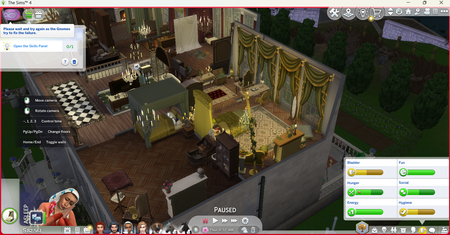
Bridgerton Event not available
Says please wait and try again while gnomes try to fix the failure but I've restarted the game and my computer several times over the course of a week and the message remains the same. Is the whole event incompatible with cc or mods because I have regency cc I'd like to be able to use with the event. I haven't gotten to engage with the event at all haven't gotten far enough to had any of the other reported issues because it won't even let me start the event quest.
Infant Interactions Failing - Constraint Error
Game Version: 1.124.63.1020 Platform: Steam / Windows 11 Expansion Packs: Growing Together installed Issue: Infant developmental and social interactions are failing in a completely vanilla game environment. Symptoms: Tummy Time does not work. Play With Infant does not work. Some caregiver/infant interactions never appear in the caregiver's queue. The caregiver briefly resets ("blinks") when the interaction is selected. Infants can still be carried. Infants can be placed on the floor. Infants can be put to bed normally. Feeding and basic care interactions appear functional. Troubleshooting Performed: Removed all mods and custom content. Verified "Modded: False" in exception reports. Created a completely new Sims 4 folder. Started multiple brand-new saves. Created brand-new households. Tested on empty lots. Uninstalled and reinstalled The Sims 4. Issue persists after reinstall. Exception Report: The game repeatedly generates the following error during infant interactions and infant autonomy: AttributeError: 'Constraint' object has no attribute '_enforce_social_group_routing_surface' Examples include: infant_BehaviorIdles_Babble infant_BehaviorIdles_BlowRaspberry infant_BehaviorIdles_PlaceToesInMouth The issue appears to occur during interaction testing/constraint evaluation rather than during routing or execution. Steps to Reproduce: Launch a completely vanilla game (no mods). Create a new household with one adult and one infant. Place household on a residential lot. Select "Tummy Time" or another developmental infant interaction. Adult briefly resets. Interaction never enters the queue. Exception report is generated. Expected Result: The caregiver should begin the interaction and infant milestone activities should function normally. Actual Result: The interaction is rejected before entering the queue and the caregiver resets. [CM edit - formatting]89Views0likes10Comments
Broken and Updated Sims 4 Mods and CC: patch 1.124, May 12 and 21, 2026
About This Thread This thread tracks Sims 4 mods and CC that have been "broken" or made obsolete by game update 1.124, May 12, 2026, and the May 21 hotfix, or declared unsupported by their creators. It also tracks updated game mods, important updates to custom content, general news from/about creators, and new bugfix mods. SORT THE THREAD FOR WHAT YOU NEED: For the COMPILED LISTS, sort by Oldest For the MOST RECENT INFO, sort by Newest … or FOLLOW to receive notifications of new posts! Click on the bell symbol 🔔, top right. Notifications can even be sent right to your email! Some things are NOT covered here: Early-access content and anything else behind a paywall Content outside the T (for Teen) game rating (no adult mods! including alcohol, violence) Creators/mods outside the EA and EA Answers HQ rules (especially trademark or copyright infringement and having permanently paywalled “exclusives”), and the Maxis guidelines for Sims 4 content creators. NOTE: The Marketplace is not a paywall: it’s items published by EA. The paywall rule is about content that creators self-publish. Creators who update active creators' CC/mods without permission, who upload folders of other people's mods and CC, who copy other modders' code without permission, or who make tools that will break your mods Separate translation files Loading screens, CAS backdrops, main menu backgrounds, and poses unless the creator says an error is fixed Sims 4 Multiplayer Mod updates that don’t change the version number CAS and Build/Buy CC unless the creator says they're fixing an error or catching up pack content Mods and CC hosted on sites that are mostly adult content or that require joining an 18+ site NEW: Updates to complex mods and tools from new creators will not be reported here unless I’m satisfied they know what they’re doing as Sims modders, not just AI-coding. In addition, news for mods/CC hosted only on Mod the Sims may be selective and/or delayed due to recent security incidents. In the end, YOU are responsible for your mod use. Because not all content and creators are covered on this official forum, many of you should be following creators directly for news. The pinned topic How to Use Mods and CC includes advice about game updates, mod management, finding broken mods, and how to avoid downloading broken and malicious content. And remember… Back up your Saves folder! Index for This Topic Newly Broken/Obsolete Game Mods and Tools Updated Game Mods and Tools, sorted by creator Newly Broken CAS and Build/Buy Updated CAS and Build/Buy Creators Clearing Mods for This Patch - gameplay mods reported by the creator or their testers to be compatible with the game update Core, Injector, Testing and Protection Mods Status: what you should be on for mods like ModGuard, Better Exceptions, venue lists, Lot51 Core, XML Injector, and MC Command Center Creator News New Bugfix Mods Start of Ongoing Reports - scroll down or sort replies by NEWEST Other Resources Previously Broken/Obsolete Mods and CC: up to patch 1.123 [MASTER POST] Common Symptoms of Mod/CC Issues, with Known Causes, including links to earlier Broken/Updated Mods threads. The previous Broken/Updated Mods thread, for patch 1.123 and its mini-patches. Patch Notes for this game update. How to use Mods and CC: including how to test for broken mods/CC ("vanilla" testing and the "50-50" method) Malicious Scripts and Malware52KViews18likes51Comments"the server encountered a mysterious error. Try again in a little bit"
i am just trying to download a game and then everytime i go to a game on the ea app the error comes up and i cant do anything on the app until i restart the app but then the error happens again. idk how to fix it can i get some help? i added a screenshot how do i fix the error
[RL] Save Error 423:<various numbers>/Issue with Secret
Hi everyone, I encountered an error while trying to save my game in The Sims 4. The error code displayed was: 423:2a7d5db5:f4062171. After the error appears, I’m unable to save my progress. I’m playing on Ondarion. Has anyone experienced something similar or knows how to fix this? Thanks in advance! Edit By crinrict: Added Tag to Title, Adjusted Title, added LE3.2KViews40likes71CommentsEA App Not Connecting via Xbox App on PC – Tried Everything
Hey everyone, I’m having an issue where the Xbox App on PC can’t connect to the EA App. I get the message: We’re having trouble connecting to EA App. Try restarting the Xbox App or contacting EA App support. I’ve tried everything: -Reinstalled both Xbox and EA App -Cleared EA App cache (AppData\Local\EADesktop) -Repaired Gaming Services and Xbox App -Searched everywhere on internet -tried contacting EA and XBOX weren't helpfull -Launched EA App first, then Xbox App -Rebooted multiple times Basically anything you can think of... i want to connect it because i have game pass on xbox and play some games that are on there. Please anybody help my head is gonna explode from this, just makes no sense.1.6KViews3likes13Comments
[INFO REQUEST] Error Code: EC:10005 In EA app
For days now, I’ve been reaceiving this error code on my PC. I repaired the EA App, uninstalled and reinstalled it, checked my Norton firewall, reset my router, ran as Administrator and tried other fixes, but the error persists. This has never happened before, and it only affects the EA App—my Steam games run without issue. PLEASE FIX THIS PROBLEM ASAP!!7.1KViews20likes217Comments
NPC Sim invades home - inconclusive Cause (Patch 1.110)
Random Townies keep walking in my house. My Sim doesn't even know most of them, but all of a sudden, they're upstairs on the computer, watching TV, and walking through my home. It has been happening consistently post patch, but I have never had this happen before. Edit By Crinrict: Adjusted Title to fit old report Edit by crinrict There are several causes/symptoms. Here's an overview of threads: [CURRENT ISSUE] Sims invading Homes | EA Forums - 5036155 If possible, please post in the correct thread for the symptom you are seeing. Post here if you're unsure.3.3KViews162likes103Comments