Terminal Flashing Green and Red Screen Loop on Startup
Hello, I am reporting a severe visual rendering bug that has made my game completely unplayable. The game worked fine initially, but now it freezes right after the initial splash loading screen. By the way I purchased the game through Steam. It drops into a solid green screen, and pressing 'Enter' or the spacebar causes the entire display to cycle aggressively between solid green and solid red screens. The main menus never render. My Hardware Specs: GPU: NVIDIA GTX 1080 (8GB) CPU: Intel Core i5-11400F RAM: 32GB Dual-Channel OS: Fresh clean installation of Windows 10 Storage: Crucial P2 M.2 NVMe SSD (380GB free out of 465GB) Troubleshooting Already Done: I have completely reinstalled Windows 10, used DDU for fresh graphics drivers, completely reinstalled the EA Anti-Cheat utility as an administrator, wiped local AppData/EA App cache directories, and attempted Steam windowed launch parameters. The issue persists across a completely flawless, clean PC environment. EA Case ID: [Case number:-249530725]. Please look into this compatibility issue with Pascal architecture graphics cards. Thank you!53Views0likes1Comment
The Season Pass unavailable
since the new season started, I can’t access the season passing PS5. It’s being a few weeks now. is anybody have problem with it? I tried everything signing out signing in turning on and off can’t fix it. How can I report it to EA sports? Cheers!choose42Views0likes0CommentsDOUBLE WALKOUTS NOT WORKING ON NINTENDO
ME AND SOMEONE ELSE THE WHOLE YEAR OF FC25 CAN NEVER GET A DOUBLE WALKOUT EVEN THO WE GET SO MANY HIGH RATED FODDER IN EVERY PACK I GET NO EXCIMENT WHEN I OPEN PACKS CUZ I ONLY GET TO SEE 1 CARD WALKOUT WHILE EVERYTHING IS IN THE BACK OF THE PACK WHICH SUCKS WHY DONT MY DOUBLE WALKOUTS WORK????185Views1like3CommentsEA SPORTS FC 25 freezes on startup on PC (EA App) – no official solution yet
Hello everyone, I’m posting this because I’ve run into a game-breaking startup issue with EA SPORTS FC 25 on PC, and it seems I’m far from the only one. Issue description When launching FC 25 via the EA App on PC, the game gets past the initial input prompt but then freezes immediately on the next screen (see attached screenshot). It never loads any further, making the game completely unplayable. What I’ve tried Restarting the game and PC Reinstalling the game Deleting personal settings and recreating them (community workaround) Unfortunately, while I can recreate the settings, the game still freezes on the exact same screen afterwards. So this workaround does not fix the issue for me. System specifications OS: Windows 11 Pro 64-bit (Build 22631) CPU: Intel® Core™ Ultra 9 285K GPU: Gigabyte GeForce RTX 5070 Ti 16GB RAM: 64 GB DDR5 (6000 MHz) Motherboard: Z890 GAMING X WIFI7 Storage: Samsung 990 PRO SSD 2TB So this is clearly not a hardware limitation. Concern There are multiple threads on this forum describing the same problem, yet there is still no official response or solution from EA. For a paid title, this really shouldn’t be acceptable. Request If anyone from EA or the community team is reading this: Is this issue acknowledged? Is a fix being worked on? Is there any official workaround that actually works? At this point, I simply want to be able to play the game I paid for. Thanks in advance to anyone who can help or share useful information.298Views0likes8CommentsEA Javelin Anticheat encountered an error. Please restart your pc
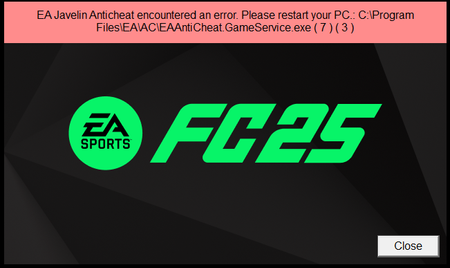
I have been experiencing this issue for more than 2 weeks. I hoped the recent update would fix it and no luck. Things I have already tried: Repairing the game (multiple times) Updating anticheat with the tool, uninstalling it, reinstalling it (multiple times) Deleting and Redownloading Fifa (multiple times) Deleting and redownloading the EA app Starting the computer in safe boot and running the game (multiple times) Running everything as an Admin Flushing the DNS Disabling Firewalls Creating a completely new windows user and only downloading EA. This also did not work. Is there no way to contact EA directly? This is insane.2.3KViews8likes7CommentsFC 25 keeps missing 3 files even after verifiyng them on steam.
I have bought the game a month ago and when i try launcing the game i get stuck on the boot aka the splash screen and i cant enter the game. I have tried everything verifying the game files on stema doesnt help everytime i try it it says "3 files missing" and everytime i launch the game those files get deleted, I have tried disabling my windows 11 antivirus and everything thats included for the antivirus and its not helping i do not know what to do i have searched for thing on google to try and fix this but i have no other option than to write my problem here and try to get help.132Views2likes3CommentsNative DTrace on Server 2025 preventing anticheat running game
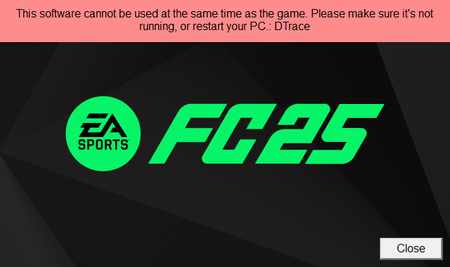
As of 03/12 game was starting fine but as 03/13 game was unable to start due to DTrace. I do not have DTrace installed and investigated this further, turns on Windows Server 2025 has native DTrace on system. Even though it is a debug tool for windows and not running and not even enabled, ea anticheat detects DTrace.exe in System32 folder and prevents game from starting. I booted up windows in troubleshoot mode and deleted DTrace.exe and game started running as intended. A native windows tool, an in a disabled state should not be detected by anticheat and prevent game from running just because you have .exe in your system32 folder, this needs to be fixed asap.878Views3likes2CommentsFC 25 stuck on black screen after launch
Message: Hello, When I launch EA Sports FC 25, the game starts normally, but when the “EA Sports” intro appears, the screen turns black and the game freezes. It doesn’t continue from that point. I have already tried the following steps: Reinstalled the game Updated my graphics drivers Used the “Repair” option in EA App Restarted my Pc Unfortunately, none of these fixed the issue. My system information: Platform: PC (EA App / Steam) CPU: AMD Ryzen 5 5600 GPU: AMD Radeon RX 6600 RAM: 16 GB OS: Windows 10 / 11 Could you please help me solve this problem? Thank you very much, Ensar70Views0likes0Comments