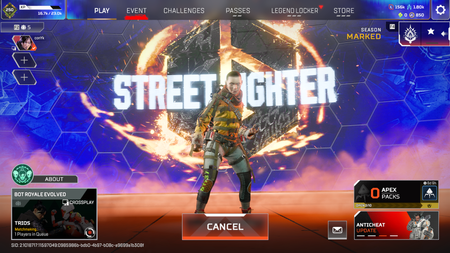
Unable to queue for the next match in a party after returning to lobby
Platform:PS5 Issue: After returning to the lobby from a match, party members are unable to queue for the next match continuously. Workaround: Disbanding the party and re-inviting everyone allows us to join a match, but having to leave and rejoin after every single match is a major inconvenience.2Views0likes0CommentsJust let me play already, dammit.
I cannot play because the game is stuck on "Preparing Party." I have tried restarting, updating, and repairing the game, but nothing has worked. Also, the AutoHotkey script I use for input switching is getting flagged by the anti-cheat. It’s not a cheat tool, so make sure it works. Everything is fully updated, and I’ve tried repairing the files, but nothing works. Check this stuff before you release it, you **bleep** morons!9Views0likes0Comments
Anti-cheat authentication (4) error
The client is not running the anti-cheat, or has failed the anti-cheat authentication (4) Im using steam Every time I try and join a game regardless of type or sometimes even just get to the lobby I consistently get kicked with this error. It happen after the update on Sep 29, 2026. Its is very frustrating since I paid for the battle pass and cannot continue to play matches anymore due to the error, I feel like im wasting my money and time9Views0likes0Comments
Infinite loading screen at title and "Party Not Ready" error
Platform: PC (EA App) Issue: Infinite loading wheel at start screen & "Party Not Ready" matchmaking loop. Description of the problem: Since the recent update/migration to EA AntiCheat, Apex Legends fails to initialize properly. 1. Initial symptom: In-game, attempting to search for a match results in an instant cancelation with a "Party Not Ready" error. 2. Current symptom: After attempting to repair/reinstall the EA AntiCheat service, the game now gets stuck indefinitely on the main splash screen (MARKED / Loading spinner). It does not display the prompt to "Click to Continue" or allow access to the Data Center / Server selection menu (Tab). Steps already attempted without success: • Reinstalled/Repaired EA AntiCheat using the installer in _Installer\customcomponent\Javelin. • Verified and started EAAntiCheatService manually from Windows Services (services.msc). • Cleared EA App cache (%localappdata%\Electronic Arts\EA Desktop) and deleted local profile data (Saved Games\Respawn\Apex). • Launched both EA App and Apex Legends as Administrator. • Fully reinstalled EA App and Apex Legends. Note: My EA Account is linked to Steam, and Apex Legends was previously installed via Steam on the same drive. A registry key mismatch or token collision between Steam's launch protocol and EA App's EAAntiCheat service might be causing the handshake to fail.12Views0likes1CommentParty Not Ready
I’m currently dealing with the party not ready bug. I’ve tried everything from deleting the game and cache, different server, selecting different games training, ranked etc, reset PC and looked through at Reddit ideas to fix. It sucks cause I can’t play this game anymore and don’t know what to do… I thought this issue was fixed years ago504Views31likes17Comments
EA JAVELIN ANTI_CHEAT BLUE SCREEN OF BIOS PC HAS RAN INTO A PROBLEM PLS FIX
error problem with recent updates anti-cheat EA JAvelin anti-cheat wont load the apex store wont load me into a Q wont load me inside a match of any rank , casual , fire range, please see please fix developers104Views4likes2Comments