Petite Alsace collaboration - Open for participation!
Aug 14/26 - UPDATE! We’re close to completing Petite Alsace with less than 10 builds in progress. If you’re interested in claiming one of the last available lots, just post your request anytime since Claiming Days have been stopped. Happy New Year and welcome to another Sims 3 community collaboration hosted by Hidehi2 , Sandraelle and soocoolsim ! Introducing Petite Alsace inspired by picturesque Strasbourg, Colmar and Ribeauville with a dual French and German blend of charming, flower-laden villages and half-timbered homes. We anticipate the completed world will be a lovely addition to your game. Experienced creators (Intermediate+) are invited to join us in creating builds to add to the base world. If you love decorating but building isn’t your forte, let us know and we'll try to build a shell for you. Everyone can experience Petite Alsace taking shape by downloading the base world and installing builds as they become available. Please keep an eye on the "News and Updates" post for milestones and links to new creations as they become available. Constructive comments throughout this event are also welcome, so don't be shy. Without further ado, onto the details below and come join in the fun! LOT LISTINGS Map A: Colmar (Medieval, half-timbered houses with flower-filled balconies) Map B: Ribeauville (Pastel, half-timbered 15th - 18th century houses) Map C: Ribeauville Outskirts (Farming area) Map D: Strasbourg (City area, mix of old and new buildings) Map E: Avenue du Rhin (Wine region) Map F: Route de Alsace (Rural area) CLAIMING OVERVIEW Download the empty Petite Alsace base world created by the talented Hidehi2. Take a look at the available lots using the Map posts as reference (see links above). Indicate you're on board and sign up for your claim by replying on this thread with your chosen map lot reference # (eg A8). I will update the lists with claims and add download / media links when builds are completed. Every two weeks (around the 1st and 15th of the month) a new claiming period starting with a 'Claiming Day' post will begin. During this period, if you join the collaboration or have a build in progress on Claiming Day, you can claim 1 lot. For ongoing participants, if all previously claimed builds are completed and (no cc) download link(s) submitted by Claiming Day, you may claim up to 2 lots. BUILDING GUIDELINES Please stay within the theme of each map area and overall Alsace inspiration. You have creative freedom otherwise. Inspiration links at the top of this post may be helpful. All / any EA Expansion Packs, Stuff Packs and official Store Items can be used. Free EA Store Items are OK for use. Note: Some are no longer available for download so use at your discretion. NO third-party Custom Content is allowed. Please Custard Check your exported file before uploading to double check. We highly recommend play-testing your build before uploading to ensure no routing concerns and users can enjoy as intended. Do test placement of your final build. This helps identify any potential issues (e.g. windows / floor tiles out of place). To do this... export your build, save your game, delete the existing build, then replace with the exported version from your library. Take a careful look around and fix as needed. It will be useful for players if the Petite Alsace lot address is included in your build description on the Exchange, albeit optional. Do take the time to put your best foot forward to make your build(s) shine inside and out. Just be cautious about using a ton of clutter since that can add to lag when playing. Each build will be showcased with credit in video walkthroughs on YouTube once the world is completed. Once your build is available on the Sims 3 Exchange, please post a reply on this thread including: name of build / map reference and/or address / download link / cover picture / custard screenshot confirming no 3rd party custom content included. Optional! Link to additional picture site / thread. SIMS / HOUSEHOLDS This collaboration focuses on builds since the final world save file will be unpopulated, however we are happy to link to Sims / Households created for Petite Alsace. Petite Alsace builders can submit Sims / Households for their completed claims as well as Townie use. All / any EA Expansion Packs, Stuff Packs and official Store Items can be used. Free EA Store Items are OK for use. Note: Some are no longer available for download so use at your discretion. NO third-party Custom Content is allowed. Please Custard Check your exported file before uploading to double check. Once your Sim / Household is available on the Exchange, please post a reply on this thread including: name / map reference or address (or identify as Townie) / download link / 1 cover picture / custard screenshot confirming no 3rd party custom content included. Optional! Link to additional picture site / showcase thread. Looking forward to participation by the Sims 3 community! 😀 STORIES / VIDEOS Players may wish to enjoy this world as it evolves and we welcome links to any Petite Alsace story threads / blogs / media. Just post a reply advising us. Click this link for submissions including interior tours by JudiAlbert . NEWS & UPDATES Click this link for the list of completed builds and other updates as released. Build links are also included within their related map post (see above). CREATORS ON BOARD (sign-ups open) Chojrak75321 , Hidehi2 , JudiAlbert (cheeseweasel), KarilynMonroe2 , Kcity74 ,Merrieann , puzzlezaddict , Sandraelle , soocoolsim , whatsociallife , ZeeGee1 (ZeeGee966) PREVIOUS WORLD COLLABORATIONS Bayou Bijou / YouTube showcase video playlist Cape Albacore Coastal World / YouTube showcase video playlist Disney's Magic Kingdom / YouTube showcase video playlist The Orient Express (London, Paris, Venice, Alps) / YouTube showcase video playlist Ackney-Upon-Sherne English Village (hosted by suzses) TIP! When first viewing this thread, you might want to sort replies by "Oldest" to view all the related posts in order and get up-to-date to a certain point. However, for future visits you may wish to sort replies by "Newest" to reduce the amount of scrolling. But of course, it's your choice on what works best for you.19KViews12likes696Comments
[Current Issue] Sims 3 Store world can't register/install
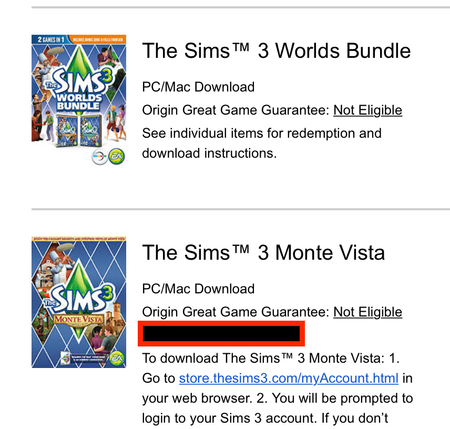
Overview This guide is for registering and installing standalone worlds from the Sims 3 Store, specifically those bought with money. That list includes Dragon Valley, Hidden Springs, Monte Vista, Roaring Heights, and sometimes Barnacle Bay. If you bought a Store world with SimPoints and it's not appearing in your purchase history on the Store site, please contact EA customer support and request that the SimPoints from the failed purchase be added back to your account. How to register a Store world jump to: My code doesn't work jump to: I can't install the world When you purchase a standalone Sims 3 world from Origin or the EA App, you should receive an email confirmation from EA. If you don't see this, check your spam filter. This email should include one product code per item, as shown here in the blacked-out red box: IMPORTANT: Some players have reported finding their product codes on ea.com, under Account Settings > Order History, so please look there as well. If you never received this email and it's not in your spam folder, please contact EA customer support. https://help.ea.com/en/customer-care/ You'll want the live chat option, not email, so you can explain the issue to a real person in real time. If you don't see the live chat option, try again in a private browsing window (or another browser), and continue as a guest rather than signing in. Otherwise, go to this site: https://store.thesims3.com/ Sign in with the same email address and password that you use for other EA sites, scroll to the bottom of the page, and click "Redeem a Code." Enter the code you've received, and the world should appear in your account. You can then download it from your purchase history (Store > My Store Account > Purchase History) or its product page. https://store.thesims3.com/worldProductDetail.html?categoryId=12642 ↑ My code doesn't work If you are sure you've never used this code, but the Store site tells you it's invalid or already been redeemed, you'll need to contact EA customer support to ask for a refund. https://help.ea.com/en/customer-care/ I strongly recommend using live chat rather than email. If you don't see the option, change the location in your browser window to U.S. or U.K., or choose a slightly different category of issue. Or use a private browsing window, or a different browser, and continue as a guest rather than signing in. If EA support doesn't help, please say so in this thread. If support does help, please post anyway letting me know what world(s) caused the issue so we can look for patterns. ↑ I can't install the world If you're getting the "there are no packages to install" error, please see this post: Re: Sims 3 Launcher "There are no packages to install" | EA Forums - 11190163 The standard way to download a world is to go to its product page or open your purchase history (Store > My Store Account > Purchase History), then click the Download button. If this isn't working for you, try a different browser. Firefox generally works best with the Store site. It is generally unnecessary to sign into the launcher before attempting to download or install Store content. However, this has helped some players, so it's worth trying. Mac users only: if you see an Error Downloading Content {0}, please repair the game in Origin, restart your computer, and try again. If the world still won't download properly, try a clean Sims 3 user folder. Rename the existing "The Sims 3" folder in Documents > Electronic Arts, open the launcher to create a new folder, and try to download only that world. If it works, you can move the downloaded world from the new Sims 3 folder to the old one you renamed, trash the new folder, and change the old one's name back to "The Sims 3." Downloaded Store items are found in the Downloads subfolder and have the extension .Sims3Pack. Be sure to delete any older downloads of the world before moving over the fresh copy. If the world downloads properly but doesn't install, please try a clean Sims 3 user folder as well. Rename the existing "The Sims 3" folder in Documents > Electronic Arts, open the launcher to create a new folder, download only that world, and try to install it. If this works, you can install the rest of your Store content into that folder, then move over your saves and any other files you'd like to keep. Please see this guide for a list. If reinstalling all of your Store content would be a burden, or you're confused about another part of this process, please ask for further help in this thread. ↑24KViews10likes802Comments
Sims 3 World bundle, worlds not downloading
Hi, I recently switched my sims 3 game from the Steam app to the EA app during a summer sale to buy some packs that were not on sale on Steam, while all my packs are there every time I try to download any world not included within a pack such as Riverview, Hidden Springs, and Monte Vista, it refuses to actually put it into my game after saying it should be in the main menu. It also does this with any purchased clothing or hair accessories. I’m confused on what I should do to be able to actually download and have the worlds and reddit and other posts have been no help. I’ve uninstalled and made new folders multiple times is there any advice anyone can give me? Thank you in advance!75Views0likes2Comments
EA App Update broke CAW "Edit in Game" again
Hello EA Community Managers, I am writing to report a recurring issue with The Sims 3 Create a World (CAW) tool. Ever since one of the recent EA App background updates, the Edit in Game (EIG) feature has completely stopped working. Instead of loading the world file directly into the building mode, the EA App intercepts the command and simply opens the standard Sims 3 Game Launcher. Testing with a custom bypass file confirmed that the EA App processes are actively blocking the direct command-line arguments to the game. I have been a loyal Sims 3 player since 2009 and a Sims Player in General since much earlier. We experienced this exact same bug when the EA App was first introduced, and it was eventually fixed after a few months through an EA App update. Unfortunately, a recent app update has broken the connection once again. As a long-time paying customer, I kindly ask the EA App development team to look into the app background architecture regarding legacy tool verification. Please ensure that the EA App allows CAW to pass its arguments to the game executable properly, just like it did a few months ago. Thank you for your time and for forwarding this to the tech team.SolvedLauncher crashes when I open the downloads tab in Sims 3
Game launcher crashes when I open the downloads tab in Sims 3, maybe someone has ideas how to fix this problem. I play in Mac. I uninstalled everything and then reinstalled but unfortunately it didn't help. I bought a new world - Roaring Heights Gold Edition but I can't download it in my game when launcher crashes.10KViews29likes175Comments
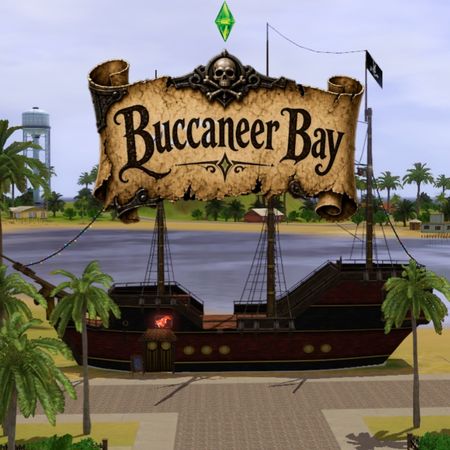
Buccaneer Bay
New world coming soon... or at least somewhere in the future. Here's some basic information for now. I'll add more as I progress with the project. Story: Welcome to Buccaneer Bay, a tropical island with a long history as a pirate stronghold. For centuries, buccaneers used its beaches for shady deals, buried treasure, and general debauchery. Today, the old pirate spirit is alive and well: the locals are charming, quick with a smile, and about as honest as their ancestors. When a massive hurricane wiped out the nearby island of Crimson Cliffs, some of the survivors were evacuated here, and the island is now busy pretending everything is totally fine... There will be returning families from Crimson Cliffs Inhabited, so in the meantime feel free to play it :) You can track the project's progress on Instagram buccaneerbay_ts3 Buccaneer Bay lots Rabbit holes Community lots (Part 1) Community lots (Part 2) Community lots (Part 3) Buccaneer Bay families / households Returning families from Crimson Cliffs Inhabited New families (part 1) New families (part 2) Used items: Expansion/Stuff Packs + Worlds: Generations, Seasons, Late Night, Ambitions, World Adventures, University Life, Island Paradise, Pets, Showtime, Supernatural, High-End Lofts, Master Suite, 70's 80's & 90's, Midnight Hollow, Roaring Heights, Hidden Springs, Sunlit Tides, Lucky Palms, Monte Vista, Aurora Skies, Barnacle Bay and Riverview Store Items: Almost everything... 🙊 No third party CC used.947Views8likes14Comments
New Sims 3 Drama - Jolene's World (Videos and Blog Stories)
Hi all! I've started a YouTube channel that features "programs" or series using life-sims games as the vehicle for telling the stories. I use Sims 3 pretty heavily. Here is the ongoing summer series "Jolene's World" both videos and blog stories based on the gameplay. If you like this, check out my channel. The Channel is called Cheeseweasel TV. This season of Jolene's world was intended to feature Jolene and her best friend Ashley as Ashley graduates from college and marries her boyfriend, but I play on high free will with Nraas Story Progression on intermittently, so the game had it's own ideas . . . THE VIDEOS: Episode 1 - Meet the Characters Episode 2 - Ashley's Hot Date and Jolene's Domestic Life Episode 3 - Scatter-brained Darrel Forgot Something Very Important Episode 4 - Is Ashley's Life a Disaster Waiting to Happen? Episode 5 - Getting to Know Bea (and mulling over storyline options) Episode 6 - The Wedding Guests (Setting the Stage for the Drama) Episode 7 - Is This Wedding Doomed? | The Scheming Mother-in-Law Episode 8 - The border gambling town tour (for backstory) THE BLOG STORES: Jolene's World - Cast of Characters Jolene's World (companion story to videos #2,#3, and #4) Spotlight on Ashely and Darrel Jolene's World (companion story to videos #5,#6, and #7) The Scheming Mother-in-Law18Views2likes0Comments
Missing download link
Hello! I bought a couple months ago dragon valley standard edition on EA and I cant seem to download it. I cant find where to even though it says I own it. I also bought a mimic voodoo doll off the sims store but I am missing a download link, it only gives me the option to repurchase it even though its in my purchase history. Could someone help me?78Views0likes5Comments
Movie and other fun?
My sim in Monte Vista has been going on dates, including going to the movies, which is pretty much the only 'fun' thing to do in town besides the Festival. But the movies don't seem to have much effect on fun, only a bit. Why? is there a way of increasing fun at the movies? Perhaps the genre? Which titles are the comedy one's? Ooh I just realised he hasn't tried a game or concert yet. Are they much more fun? Thanks.191Views0likes3Comments