Forum Discussion

kKOV27's avatar
kKOV27
New Ace
1 year ago
Solved

60hz 120 hz

hi! i would like to know if theres a matter if i buy a new monitor the hz? i would like to buy the best monitor possible to have the less input lag possible?!

  • @kKOV27 A 120Hz monitor can provide benefits even when playing a game capped at 60fps. Here are some potential advantages:

    Reduced Input Lag: A higher refresh rate monitor can potentially reduce the input lag, which is the delay between your actions and what’s displayed on the screen1.

    Smoother Frame Delivery: Even if the game is running at 60fps, a 120Hz monitor can result in smoother frame delivery due to better synchronization between the frame rate and the refresh rate.

    Adaptive Sync Technologies: If the monitor supports adaptive sync technologies like FreeSync or G-Sync, it can help eliminate screen tearing and make the gameplay feel smoother.

    Taken from GPT which has links to reddits about it. But you can notice things if you are looking for them. They aren't going to be huge but you should see inputs a bit more responsive.

27 Replies

  • Willygeez's avatar
    Willygeez
    New Novice
    1 year ago

    Hey all, 

    I'm a bit desperate. I got this display: https://www.newegg.ca/black-gigabyte-gs32qc-31-5/p/N82E16824012068?Item=N82E16824012068c 

    But, as with the other monitor I bought with similar specs, the input lag is somehow worst than my TV. 

    My TV is not a gaming focused TV by any means. I bought it for 800$ so I don't think it's because my TV is better than the monitor in terms of gaming performance. 

    What could explain that the input lag is worst on a gaming monitor? 

    I tried messing with the setting on PS5 and the monitor, but nothing conclusive. 

    Any input?

  • KlariskraysNHL's avatar
    KlariskraysNHL
    Hero+
    1 year ago

    @WillygeezI know this sounds weird but I hope you have a PC you can use. Maybe see if there are drivers to update the monitor. Sometimes monitors need updates before you even use them. Also not 100% familiar with the PS5 settings. Like on Xbox I can do lots when it comes to the video modes like having low latency mode, VRR, HDR stuff, rrefresh rate. If you could post a picture of your options on PS5 that would be helpful maybe. I also assumed you tinkered with the monitor settings too?

    From reading around it also seems having the graphics in 1440 disables VRR.  Not sure if it's changed since a little over a year ago.

    And on one of the reviews someone suggests these settings.....

    Resolution: 2560 X1440

    Black Equalizer: 11 ( must be 11 to completely delete any slight "ghosting/smearing" . 11 is optimal for color as well ) Very important you do not leave it 10 or less.

    Overdrive : set it to "picture quality" or " balance" Up to you and your eyes.

    Refresh rate : 165hz

    AMD Freesync ( or nvid g-sync, doesn't matter, use what you prefer ) Set to ON

    SDR - ON

    Brightness : 62

    Contrast: 50

    Sharpness: 8

    Gamma : Gamma 4

    Overclock : OFF

    Low Blue Light: 0 or 1 or 2 or 3, i can't really tell the difference

    Color Temperature: User define = Red 93 Green 96 Blue 100 adjust to your preference of course

    Super Resolution : 0 i dont use it . feel free to experiment

    Color Vibrance = 15

  • Willygeez's avatar
    Willygeez
    New Novice
    1 year ago

    I unfortunately don't have a PC. I just tried plugging in my mac at it shows that the monitor is indeed capable of going to 144hz (if that means anything). 

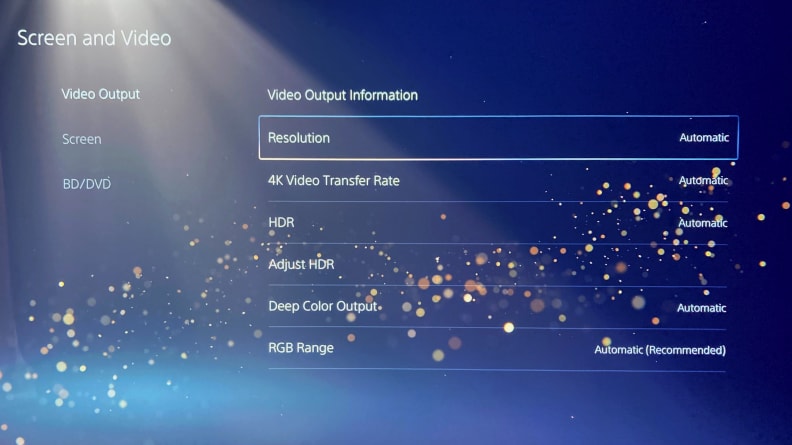
    PS5 has all of what you just said. Here's what happened when I tried playing around with it: 

    - Low latency mode (says that my "Tv doesn"t support this mode") 

    - VRR (says that my "Tv doesn"t support this mode")

    - HRD (I tried turning it on and off to see if it changed anything, but nothing really) 

    - Refresh Rate: I set it to automatic 120hz for games that do support it. NHL doesn't so I don't really mess with that. 

    I didn't take this screenshot, but it shows basically all the options I have. 

     The PlayStation 5's

    As for the monitor's settings, I did try to mess around with all the sliders you mentioned below. But nothing really came from it. 

    I feel like there might be something wrong with my Ps5...it feels way more difficult than it should be to just find a monitor on which I can play the game smoothly. 

    I often play at my best friend's, who plays on a Samsung TV and the game is the smoothest I've ever played it. 

  • KlariskraysNHL's avatar
    KlariskraysNHL
    Hero+
    1 year ago

    @WillygeezYeah Samsung TVs are pretty great. I'm sure he spent a pretty penny on it too. I know my console I got is actually designed they claim for PS5/XSX. It doesn't seem like you have a ton of options with Sony I will post what I can do with my console.

    Here are my setting options on Xbox. 

  • NeonSkyline21's avatar
    NeonSkyline21
    Seasoned Ace
    1 year ago
    @TTZ_Dipsy I've played on my clients' OLED LGs and the difference is actually palpable. My TV (Samsung Q80T) is fine for the "feel" when it comes to gaming (I can play games like Warzone and GoW: Ragnorak at 120 fps if I want to on a full-blown smart television so that's cool) but the real difference lies within the visuals that the LG provides. OLED blows Samsung's fake "QLED" out of the water in terms of true blacks and the LG's HDR is just next level beautiful.

    It's all good though. I'll upgrade next time I move house.
  • NeonSkyline21's avatar
    NeonSkyline21
    Seasoned Ace
    1 year ago
    @KlariskraysNHL That second screenshot is irrelevant when it comes to video games though, no? It says "video apps" so I'm thinking of apps like Youtube, Amazon Video, etc.

    The PS5 has pretty much everything contained in that first screenshot other than "calibrate TV" which would be much smarter to do within the actual TV's menu.
  • KlariskraysNHL's avatar
    KlariskraysNHL
    Hero+
    1 year ago
    @NeonSkyline21 Oh The 2nd screenshot is just showing all of it. I had the 50hz highlighted. But was more meaning to show that VRR and Low Latency Mode.

Featured Places

Node avatar for NHL 24 General Discussion

NHL 24 General Discussion

Discuss the latest news and talk with us about your experiences in NHL 24.Latest Activity: 2 years ago
4,284 Posts