
kKOV27
2 years agoNew Ace
Re: 60hz 120 hz
im on ps5 and i got a 60hz monitor... so you saying even if the game is 60fps and i bought my self a 120-240hz monitor, i can see a difference anyway? it will be more fluid?
im on ps5 and i got a 60hz monitor... so you saying even if the game is 60fps and i bought my self a 120-240hz monitor, i can see a difference anyway? it will be more fluid?
@kKOV27Look for a monitor with FreeSync since PS5 and Xbox use that from their AMD built tech. Also variable refresh rate is nice to have.
@kKOV27When it comes to deciding on some electronic I use this site. Here is the review for the item you looked at. Overall seems like it has issues.
https://www.rtings.com/monitor/reviews/aoc/cq27g2
Also not sure if you can access these in Canada but here is 2 decent ones.
https://www.newegg.com/p/N82E16824012015
https://www.newegg.com/black-asus-tuf-gaming-vg32vq1b-32/p/N82E16824281075

Hey! Can I know what you ended up going for? I've been looking for months now, but I can't set my sights on single monitor that won't break the bank
Hey!
I don't need 4K at all. I prioritize performance over everything. Honestly, I'm okay with 1080p, but 1440p would be nice.
I'm in Canada and would like not to spend anymore than 500$.
Oh and ps5. I play at a pretty high level and just want that edge and no input lag!

Target is apparently having a crazy clearance sale on LG C2 and C3 TV's. I have the C3 and it's amazing - They have Gsync and other PC parts and are built for gaming (can even replace dedicated monitors). 0 lag though it won't help you for NHL because the game and code itself is beyond repair
Will do, thanks for the tip!
Consoles don't use GSync. They use FreeSync which is why i narrowed the things down to ones that use that. Also ones with variable refresh rate are great too.
Ah yup you're right about Gsync; still useful if you also enjoy switching to PC from time to time.
The VRR and 1440p is quite interesting - just takes a little getting used to.
What is NHL even capped at anyway? I figured they need to ditch last gen before even thinking of reaching 60, let alone 120.

@TTZ_Dipsy wrote:Ah yup you're right about Gsync; still useful if you also enjoy switching to PC from time to time.
The VRR and 1440p is quite interesting - just takes a little getting used to.
What is NHL even capped at anyway? I figured they need to ditch last gen before even thinking of reaching 60, let alone 120.
It's been 60 since NHL 09.
Well yes but, in my mind, 60 could still be much smoother compared to other titles.
I wouldn't worry about your choice - From what I see, the LG and Samsung Q 8/9 are practically direct competitors.
Hey all,
I'm a bit desperate. I got this display: https://www.newegg.ca/black-gigabyte-gs32qc-31-5/p/N82E16824012068?Item=N82E16824012068c
But, as with the other monitor I bought with similar specs, the input lag is somehow worst than my TV.
My TV is not a gaming focused TV by any means. I bought it for 800$ so I don't think it's because my TV is better than the monitor in terms of gaming performance.
What could explain that the input lag is worst on a gaming monitor?
I tried messing with the setting on PS5 and the monitor, but nothing conclusive.
Any input?
@WillygeezI know this sounds weird but I hope you have a PC you can use. Maybe see if there are drivers to update the monitor. Sometimes monitors need updates before you even use them. Also not 100% familiar with the PS5 settings. Like on Xbox I can do lots when it comes to the video modes like having low latency mode, VRR, HDR stuff, rrefresh rate. If you could post a picture of your options on PS5 that would be helpful maybe. I also assumed you tinkered with the monitor settings too?
From reading around it also seems having the graphics in 1440 disables VRR. Not sure if it's changed since a little over a year ago.
And on one of the reviews someone suggests these settings.....
Resolution: 2560 X1440
Black Equalizer: 11 ( must be 11 to completely delete any slight "ghosting/smearing" . 11 is optimal for color as well ) Very important you do not leave it 10 or less.
Overdrive : set it to "picture quality" or " balance" Up to you and your eyes.
Refresh rate : 165hz
AMD Freesync ( or nvid g-sync, doesn't matter, use what you prefer ) Set to ON
SDR - ON
Brightness : 62
Contrast: 50
Sharpness: 8
Gamma : Gamma 4
Overclock : OFF
Low Blue Light: 0 or 1 or 2 or 3, i can't really tell the difference
Color Temperature: User define = Red 93 Green 96 Blue 100 adjust to your preference of course
Super Resolution : 0 i dont use it . feel free to experiment
Color Vibrance = 15
I unfortunately don't have a PC. I just tried plugging in my mac at it shows that the monitor is indeed capable of going to 144hz (if that means anything).
PS5 has all of what you just said. Here's what happened when I tried playing around with it:
- Low latency mode (says that my "Tv doesn"t support this mode")
- VRR (says that my "Tv doesn"t support this mode")
- HRD (I tried turning it on and off to see if it changed anything, but nothing really)
- Refresh Rate: I set it to automatic 120hz for games that do support it. NHL doesn't so I don't really mess with that.
I didn't take this screenshot, but it shows basically all the options I have.
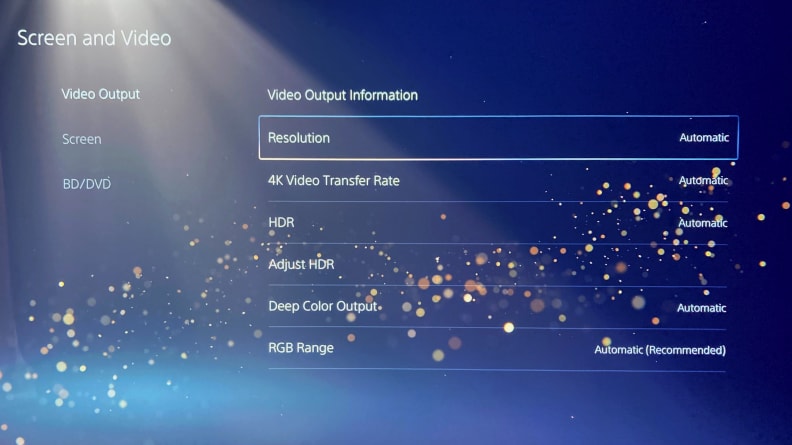
As for the monitor's settings, I did try to mess around with all the sliders you mentioned below. But nothing really came from it.
I feel like there might be something wrong with my Ps5...it feels way more difficult than it should be to just find a monitor on which I can play the game smoothly.
I often play at my best friend's, who plays on a Samsung TV and the game is the smoothest I've ever played it.
@WillygeezYeah Samsung TVs are pretty great. I'm sure he spent a pretty penny on it too. I know my console I got is actually designed they claim for PS5/XSX. It doesn't seem like you have a ton of options with Sony I will post what I can do with my console.
Here are my setting options on Xbox.



