[PS5][Ultimate Team Co-op] Game freezes when opponent leaves matchmaking lobby
I've been experiencing this issue for several years now, and unfortunately, it still hasn't been fixed in FC 27. When playing Ultimate Team Co-op with a friend, we frequently find an opponent through matchmaking, but the opponent leaves the pre-match lobby before the match starts. The problem isn't that the opponent leaves. That's understandable. The real issue is that once they leave, our game gets stuck on the pre-match screen. Neither of us can return to the lobby, search for another opponent, or interact with the game properly. The only way to fix it is for both players to completely close and restart the game. This happens in more than 50% of our matchmaking sessions, regardless of whether we're playing Rivals or other Co-op modes. What's frustrating is that this is not a new issue. I've seen similar reports from FIFA 24 and FC 26, yet we're still experiencing it in FC 27. Expected behavior: When an opponent leaves before the match starts, both Co-op players should simply be returned to their lobby so they can search for another match. Actual behavior: The game gets stuck, forcing both players to restart the entire game. It's extremely frustrating to deal with this issue repeatedly, especially when playing with a friend. Please investigate this longstanding Co-op matchmaking issue and provide a proper fix instead of carrying it over to another edition of the game. Is anyone else still experiencing this in FC 27?4Views0likes0CommentsGame Crash Attempting to Play Any FUT Game Mode (PS5)
Ever since the Title Update v1.1., I have been unable to play any game mode on Ultimate Team. When I try to play the live event Ghoul Fest, I get disconnected right away as I start up the game. I try to play Rush, and after the team loading screen, when I enter the game, the screen goes black and doesn't change. Then I get docked for a DNF modifier, saying I quit. Then I try to play squad battles, and as soon as I select the kits and click to start the match, the entire game crashes. There is no game mode I have been able to play in FC27 since the title update. I have already tried: Updating FC 27 to the latest version Updating PS5 system software Completely reinstalling FC 27 Deleting ALL FC 27 saved data and starting from scratch Clearing the PS5 system cache Rebuilding the PS5 database Power cycling the PS5 None of these steps fixed the problem.21Views0likes2CommentsXbox series X. Fc 27. During games, during menu. Green screen system crash
Wow is this frustrating, in game doing objectives and boom 💥 hard crash of my series x on fc 27. Doesn’t happen on any other games… just fc 26 and now fc 27. Please have your engineers fix this asap. Or I’ll need a refund on the game. It’s infuriating to play this game on my day off and have it crash every 2/3 games, just randomly.167Views2likes13CommentsCan't play the new live event called Ghoul Fest
Hello, i am trying to play the new live event mode called ghoul fest, but everytime i try to start a match i get disconnected right from the start. I am unable to play this live event and therefore gain tokens from the current event. i have attached one image and video. I hope you can help me somehow. Kind regards, Xidir656Views10likes48CommentsEA SPORTS FC 27 Repeated Crashes on PS5 (Error CE-108255-1)
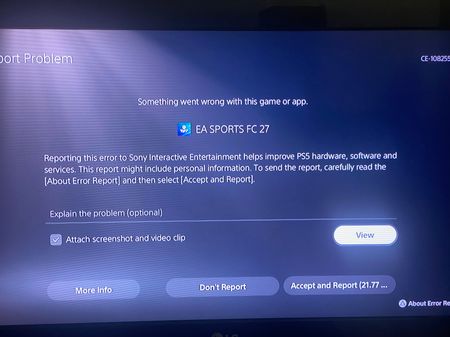
Dear EA SPORTS FC Support Team I am writing to formally report a persistent and serious issue with EA SPORTS FC 27 on PlayStation 5, which has made the game practically unplayable. The game repeatedly crashes with error code CE-108255-1, either at the beginning of a match or during gameplay. This issue occurs across all match types, including Career Mode and Kick Off, and persists even when playing completely offline. My troubleshooting efforts so far include: - Updating both the PS5 system software and EA SPORTS FC 27 to the latest available versions. - Testing a completely new Manager Career. - Disabling HyperMotion Insight Overlays. - Changing the PS5 video output and graphics settings, including resolution, HDR, VRR, and 120Hz. - Deleting the game's local data. - Testing the game without an internet connection. Unfortunately, none of these steps has resolved the problem. Other games, including Need for Speed Payback, run normally on the same PS5, which suggests that this issue may be specific to EA SPORTS FC 27 rather than a general console problem. I have invested considerable time troubleshooting this issue, yet I am still unable to enjoy a game I purchased. I am extremely disappointed that the problem persists despite updating the game and console and following multiple troubleshooting procedures. I respectfully request that EA: 1. Investigate this issue and confirm whether it is a known problem affecting FC 27 on PS5. 2. Provide a specific, effective solution rather than repeating troubleshooting steps that I have already completed. 3. Escalate this case to the technical team if necessary. 4. If the issue cannot be resolved within a reasonable timeframe, advise me of the available options for a refund or other appropriate resolution. Please treat this complaint seriously and provide a clear response regarding the cause of the issue and the next steps toward resolving it. I can provide screenshots of the error code and any additional technical information required. Thank you for your attention. I look forward to your response and a proper resolution. Kind regards.180Views2likes4Comments
Game keeps crashing after selecting the kits in division rivals
Hello, I keep seeing this bug when I try to play division rivals on PS5, after the kit selection, the match never starts, game crashes and even the PS5 is suggesting me to report it (which I did, every single time) After loading FUT again, I get the DNF warning and my progress is being affected, it happened 5 times in the last 2 days, it reached the point where I can't even play the game, already lost checkpoints and "stages" in division rivals, which in my opinion is incredible unfair, I'm getting close to relegation for games I did not lose, couldn't even see the name of the team who allegedly defeated me. Needless to say how bad it is to pay full price for a game I can't play anymore, and the fact that I expect my progress to be reverted, I can't be responsible if you release a game with bugs, and my progress shouldn't be affected by this. Error message is: ce-108255-1 (attached the screenshot) Both the game and the PS5 software are up to date. Thank you for your time, Regards.8Views0likes0CommentsFC 27 Crashing on PS5 Title Update 1.1.0 – Error CE-108255-1
Hello EA Support, I am experiencing repeated freezing issues with EA SPORTS FC 27 on my PS5. The game freezes in two specific situations: During the transition between the first and second halves. Immediately after the match ends. When this happens, the screen freezes completely and the audio stops. I have to press the PS button on my controller, open the console menu, and manually close the game. After closing the game, error code CE-108255-1 appears. This issue occurs across multiple game modes. I have already tried: Clearing the PS5 cache. Rebuilding the database. Restoring licenses. Uninstalling and reinstalling the game. Unfortunately, none of these steps resolved the issue. Other games, including Red Dead Redemption and Mafia, run normally on my PS5 without any freezing issues. Please investigate whether this is a known FC 27 software issue affecting PS5 players and provide a proper solution. I would appreciate a technical investigation rather than generic troubleshooting instructions. Thank you.114Views2likes1CommentUnable to enter any Ultimate Team match – Kicked during loading
I’m playing FC 27 on PS5. Since this morning, I haven’t been able to enter any Ultimate Team match. Every time I try to play Rivals or another Ultimate Team mode, the game kicks me out during the loading screen. Things I’ve tested: Kick Off works perfectly. All Ultimate Team modes have the same issue. Other games on my PS5 work normally. The issue started this morning. Please investigate this issue. Is anyone else experiencing the same problem?15Views0likes1CommentDpad R1 Sprint conflicts with the new Pass&Follow Curved Run & cant be remapped
Only with people using the arrows for player movement, Platform: PlayStation 5 i been playing with arrows for 7 years and R1 is sprint can’t change after such long time Issue: I have used a custom control layout for more than 6–7 years where R1 is Sprint and R2 is used for the other functions assigned to it. In FC 27, EA introduced the new Triggered Curved Run / Pass & Follow using L1 + R1 and L1 + R1 + X. This creates a major conflict for players who use R1 as Sprint. When I am sprinting with R1 and want to perform a normal one-two / pass-and-go using L1 + X, the game interprets the combination involving R1 as the new Pass & Follow / Curved Run mechanic. The player therefore makes a curved run around the teammate instead of performing the direct one-two movement I have used in previous FC games. I have already tried changing/remapping R1 and R2 in Custom Controls, but the new curved-run mechanic still uses the physical R1 input. The only workaround is to change Sprint back to R2. However, this is not a practical solution for players who have used R1 as Sprint for many years because it requires completely relearning the controller muscle memory. Expected behavior: Custom controller users should be able to assign the button used for the new Curved Run / Pass & Follow mechanic, or the game should respect the R1/R2 custom remapping for this mechanic. For example, I should be able to use: R1 = Sprint R2 = the alternative button for Curved Run / Pass & Follow without forcing players with established custom controls to completely change their Sprint button. Please consider adding a separate control assignment for the new Curved Run / Pass & Follow mechanic, or make the mechanic properly respect custom R1/R2 remapping. This is especially important because R1/R2 custom layouts are used by many long-term players and changing Sprint after 6–7 years significantly affects gameplay and muscle memory.13Views0likes0Comments