Forum Discussion

LordXOne's avatar
LordXOne
New Adventurer
5 years ago

Re: DirextX function "GetDeviceRemovedReason" failed with DXGI_ERROR_DEVICE_HUNG

Product:  Battlefield 2042
Platform:  PC
Please specify your platform model.  PC
AMD or Nvidia Model Number  TUF-RTX3080-O10G-GAMING
Enter RAM memory size in GB  64
Are you using any software with an overlay? Y es
If yes, can you list them here?  NVidia GeForce Experience
If you disable this software, does that have any effect? No
Which part of the game is the issue happening in? Multiplayer
Which part of the mode? Conquest
Please select your region Australia
On which server did this happen? Unknown
When did this happen? (dd.mm.yy hh:mm) 17/11/2021 23:44hrs
Summarize your bug:  Game froze and eventually crashed after the below error was received during the game (DXGI_ERROR_DEVICE_REMOVED / DXGI_ERROR_DEVICE_HUNG)
How often does the bug occur? Rarely (0-10%)
Steps: Unknown.  In this case, I hopped in a civilian ute/vehicle and opened my map.
What happens when the bug occurs? Game froze and I heard a 'ping' in the background, indicating there was an error message.  Alt-tabbing showed me there was the error message hiding behind the game.
What should be happening instead? Not crashing.

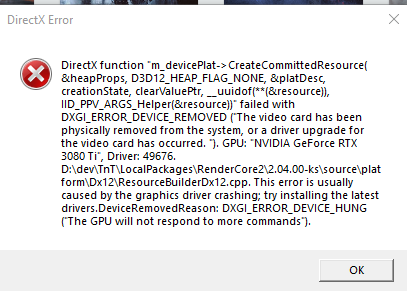
DirectX Error

DirectX function "device->CreatePlacedResource( m_heap, heapOffset, &desc, D3D12_RESOURCE_STATE_GENERIC_READ, nullptr, __uuidof(**(&uploadBuffer)), IID_PPV_ARGS_Helper(&uploadBuffer))" failed with DXGI_ERROR_DEVICE_REMOVED ("The video card has been physically removed from the system, or a driver upgrade for the video card has occurred. "). GPU: "NVIDIA GeForce RTX 3080", Driver: 49676.

D:\dev\TnT\LocalPackages\RenderCore2\2.04.00-ks\source\platform\Dx12\ResourceUploadHeapDx12.cpp. This error is usually caused by the graphics driver crashing; try installing the latest drivers.DeviceRemovedReason: DXGI_ERROR_DEVICE_HUNG ("The GPU will not respond to more commands").

Additional:  I initially read this error as it trying to indicate that I physically removed the graphics card from my PC, which I can assure you is absolutely not the case.  I have no idea why this error message appeared, and there were no bumps or knocks to the desk that would have jarred the card from its connection to the motherboard.  To think that Battlefield thinks I physically ripped out my card during a game is a bit bonkers.  I had also just updated the graphics driver to the latest version earlier today and the last part of the error message appears to be related to other DXGI_ERROR_DEVICE_HUNG issues, which I've also encountered in the past.

Video:  BF 2042: Freeze and Error (DXGI_ERROR_DEVICE_REMOVED)

3 Replies

  • Product:  Battlefield 2042
    Platform:  PC
    Please specify your platform model.  PC
    GPU:  Nvidia 3080 Ti
    CPU: AMD 3950x
    Enter RAM memory size in GB  32
    Are you using any software with an overlay? No
    If yes, can you list them here?  -
    If you disable this software, does that have any effect? No
    Which part of the game is the issue happening in? Multiplayer
    Which part of the mode? Any mode that isn't Portal
    Please select your region US
    On which server did this happen? Unknown
    When did this happen? (dd.mm.yy hh:mm) 11/19 2021 7:23PM ET
    Summarize your bug:  Game froze and eventually crashed after the below error was received during the game (DXGI_ERROR_DEVICE_REMOVED / DXGI_ERROR_DEVICE_HUNG)
    How often does the bug occur? Common (99%)
    Steps: Play any 2042 mode that isn't Portal and it is guaranteed to crash.
    What happens when the bug occurs? Game froze and I heard a 'ping' in the background, indicating there was an error message.  Alt-tabbing showed me there was the error message hiding behind the game.
    What should be happening instead? Not crashing.

    Additional:

  • zuffcat's avatar
    zuffcat
    5 years ago

    I get the same error after about 10 minutes in game on a brand new PC with a 5950X and 3090. The game freezes, I can't move but I can continue to aim for 2-3 seconds then the game completely crashes to the desktop. Error message is attached. 

  • LordXOne's avatar
    LordXOne
    New Adventurer
    5 years ago

    Product:  Battlefield 2042
    Platform:  PC
    Please specify your platform model.  PC
    AMD or Nvidia Model Number  TUF-RTX3080-O10G-GAMING
    Enter RAM memory size in GB  64
    Are you using any software with an overlay? Yes
    If yes, can you list them here?  NVidia GeForce Experience
    If you disable this software, does that have any effect? No
    Which part of the game is the issue happening in? Multiplayer
    Which part of the mode? Conquest
    Please select your region Australia
    On which server did this happen? Unknown
    When did this happen? (dd.mm.yy hh:mm) 21/11/2021 01:20hrs
    Summarize your bug:  Game froze and eventually crashed after the below error was received during the game (DXGI_ERROR_DEVICE_REMOVED / DXGI_ERROR_DEVICE_HUNG)
    How often does the bug occur? Occasionally (10% - 49%) 
    Steps: Unknown.  In this case, I had run into a vehicle and got out of it quickly when some rockets came my way.  I got out, but shortly afterwards I ate those helicopter rockets; the screenshot shows the LMG being thrown forwards by me as Boris nakes a permanent nap.
    What happens when the bug occurs? Game froze and I heard a 'ping' in the background, indicating there was an error message.  Alt-tabbing showed me there was the error message hiding behind the game.  I had to use the Windows+Shift+Right to move the error message out from behind the game and onto my second monitor, otherwise I couldn't get to it.
    What should be happening instead? Not crashing.

    DirectX Error

    DirectX function "m_devicePlat-> CreateCommittedResource(&heapProps, D3D12_HEAP_FLAG_NONE, &platDesc, creationState, clearValuePtr, __uuidof(**&resource)),IID_PPV_ARGS_Helper(&resource))" failed with DXGI_ERROR_DEVICE_REMOVED ("The video card has been physically removed from the system, or a driver upgrade for the video card has occurred. "). GPU: "NVIDIA GeForce RTX 3080", Driver: 49676.

    D:\dev\TnT\LocalPackages\RenderCore2\2.04.00-ks\source\platform\Dx12\ResourceBuilderDx12.cpp. This error is usually caused by the graphics driver crashing; try installing the latest drivers.DeviceRemovedReason: DXGI_ERROR_DEVICE_HUNG ("The GPU will not respond to more commands").

    Additional:  I made another post back on the 17th, when I had my last proper gaming session with Battlefield 2042, and it looks like I'm getting this at least once per session.  Given, I'd been at it for a few hours, but it's a very similar error (if not the exact same).  I checked my drivers and they were all up to date (both Windows & Nvidia).

    Video Clip:  BF 2042 - Device_Hung error after death

    (CM: Edited font to make it readable) 

Featured Places