directx DXGI_ERROR_DEVICE_REMOVED
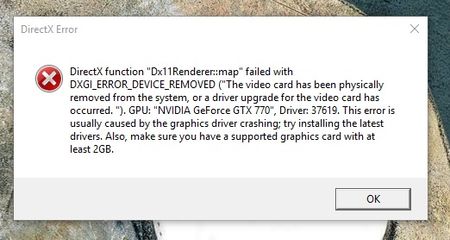

Hi Thanks for all your replies, I've done a clean boot and also re-installed the latest drivers, with no change in my situation, it looks like I'm going to have to upgrade my system, was planning on using my Christmas bonus for that anyway so luckily I've been saving up.
In regards to what corbonic criticized about me and the original poster, I had searched on the forum and this was the only page that came up with the exact wording I used, I had seen his notes before about including the DxDiag file so I made sure I had that, I was trying to be thorough and have the relevant info, much of carbonics requested info is found in the DxDiag file, and the OP has a screenshot already. So between me and him there should be enough to help others.
I should also mention I waited what felt like an hour in live chat with EA support without them responding, which was my first choice for help before I searched around and found this thread.
I have also watched the youtube video raganarok recommended and it recommended a clean boot which I had already done and underclocking my graphics card, which I did not try as the game only just runs on my card as it is.
Good luck to anyone else with this issue.
great news ! fresh installed windows , origin , battlefield and all drivers and updates and what do you think ? That DAMN EA product get the same error :D
Description:
Faulting application name: bf1.exe, version: 1.0.47.30570, time stamp: 0x5842f1e9
Faulting module name: KERNELBASE.dll, version: 10.0.14393.479, time stamp: 0x582588e6
Exception code: 0x887a0005
Fault offset: 0x0000000000017788
Faulting process id: 0x22dc
Faulting application start time: 0x01d256b7202410a8
Faulting application path: C:\Program Files (x86)\Origin Games\Battlefield 1\bf1.exe
Faulting module path: C:\Windows\System32\KERNELBASE.dll
Report Id: ad859e59-eebc-4794-b23c-de881768bcea




