Forum Discussion

3 Replies
 Anonymous9 years agoNot applicable
Hey @Carbonic,
do you have an idea why this would happen all the time?
Cheers,
Val Carbonic9 years agoHero+
Well @EA_Valgard, one reason could be continuous hard drive errors causing file corruption effecting the areas of the hard drive where the VC++ runtime is located. I would do the following:
Possible long term solution:
- Check hard drive with tool capable of S.M.A.R.T. detection - example http://www.howtogeek.com/134735/how-to-see-if-your-hard-drive-is-dying/
- If the hard drive is dying it should be replaced before it fails completely
Possible short term solution:
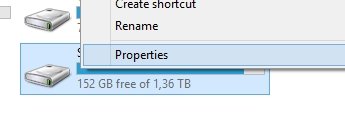
- Go to "This PC" in Windows and right click the hard drive and click "properties"
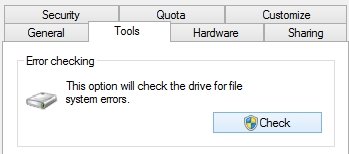
- Go to "Tools" and and press "Check"
- Click "Scan Drive" and let it scan for errors.
- If it finds errors let the program fix them
(If there are errors it could mean nothing, but it can also suggest that it might be time to format your computer and/or replace the hard drive) - Reboot your computer
- Run the scan again
- Keep repeating step 3-5 until no errors are found
- Reinstall VC yet again
 Mustriggs9 years agoNot applicable
Found the problem. It was Origin. I reinstalled it and everything worked.
Featured Places