Anonymous
7 years agoNew update install issues
This mornings update seems to hang at 656.19 mb eternally. I left it installing for well over an hour sitting at 656.19 downloaded but it would not progress to complete. Had to start it over, had the same result.
Any suggestions?
Hey, A possible work around is to clear the cache and re-try the download.
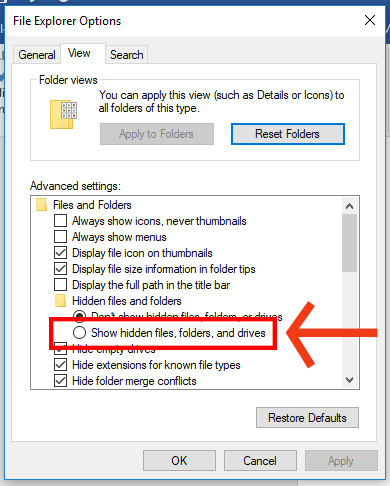
First, make sure you can view hidden files and folders:
- Hit the Start button (or press Win + X for Windows 10).
- Click on Control Panel.
- Click on Appearance and Personalization.
- Under File Explorer Options, click Show hidden files and folders.
- On the new window pop-up, click the View tab.
- Under Advanced settings, click Show hidden files and folders, then click OK to save the change.
Next, follow these steps to clear cache:
- If Origin is running, close it by clicking Origin in the menu bar then Exit.
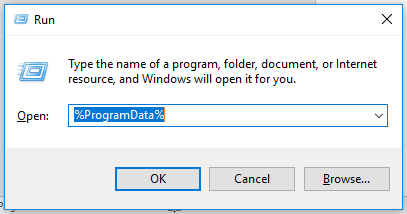
- Hold the Windows key + R.
- In the command box that opens, type %ProgramData% then click OK.
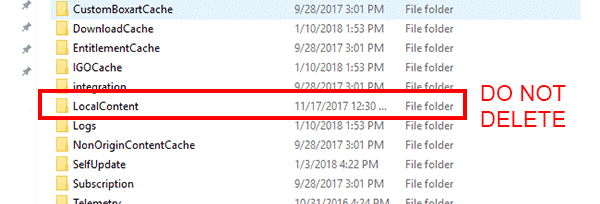
- Open the Origin folder and delete all the files and folders inside it except for LocalContent. Do not delete that folder.
- If you’re on Windows XP, you’ll find the ProgramData folder in C:\Documents and Settings\All Users\Application data\Electronic Arts\
- Hold the Windows key + R again.
- In the command box that opens, type %AppData% then click OK.
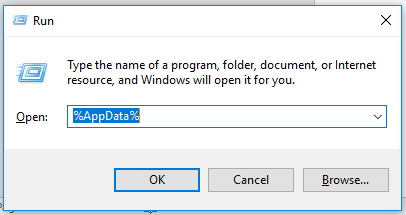
- In the Roaming folder that opens, delete the Origin folder.
- Click on AppData in the address bar.
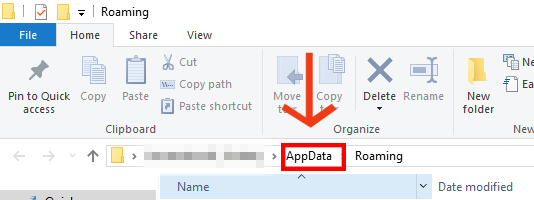
- Open the Local folder.
- Delete the Origin folder in there.
- Restart your PC and log back into Origin.
Best of luck!