
IICookieGII
7 years agoSeasoned Veteran
Re: New update install issues
Hey, A possible work around is to clear the cache and re-try the download.
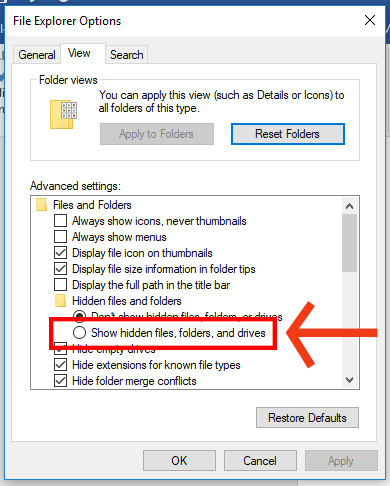
First, make sure you can view hidden files and folders:
- Hit the Start button (or press Win + X for Windows 10).
- Click on Control Panel.
- Click on Appearance and Personalization.
- Under File Explorer Options, click Show hidden files and folders.
- On the new window pop-up, click the View tab.
- Under Advanced settings, click Show hidden files and folders, then click OK to save the change.
Next, follow these steps to clear cache:
- If Origin is running, close it by clicking Origin in the menu bar then Exit.
- Hold the Windows key + R.
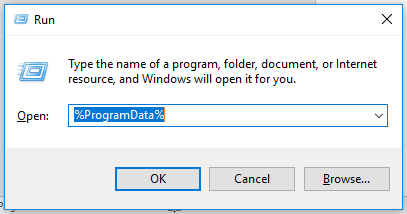
- In the command box that opens, type %ProgramData% then click OK.
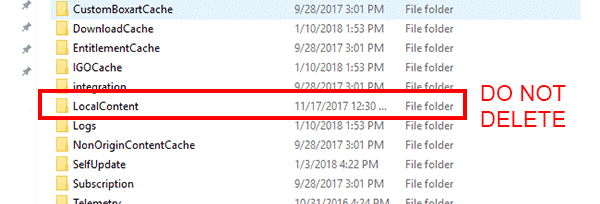
- Open the Origin folder and delete all the files and folders inside it except for LocalContent. Do not delete that folder.
- If you’re on Windows XP, you’ll find the ProgramData folder in C:\Documents and Settings\All Users\Application data\Electronic Arts\
- Hold the Windows key + R again.
- In the command box that opens, type %AppData% then click OK.
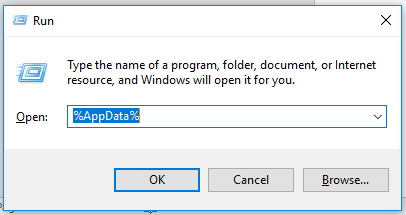
- In the Roaming folder that opens, delete the Origin folder.
- Click on AppData in the address bar.
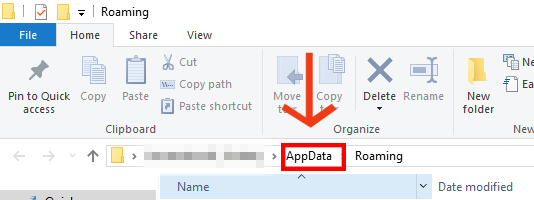
- Open the Local folder.
- Delete the Origin folder in there.
- Restart your PC and log back into Origin.
Best of luck!