Forum Discussion

18 Replies
 Perti235 months agoSeasoned Veteran
Try to restart your computer. That helped in my case.
- Elisathezim5 months agoSeasoned Novice
Yesterday I installed the sims 4 for the 1st time on my pc from the ea site.
After downloading the game and everything this message keeps popping up,I have already tried all the methods to solve this that I saw online.
Please solve this,i REALLY want to play.
 EA_Claus5 months ago
Community Manager
Hey Elisathezim,
Do you also use Mods or CC? If you do, try identifying the problematic file following the guide at the bottom of this article.
Disabling all the CC seems to have worked for another player getting the same error in this thread, where I moved your message.
If you don't use Mods or CC, please try backing up and refreshing the game. Let us know how it goes!
- Elisathezim5 months agoSeasoned Novice
I have already tried this (I have never played the sims before so I don't have anything saved or any mods/cc,It is still not working.
- Elisathezim5 months agoSeasoned Novice
EA_Claus please stay with me in the hope of solving this problem.
- EA_Claus5 months ago
If you have already tried backing up and refreshing the game, please try clearing the cache and repairing the game installation.
 Nutmegxox5 months agoNew Novice
I have this exact same problem, except most times I cam get into the game but it will randomly crash and then show that message on the EA app. I have logged out and into the EA app, uninstalled and reinstalled the game, removed all mods, deleted cache, uninstalled the app then reinstalled it, repaired the game, etc. I'm not sure what the issue is. I've just made do by saving every 15-30mins in CAS or buildmode, or saving before I leave a lot.
- Elisathezim5 months agoSeasoned Novice
I understand,but I have never played the sims since this was my first time so I don't have anything saved Nutmegxox
- Elisathezim5 months agoSeasoned Novice
EA_Claus I am not understanding what You mean by repearing the game installation, I have already cleared my cache but It's still not working.
- EA_Claus5 months ago
You can repair the game installation through the EA app, following the steps below:
- Launch the EA app and go to your Library.
- Find the game you want to repair and select the three-dot menu on the game tile.
- Choose Repair.
- When the game has finished repairing, try launching it again.
I'd also recommend restarting the PC, after the repair is complete, before launching the game again.
- Elisathezim5 months agoSeasoned Novice
EA_Claus I have already tried those too.
- Elisathezim5 months agoSeasoned Novice
EA_Claus I have now restarted my pc and a blue and yellow thing is on the bottom-right side of the ea app but nothing seems to work.
- Elisathezim5 months agoSeasoned Novice
Can someone please help?
- EA_Claus5 months ago
You have backed up the data, reset the game, repaired the installation, and cleared the cache.
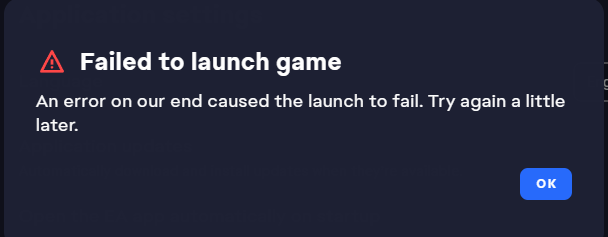
After restarting the PC, launching the EA App, and launching the game, are you still getting an error message? If it persists, a photo of the error might help us figure this out.
- Elisathezim5 months agoSeasoned Novice
Yes, I am still getting that message, here's a photo.
- EA_Claus5 months ago
Hey again Elisathezim,
I moved our messages into this other thread, as various troubleshooting steps, including removing the Mods and CC, don't seem to fix your error.
It might help keep track of this situation if it persists for you and other players.
- chillyw3165 months agoNew Traveler
I finally got into the game today and it won't pull up my save game and when I hit new game it kicks me out and gives me the same error as yesterday. I agree with someone else on this forum who said that these forced updates should not happen.
 SavageMom855 months agoRising Novice
Nothing is working!!!
Featured Places