Forum Discussion

Anonymous's avatar
Anonymous
8 years ago
Solved

Game won't launch after using frosty mod manager

So the game was working perfectly fine and I decided to try some mods. Installed the frosty mod manager got about 8 or so mods and tried to launch, and the game never popped up on the screen. In origin the play button was invisible though and activation ui.exe was in the task manager. I've already tried everything like repairing game, deleting exes and then repairing, safe boot, etc. The only thing that seemed to work was reinstalling the game. I really want to play with the mods and I'm really confused why the game won't work after using the mod manager
  • @Kobranz  @CC5O5O @rfields99

    Try this:

    • Go to your game directory (Normally at ">drive<:\Program Files (x86)\Origin Games\Andromeda" and delete the "bcrypt.dll" file and the "ModData" folder.
    • Then go to your "FrostyModManager\ThirdParty" folder and delete the "bcrypt.dll".
    • reboot
    • test the game.

    If the game works after you did this you can try to re-download the "bcrypt.dll" from the nexusmods page of the Mod Manager (important) and put it in the same folders as mentioned above. 

40 Replies

  • Can we get mod support for other EA titles? I want to figure out some limitations in NFS 2015 for example.

  • txqueenbee75's avatar
    txqueenbee75
    6 years ago

    I have the same issue, except with SWBF2 (2017) what should I Do? I also cannot find any of these files mentioned in the post.

  • @txqueenbee75So assuming you have installed FMM, go to that file folder. If you dont know how, simply right click on the desktop icon and select Open File Location. From there, find the CryptBase.dll file and copy it. From there, just paste it into your Game File location using same method.

    Hopefully this helps.

  • txqueenbee75's avatar
    txqueenbee75
    6 years ago

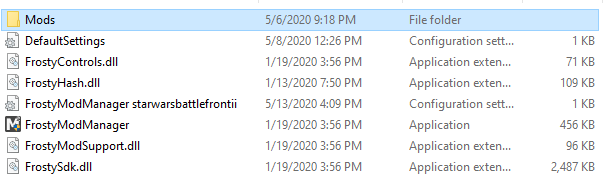
    Issue is, I cannot find the CryptBase.DLL File. As you can see in this file/png below

  • I would try to re-download it. Not sure how you unpacked yours, but I did mine through the Nexus tool, Vortex. I doubt that would make a difference though. So yea, just go to Frostys website and re-download the file.

  • Jakeymomo107's avatar
    Jakeymomo107
    6 years ago

    I believe I've found a fix to the problem. While troubleshooting launching the game without any mods, I found out that FMM 1.0.5.7 can perfectly launch the game, but cannot load mods. From this, I downloaded both FMM 1.0.5.9 and 1.0.5.7 and ran them both at the same time. Since the mods I'm using work with 1.0.5.9,  I was able to successfully load them there and launch the game.

    In shorter words, run both FMM 1.0.5.9 and 1.0.5.7 at the same time, load mods to 1.0.5.9, launch game from 1.0.5.9.

    In this instance, I am running FIFA 20 with mods, but I am guessing the fix also works for Mass Effect Andromeda. 

  • ShibbyMary's avatar
    ShibbyMary
    5 years ago
    @Jakeymomo107 I had to log in to say thank you!! Thank you for taking the time to share a solution. I've been trying to play Andromeda for the last 4 days and nothing else was working. I was just about to give up on ever playing the game when I found this thread.
  • Hi guys,

    I found a solution for my pc a little futher down in the Google results! - works with Frosty 1.0.5.9.

    You need to fix AnselSDK64_org.dll and AnselSDK64.dll - look at this YT video: https://www.youtube.com/watch?v=qbzPel4pHnU

    (If the forum deletes the link, google this video key: qbzPel4pHnU

    Thanks for everyone trying to help with fixes!

Featured Places

Node avatar for Mass Effect Franchise Discussion

Mass Effect Franchise Discussion

The fate of the galaxy lies in your hands. Join the Mass Effect community forums and tell us how you'll fight for it.Latest Activity: 9 days ago
19,258 Posts