Forum Discussion

25 Replies
 holger14051 year agoHero+
You still get the same error message?
EA Desktop is EA app, did you tried to run it normally after the re-installation?
What do you mean with EA Launcher?
Do not run "MassEffectLauncher" as Administrator. It should not be necessary.
If that still don't helps I would like you to the start the game from the "ME3Tweaks Mod Manager" you can find in this post!
Its the standard modding tool for MELE and it circumvents the MassEffectLauncher.
(You don't need to install any mods or configure anything, the "ME3Tweaks Mod Manager" will read the game location from you registry and you can start ME3 right away.) teloq17931 year agoRising Traveler
@holger1405 Yes, the same error keeps popping up every time. At one point one of the solutions I saw mentioned running those three as Admin. I have changed the EALauncher.exe and MassEffectLauncher.exe back to normal. Despite trying it with EA Desktop both as Admin and normal nothing has changed as far as I can tell.
ME3TweaksModManager ends up with the same result. The error pops up on the EA App after about a minute of it saying "Preparing game..." After that, I tried launching it from all three, steam, EA app and ME3 with both EA Desktop as admin and normal. Same result each time.
Do you think the other solution offered by MiammDB should be tried?
- holger14051 year agoHero+
It certainly can't hurt to contact support and see if this is a account problem.
Let us know how it goes.  EA_Shepard1 year ago
Community Manager
Hi @teloq1793, quick question. Maybe i missed it. Did you ever have Ea Play at all through PC, Xbox (Game Pass)? Some entitlements can conflict but the "preparing game" in most cases comes down to entitlements or an EA app issue, yall have ruled out most everything else already.- teloq17931 year agoRising Traveler
Hi @EA_Shepard sorry for the delayed reply. I don't believe I ever had EA Play. I used to mainly play on Playstaion and don't remember ever subscribing to it. Is there a way to check if I have?
Is there anything else I can do that you know of? I have talked with support and they did not seem to have an answer either.
Do you think a different EA account might work?
I'm about out of ideas
- teloq17931 year agoRising Traveler
@holger1405 Well, I have reached out twice to support. They were unable to fix the issue but the first person did try to adjust something in my account on their end like MiammDB mentioned. They were surprised when that did not work, and were kind of a loss as what to do next. The second was unable to help any more than the first and passed it along higher up.
So @VirusTito23 if you have not gotten yours resolved yet you should try what @MiammDB mentioned above as the support team expected it to work for me like it did for them.
I'm not really sure what to try next, I see the games on sale. I might make a new EA account and buy it to test if maybe its a problem somehow with my EA account. Does anyone think that might make a difference?
- EA_Shepard1 year ago
@teloq1793 If you log into EA.com with that EA account, you can go through your purchases or subscriptions and check it that way. I can always poke around in the account and see if there ever was as well.
- teloq17931 year agoRising Traveler
@EA_Shepard All right. I logged in and checked the order history, there wasn't to much there but I saw some old games that I got in 2014 and 2015 that were charged zero dollars so maybe those were from EA play back then.Then I found the EA Play tab and at the top it says that my EA Play has expired and that I can come back at any time. So I was wrong I guess from what I am seeing and at one time I did have EA Play years ago if I am looking at this right.
If you would like to poke around to verify you can. But it looks like I did in fact have it. So is that the root of my problem?
- EA_Shepard1 year ago
@teloq1793 Oh for sure! Let me take a look and see what I can find.
- EA_Shepard1 year ago
@teloq1793 Account is fine. I see the game is active, so the issue isn't account related. The issue is something on the PC.
Let me ask you this just as a refresher. When you played offline, did this error happen the moment you went online?
Did the game update?
Has the EA app been updated?
Has anything as far as security been changed? Firewall/Antivirus/pop blockers/Windows Security, anything at all on the PC?
What about a VPN? Do you use one or have you tried one? - teloq17931 year agoRising Traveler
@EA_Shepard All right, good to know. I wish the problem would make itself known at this point whatever it is.
When Mass Effect worked, offline was the only time I could get it to work. From the beginning, I had this error. So I tried to find my way around it the best that I could, first by checking for updates on everything and verifying files then looking around at what some others had success with. I didn't have any luck so I thought to try it offline to see if I could bypass the problem.
The steps that I did that got it to work seem convoluted now but at least it worked. First I download the EA App then turned off both the steam overlay and the EA App overlay. Verified the steam game files and made sure both accounts were linked. Then in the steam game properties unchecked the dlc check box. Added ea app.exe and eadesktop.exe to steam as non games then made sure to log into both the steam and ea app accounts. Then closed them out and turned off the internet adapter, restarted the CPU, pulled up steam, and then ea app and it would launch through EA App or Steam with no issue.Looking at it now it was a bunch of odd steps that I ended up taking but it would say preparing game for a few seconds and then launch it just fine every time.
I tried to not be online on the CPU because I was concerned that it would ruin what I had finally got to work. Turns out I was right. I went online for a few hours of black Friday shopping and ran a CPU benchmark test. After that no matter how I tried to launch it it is back to the state it is now. Online never worked for me but now my offline method doesn't work either.
I have tried to restart/reverted all the changes as we have went along but that error is always there.
So to answer your questions. No the game has not updated.
The EA App as far as I can tell has not either but it could have in those hours I was online.
This is what I am now wondering might have messed up what I had working. The CPU bench test is the only thing other than maybe a windows defender update that could have happened.
I do not have a VPN right now. I did try it on a different network in case the internet was a problem but then I got it to work only when all internet was turned off.
Quite the confusing problem.
Oh and one more thing, I did uninstall the steam version and buy the game from EA in the beginning to try and see if that would help. I ended up with the same issue so I got a refund.
- EA_Shepard1 year ago
@teloq1793 Thank you for all of that info. That is really way too many steps to go through. That should not happen. Its really a download and go so Im curious if its Windows related. Something blocking it.
Have you tried any of these?
- Put your device in a Clean Boot, then launch the game
- Try the Game in different Compatibility settings
- Try Safe Mode with Networking
- Try a new Windows Account
- Change UAC Controls within Windows (change back once tested)
The online thing is the key though. I looked at your account and the game is active. As of now though, to confirm, you bought it and currently own it through Steam? I am not seeing it through the EA app on your account but I do see it was played through Steam. I just want to make sure.
- teloq17931 year agoRising Traveler
@EA_Shepard Your welcome. Its starting to be hard to belive it can be that simple. haha. But I'm sure it normaly is.
I have tried the clean boot a few different times, first by itself then on a new Admin Windows account with a new Microsoft account, then on a new Admin Local Windows account.
For compatibility settings I have tried for the following .exes, the EA Applauncher, EA Desktop, MassEffect Lancher, MassEffect 1... ect. Basically any that I could guess interacted with the program. For clarity, I did not do them all at once but slowing expanded to them trying to get it to work.
Changing the UAC Controls if I did it right did not seem to do anything. I maxed it out and tried then turned them all the way down and got no indication anything was different either time.
For the Safe Mode with Networking, I could not get the EA App to open. So maybe that showed there is a problem there? With Windows and the App? Steam opened up okay but the EA App would not. I tried running it as Admin and running the EA App updater but it would not open. A little black screen would pop up and say that EA App was up to date and that the window would close when the 5 second timer counted down but nothing after that. I tried putting the EA App back into Steam as a non-game but it still would not launch. And when I tried to launch the game by Steam, ME3, or just the .exes it would flash the EA preparing game briefly then disappear and nothing else happened.
And yes, I bought it on Steam and still own it there. When that did not work in the begining I bought it through EA and returned it in EA when it did not change the problem. Sorry for the confusion.
- EA_Shepard1 year ago
@teloq1793 You are good trust me. I am digging into some things but I needed to make sure on those. Its a tougher one for sure but we will get it figured out. Looking into more options on this one.
- EA_Shepard1 year ago
@teloq1793 Okay, so went over your last DxDiag, and compared everything you had done, and this is what it comes down to on of the following. Take your time with these. It may be a lot but once you uninstall and delete programs and files, the rest is cake.
EA App Connectivity Issues:
Drive Configuration and File Paths:
Administrator and Compatibility Conflicts:
Corrupt Cache or Temporary Files:
EA App Safe Mode Launch Issue:
Hardware or Driver Issues:
Background Services and Software Conflicts:
Windows Registry Issues:
Account Verification Issues:
Now here is the long part, I have put to gether everything your DxDiag gave errors on, was outdated or possible causes of this.Clear Cache for EA App and Steam:
Delete EA App cache files:
makefile
Copy code
C:\Users\[Your Username]\AppData\Local\Electronic Arts\EA Desktop\CacheC:\Users\[Your Username]\AppData\Local\Temp
- Clear Steam download cache via Steam settings (Steam > Settings > Downloads > Clear Download Cache).
Reinstall EA App and Steam Properly:
- Completely uninstall the EA App and Steam, removing all registry entries and files related to them.
- Install them on the same drive as the game. Avoid using separate drives for the launcher and the game itself.
Reset Permissions:
- Remove admin permissions for all relevant .exe files (EADesktop.exe, MassEffectLauncher.exe, etc.) and run them as a standard user to avoid UAC issues.
- Verify file ownership and permissions for the game directory. Ensure the current user account has full control.
Re-link EA and Steam Accounts (has to be the same accounts)
Run Clean Boot: You tested already
Move All EA, Steam, and Game Files to a Single Drive:- Consider moving everything (Steam, EA App, and Mass Effect) to a single drive (ideally an SSD for faster load times).
- Use the Steam Library Manager to move games within Steam, and use the EA App's settings to specify the correct download and game location.
Check Internet Issues / Offline Mode:
- If offline mode works, attempt to "trick" the app into offline mode:
- Launch Steam in offline mode, disconnect the internet, and then attempt to launch the game.
- If this works, there may be an account verification issue or a DRM-related check failing online.
Reinstall Visual C++ Redistributables:
- Reinstall Microsoft Visual C++ redistributables (x64 and x86) from Microsoft’s official site.
Reinstall DirectX:
- Run the DirectX End-User Runtime Web Installer from Microsoft’s DirectX site.
- Update DirectX via Windows Update to ensure you have the latest patches.
Network Troubleshooting:
- Disable IPv6 in Network Adapter Settings.
- Check the Windows Defender firewall for EA App and Steam entries.
- Temporarily disable antivirus or add exceptions for Steam, the EA App, and game executables.
Check for Corrupt Files or Disk Issues:
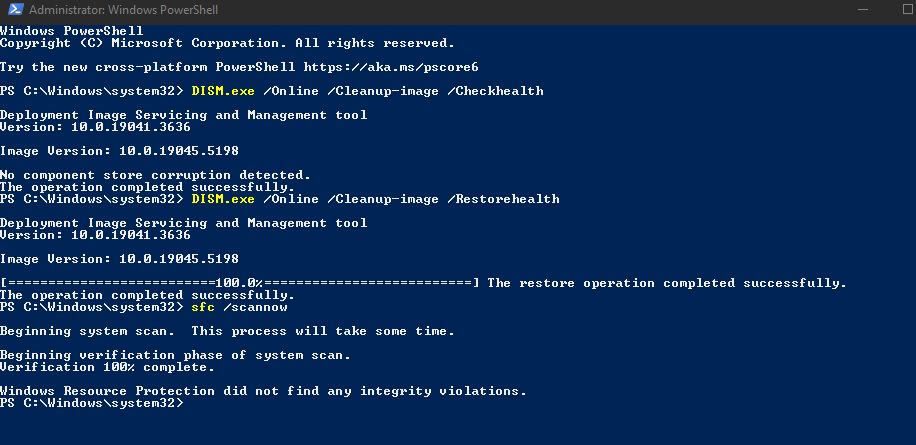
- Run sfc /scannow and DISM /Online /Cleanup-Image /RestoreHealth to ensure no Windows system files are corrupt.
- Use chkdsk /f /r on the drive where the game is installed.
Switch to Windows 10 Local Account:
- If possible, create a local (non-Microsoft) Windows account, install Steam, EA App, and Mass Effect under this new account, and try to launch the game.
Reset EA Desktop App:
- Run EA App Recovery Tool. It’s often included in the EA App or available from EA's support site.
Registry Fix:
- Check for duplicate or incorrect registry entries for EA Desktop, Steam, and Mass Effect Legendary Edition.
- Open Regedit and search for "Mass Effect" and "EA Desktop" keys to ensure all paths point to the correct directories.
Try Launching Without Overlays:
- Ensure both the Steam and EA App overlays are disabled.
- Disable Discord and NVIDIA GeForce overlay if running.
Disable Audio Enhancements:
- Disable audio enhancements for all active sound devices (VoiceMeeter, etc.):
Right-click the speaker icon in the taskbar > Sounds > Playback tab.
- teloq17931 year agoRising Traveler
@EA_Shepard Okay wow. Thank you for the deep dive. I will start working my way through all these steps. It may take a while if I need to download some big files. The internet is not the fastest.
- teloq17931 year agoRising Traveler
@EA_Shepard A few quick questions. Should I uninstall all the Steam games too or will they be uninstalled with steam? Or back them up to an external drive?
Would backing up Mass Effect be worse than just getting a clean install of it?
- holger14051 year agoHero+
You don't need to uninstall other games and the games will not be uninstalled with the Steam client.
teloq1793 wrote:
Would backing up Mass Effect be worse than just getting a clean install of it?
You need to clean install the game. Back up save games if you have any, but the game files must be gone.
- teloq17931 year agoRising Traveler
Okay thank you.
- teloq17931 year agoRising Traveler
@EA_Shepard Well... after trying all those steps nothing has changed as far as I can tell. Still have the same error pop up. I went down through them one by one. Man am I regretting getting online that day. Do you think that maybe I have to reinstall Windows and start from the very ground floor? This problem just won't let go.
- EA_Shepard1 year ago
@teloq1793 I dont think you need to start from the ground up no. You can try the following before that happens.
- Reset Windows Host File
- Put your device in a Clean Boot, then launch the game
- Try the Game in different Compatibility settings
- Try Safe Mode with Networking
- Try a new Windows Account
- Change UAC Controls within Windows (change back once tested)
- Remove any over-clocking or undervolt settings or software and check if the issue continues
I go through these as they are just a few steps. Windows reinstalls are a last resort. I also do an SSD/HDD repair with System File Checker
For added measure, You could try the following tooRenew IP
- From the Start menu, type cmd to search for the Command Prompt app.
- Select Run as administrator.
- Click Yes to allow User Account Control (UAC), if prompted.
- The Administrator: Command Prompt window opens.
At the prompt, type ipconfig /release, and then press Enter - The command now executes. You may see several lines of text before the command prompt returns.
- At the prompt, type ipconfig /renew, and then press Enter.
DNS Flush
- Click the Start button. It’s the Windows logo in the bottom left corner.
- Select Command Prompt.
- To open the command prompt console, you could also simply press the Windows and R keys at the same time and enter cmd.
- You may see a popup asking if you want to allow Command Prompt to make changes to your computer. If you do, select Yes.
- If you are asked for an administrative login at this point, then you’ll need to contact your system administrator to proceed.
- In the command prompt window, type ipconfig /flushdns.
- Press Enter.
- You should see a message confirming that the DNS Resolver Cache was successfully flushed.
- teloq17931 year agoRising Traveler
@EA_Shepard It has been fixed!!!! Finally, after all this, it launches every time!
Thank you so much for all the time you and @holger1405 spent helping me!
After going through these steps it still did not work. So I went to a friend's house to try it on a different CPU and network to make sure that it was not account related. Because it felt like we had tried so much I just wanted to be sure. It went just fine on his CPU with no trouble. So I came back and thought about it more and the idea to try it on a hotspot again felt like it might be worth it. I believe early on one of you mentioned trying it on a different network. It did not work then but when I tried it now it works fine every time. So one of these steps cleared the problem but I can not point to which one. It is the same hot spot that I tried before. This time however it did the preparing game for a bit then asked me which save I wanted on the cloud, the local one or the one that was used at my friend's house. I chose local and it launched to the main menu!
I believe my internet which is pretty slow is too slow to do whatever verification is needed to launch. On the hotspot it goes a lot quicker when trying to launch. So maybe that info will help you guys later if someone else is having as much trouble as me. I wish I could point to the step that fixed it so that it could work with the hotspot but it has been some time since I had last tried that.
Thanks again.
Is there anything I need to do to mark this as solved? Or does it not matter for the forum post? This has been my first time here.
- EA_Shepard1 year ago
@teloq1793 That's fantastic news! @holger1405 is amazing at helping others get back into the game.
I'm happy to hear that you can get back in and play!
I'm Commander Shepard, and this is my favorite type of message on the Citadel - holger14051 year agoHero+
Good to hear that you got it running. Have fun gaming!
- teloq17931 year agoRising Traveler
Thank you both again. I don't think I would have ever been able to figure it out on my own. Now I can finally go stop those Reapers from invading!
Featured Places