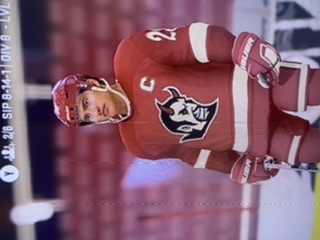
Default EASHL Club Jerseys Bug
Product: NHL 23
Platform:Microsoft XBOX One
What is your gamertag/PSN ID? Austsin
How often does the bug occur? Occasionally (10% - 49%)
Steps: How can we find the bug ourselves? 1. Create an EASHL Club 2. Assign Captain and Alternate Captain 3. Customize jerseys 4. Assign new Alternate Captain
What happens when the bug occurs? The club customization resets completely. Upon re-customizing the Jersey, Pants, and Socks stay the black EASHL default.
What do you expect to see? My custom club jerseys
Was the issue in online or offline mode? Online
Insert Game Mode or Feature here World of Chel EASHL Clubs
What time did you see the bug? (HH:MM AM/PM) 9:00 AM
What is your time zone? EST (IET) - GMT - 5:30
EASHL issues? Please insert your Club Region. North America North East
What is your game language? English
We spent more than an hour customizing our club. I logged on today and everything was reset after we assigned a 2nd Alternate Captain.
I re-customized everything but the jerseys, pants, and socks won’t update. The helmet, gloves, and goalie equipment did update along with the arena and mascot.
It is showing a C on my jersey when it should be an A for assistant captain.
I was looking into how this bug can be fixed and it appears it’s been in the game franchise for almost 4 years.
Please see the attached photos.
1st Photo: How the jerseys appear in the dressing room group
2nd Photo: How the jerseys appear in Free-Skate
3rd Photo: How the jerseys appear in the Club Jersey customization screen.