
15 years ago
Tutorial - Connecting Pools to Basement Walls after Late Night EP
Since the release of Late Night, the old way of connecting basements and in-ground pools together doesn't work. With some subtle changes though there are two techniques now to do the same thing.
First Method
This is essentially the same as Amoebius' earlier method and he still deserves all the credit for showing the simming community how to do this. But since Late Night, we just have to do it in reverse of those earlier steps.
Step 1. Build your basement area.

Step 2. Grab the pool tool, and on ground level, hold down the CTRL key and drag your pool where you want it to be.

When you let go of the mouse button, it will look like nothing happened. But if you go down to basement level, you will see that one side of the basement wall has disappeared where you used the pool tool. I circled it in red.

Step 3. Then go back to ground level and draw your pool in regularly with the pool tool.

Now if you go down to basement view, you will see the pool and basement are connected.

You can then add windows to the wall between the two areas for a viewable pool.
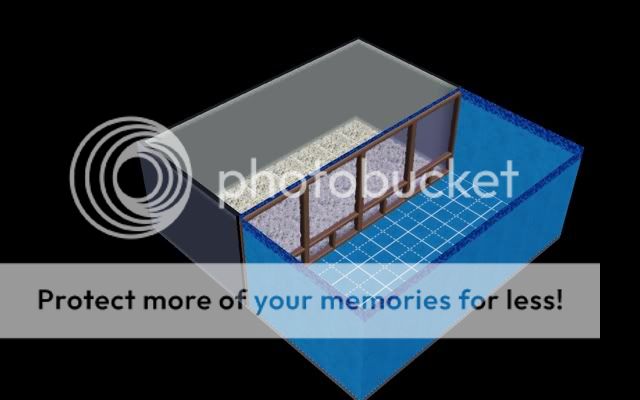
Since Late Night, you don't even need to use the "moveobjects on" cheat to place the windows either. Cool!
Again, all credit for this method still belongs to Amoebius, because they are his same steps, just in reverse order.
Second Method
This accomplishes the same thing as the first method. Takes a few more steps, but then offers more flexibility with what we can do with the pools once they are placed. Others in the community are already working on other tutorials for other effects we will be able to do with pools. :)
Step 1
Draw a large area of basement around the area you want your pool to be located.

Step 2
Use the pool tool, to then draw your pool area inside the perimeter of the basement.

Step 3
Grab the hammer tool and go to the basement level and delete the basement from around the edge of the pool on your other three sides where the red arrows are.
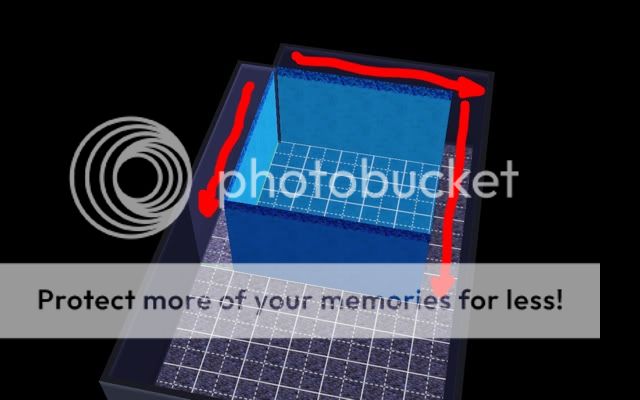
You can then add the windows to the walls between the basement and the pool as before.

This second method will then allow you to do other things with in-ground pools like put walls inside of them, etc.
I hope these two methods will once again let builders connect their in-ground pools to basement walls. A lot of us thought this ability was lost with the release of the Late Night expansion. But as you can see, we still get to enjoy this thoroughly enjoyable expansion from EA, as well as have connected pools with basements. :)
First Method
This is essentially the same as Amoebius' earlier method and he still deserves all the credit for showing the simming community how to do this. But since Late Night, we just have to do it in reverse of those earlier steps.
Step 1. Build your basement area.
Step 2. Grab the pool tool, and on ground level, hold down the CTRL key and drag your pool where you want it to be.
When you let go of the mouse button, it will look like nothing happened. But if you go down to basement level, you will see that one side of the basement wall has disappeared where you used the pool tool. I circled it in red.
Step 3. Then go back to ground level and draw your pool in regularly with the pool tool.
Now if you go down to basement view, you will see the pool and basement are connected.
You can then add windows to the wall between the two areas for a viewable pool.
Since Late Night, you don't even need to use the "moveobjects on" cheat to place the windows either. Cool!
Again, all credit for this method still belongs to Amoebius, because they are his same steps, just in reverse order.
Second Method
This accomplishes the same thing as the first method. Takes a few more steps, but then offers more flexibility with what we can do with the pools once they are placed. Others in the community are already working on other tutorials for other effects we will be able to do with pools. :)
Step 1
Draw a large area of basement around the area you want your pool to be located.
Step 2
Use the pool tool, to then draw your pool area inside the perimeter of the basement.
Step 3
Grab the hammer tool and go to the basement level and delete the basement from around the edge of the pool on your other three sides where the red arrows are.
You can then add the windows to the walls between the basement and the pool as before.
This second method will then allow you to do other things with in-ground pools like put walls inside of them, etc.
I hope these two methods will once again let builders connect their in-ground pools to basement walls. A lot of us thought this ability was lost with the release of the Late Night expansion. But as you can see, we still get to enjoy this thoroughly enjoyable expansion from EA, as well as have connected pools with basements. :)





