
Anonymous
12 years ago"Peristent Data" Error
I got Titanfall for Xbox 360 yesterday and after getting it working with wireless, I came across a new error this morning. I try to log in to play, I'm not even getting into the lobby, and I get an e...
 12 years ago
If you are still experiencing this issue, clear the cache on your Xbox 360 by performing the following:
- Press the Guide button on your controller, go to Settings, and select System Settings.
- Select Storage or Memory.
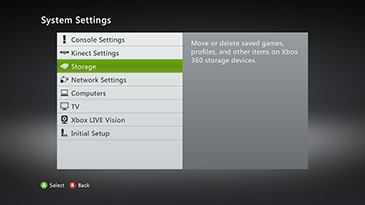
- Highlight any storage device, and then press Y on your controller. (It doesn't matter which storage device you select; the cache will be cleared for all storage devices.)
- Select Clear System Cache.
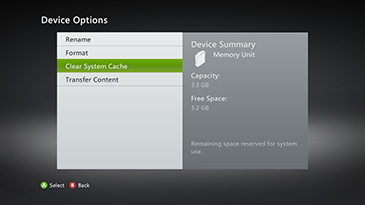
- When prompted to confirm storage device maintenance, select Yes.
Restart your Xbox 360, sign into Xbox Live, and launch Titanfall.
Please post back if the issue persists.X


