Anonymous
8 years agoTitanfall not starting
Greetings, i bought titanfall deluxe edition 2 days before and until now i couldn't play the game, nothing happens when i click "play" button in origin. I have repaired the game more than 5 times an...

u did good )
1) "DISM.exe /Online /Cleanup-Image /spsuperseded /hidesp - error: 87"
on ur screenshot I see error in command: DISM.exe /Online /Cleanup-Image /spsuperseded /hidesp
2) "DISM.exe /Online /Cleanup-Image /ScanHealth"
Yes in log file i see that System Update Readiness tool has fixed all found errors:
3) Where is CBS log?
4) "so far i still cannot install system update kb2966583 (update for windows (KB2999226) is already installed on this computer)"
I don't understand relation between kb2966583 and KB2999226. U cannot install kb2966583 becouse it is already installed? In this case its good. )
I have rerun the DISM.exe /Online /Cleanup-Image /spsuperseded /hidesp - successfully completed
the sfc is still cannot and showing unable to repair.
i have attached the dism and cbs log.
as for the kb2966583, i wrongly saw your message previously. sorry for that, i did download kb2966583 and try to install, the same message appeared which is ( already installed on this computer).
Download this two files and save it to C: volume https://files.fm/u/474n8cea#_
After this u should have two files in paths:
C:\cpfaile.cmd
C:\iassdo.dll.mui
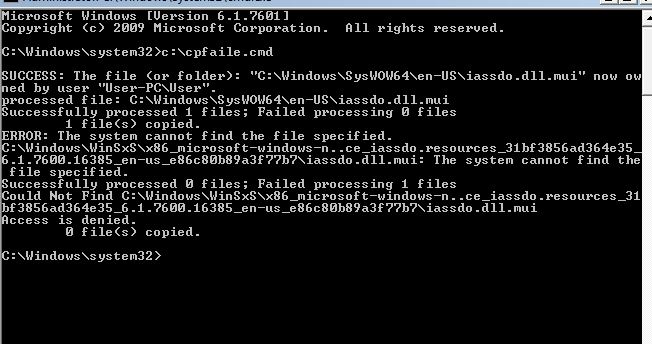
Then boot ur PC in "Safe mode" or "Safe mode with command prompt" and run batch file by typing in cmd: C:\cpfaile.cmd [and press enter]
Notice if it done good or with error.
If it good, load PC in normal mode and run sfc command again.
sorry for the delay, i was away and i did as u asked. please refer attached. theres a error in cpfaile and sfc.
@MADrag0n hello,
i have downloaded the file again and run test again. still same problem.
Hmmm, @resh56 ok, lets try to return to base problem with a game. )
Clear syslogs: run a command prompt as Admin, enter a command:
for /D %T in (ACEEventLog Application Setup System)do wevtutil cl %T
Try running a game few times...
Take new syslogs: run a command prompt as Admin, enter a command (then zip *.evtx files from your desktop and attach it to a message or give a link on it):
for /D %T in (ACEEventLog Application Setup System)do wevtutil epl %T "%USERPROFILE%\Desktop\%T.evtx" /ow:true