Goalie (Be a Pro Mode) Butterfly Glitch
NHL 27 PS5 — Be a Pro Goalie Faces Own Net and Gets Stuck in Butterfly Platform: PlayStation 5 Game: NHL 27 Game Mode: Be a Pro Goalie Career Issue Description: While playing as a goalie in Be a Pro career mode, my goalie repeatedly turns backward toward his own net and enters an abnormal butterfly position, regardless of where the puck is located on the ice. The goalie does not maintain normal positioning or respond as expected, making it extremely difficult to play the position properly. Troubleshooting Already Completed: Verified goalie controller settings before starting games. Confirmed that goalie settings sometimes reset and manually corrected them. Restarted the game multiple times. Tested playing goalie outside of Be a Pro mode using the same PS5 and controller. The goalie functions normally in other game modes. Confirmed the issue persists specifically within Be a Pro career mode. Expected Behavior: The goalie should face the play, maintain normal positioning, and enter butterfly only when appropriate or when commanded. Actual Behavior: The goalie repeatedly turns toward his own net and enters an abnormal butterfly position, even when the puck is at the opposite end of the ice. Additional Information: This problem did not occur during previous gameplay. It began after starting a Be a Pro goalie career. I have video footage demonstrating the problem.37Views0likes3CommentsGoalie style/attributes ‘25v’27
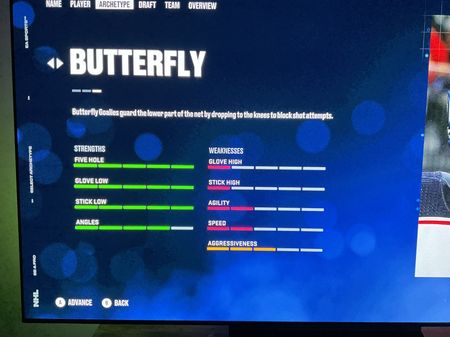
Here is one of my issues.. goalie style and attributes. In ‘25 you had a choice between 3 styles of goaltending and each style would have their own unique set of attributes. In NHL’26 and ‘27, it doesnt matter what you chose, the attributes would default to the NHL’25 stand up goalie. This is only for BAP. I cant tell you if there are issues for other game modes. Butterfly 25 and 27. Notice the huge difference Hybrid Stand up. Notice how all three NHL’27 attributes are virtually the same while there is a difference between the NHL’25 goalies? I not asking for any add ons. Just fix what is clearly broken. Make the game fun Thank you29Views0likes2CommentsBe a Pro Greatness Trophy Bugged
I have broken Gretzky's point record in NHL 27 Be A Pro, and the Greatness trophy has not popped and refuses to pop. I have well over Gretzky's point total (sitting around the 2950 mark), and I have made multiple saves and tried to get traded, tried to retire, and tried playing multiple seasons afterwards. I started this be a pro during the early access of this game, so that I guess is on me, but I have sunk way too much time into this, and I would really appreciate it if someone from EA could help me out or put out a patch. Normally, I would wait for the new patch and pray, but this is the last trophy I need to 100% platinum the game and be top 10 in the world to do so, so I really am expressing all options here. Please please someone help me out, thank you!58Views0likes0CommentsFranchise-Mode X-Faktor One-Tee
Hello EA Support, I am experiencing an issue in NHL 27 Franchise Mode on PlayStation 5 regarding the X-Factor unlock system. Before the season, I selected One-Tee as a seasonal X-Factor objective for one of my players. The requirement shown in-game is to score 10 Power Play Goals. The player has reached the required milestone, but the X-Factor has not been unlocked. On the player's card, the milestone is still displayed as incomplete, as if the required number of Power Play Goals has not been achieved. Details: Platform: PlayStation 5 Game Mode: Franchise Mode X-Factor: One-Tee Requirement: 10 Power Play Goals Player Type: Sniper Current Issue: One-Tee did not unlock after reaching the required milestone Could you please clarify the following: Are there any additional requirements for unlocking One-Tee beyond scoring 10 Power Play Goals? Do only specific types of Power Play Goals count toward the objective (for example, only 5-on-4 situations)? Is this a known issue in Franchise Mode? Is there a workaround or method to force the game to recognize the completed milestone? Thank you for your assistance. I look forward to your response. Kind regards, Lucas Schmidt PlayStation 5 User NHL 27 Franchise Mode Player11Views0likes0CommentsBe A Pro mode All Star selection bug
Since the release of the first update, it seems the code for selecting your avatar player to the All Star Game is disabled, meaning your player never gets selected. I waiting until after completing three seasons before posting this to ensure it was a pattern. This despite my avatar player earning post season trophies, including the MVP of the league and Players Association.47Views0likes2CommentsIn BAP mode, the career records isn't working properly
In the Be A Pro mode, the career records screen isn't working properly. When my player has reached top five in goals and points, his name is not appearing in the top five list. Also, in the seasonal records screen, my player is only appearing once when his goals, points, and assists are enough to appear multiple times in the top five seasonal leaders list.24Views0likes0Comments"Get in the Game" nuisance message
This coach "warning" keeps showing up in the game in Be a Pro, and it makes increasingly less sense. I get it after winning faceoffs, after body checking an opponent, dislodging the puck, and even recovering the puck and going on offense, after making a breakaway pass. Frankly, it seems like this message is just being displayed because there is nothing else the "coach" has available to complain about. But, it deducts two points from my team grade, and given everything else is positive in that area, it just reinforces the point that the code that causes this message to display is fundamentally flawed.13Views0likes0CommentsAway crowd celebrating home team goals in wrong jerseys
Custom Team crowd glitch: Away crowd celebrating home team goals in wrong jerseys Hi, I want to report a frustrating graphical and logic bug regarding Custom Teams in NHL 27. When playing with a created custom team on away ice (offline in both Play Now and Franchise Mode), the crowd textures and animations get completely glitched when the home team scores a goal. Instead of the home crowd celebrating, the game triggers animations showing fans wearing my custom team's away jerseys jumping and celebrating the goal scored against my own team. The audio correctly plays the home team's goal horn and stadium cheering, but the camera cuts to fans in my team's jerseys celebrating the opposing team's goal. It seems like the game engine confuses the home/away variables for the crowd assets when a custom team is involved. This completely ruins the immersion, especially when trying to build a custom league. Please look into fixing the crowd logic for custom teams in an upcoming patch. Platform: PlayStation 545Views0likes0Comments