Introducing Drafts
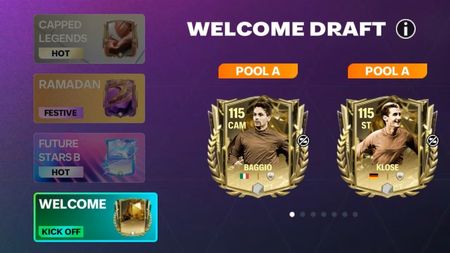
Drafts are a new way in FC Mobile to obtain Player Items to help build your team. The setup is simple: Earn Vouchers from various parts of the game or get them using Gems and FC Points. Use them in Drafts to get Player Items. Voucher > Draft > Player > Use Player Alongside Drafts we have introduced Phase Exchanges. Convert qualifying Player Items for Phase Tokens, and exchange them for Player Picks and Draft Vouchers. Voucher > Draft > Player > Phase Exchange > Token > Player Exchanges In this Deep Dive, we will explain these new features and answer some of the most frequently asked questions. Let's dive right in. Where to Find Drafts Head over to the Draft menu from the right-hand tile on the FC Mobile homescreen. This is the hub to use Draft Vouchers to earn Player Items. Drafts are split into 3 Pools; A, B, and C. Each pool has their own OVR ranges with Pool A having the highest OVRs. Tap on the [MORE] button to see which Player Items are available in each pool. How to Earn Draft Vouchers Draft Vouchers can be earned in different parts of the game. You will typically find them earnable in Event Chapters, Star and Mini Passes, and Phase Exchanges. You can also use Gems and FC Points to get more Draft Vouchers in the Store and the Draft Menu. Guaranteed Pools You’re guaranteed to get a Player Item from Pool A or B at certain milestones. If you earn a Pool A or B Player Item from Drafts before reaching the milestone, then that progress will be reset. Each Pool tracks separately. Progress of the same Draft type within the same Event is carried over, but progress is not carried over between Events and different Voucher types. For example, during TOTY the progress carried over from the Attackers Draft to the Midfielders Draft as they share the same Draft type in the same Event. That progress was not carried over to the UTOTY Draft that uses a different Draft type, or to the Capped Legends Draft as it is a different Event. Types of Drafts Draft Vouchers are split into different types; Hot Deluxe Festive Kick Off Which type of Voucher the Draft uses is highlighted with a tag on the Event Draft button. Festive Drafts accept both Draft vouchers and Festive Draft Vouchers. Phase Exchanges Phase Tokens are a new currency in FC Mobile. They can be used in Exchanges to get Player Items from Player Picks from all Events in the current phase. For example, you can exchange Player Items earned from Drafts for Tokens, and when you have enough Tokens you can exchange them for a Player Pick! A Player Pick allows you to choose one Player Item from a random selection of 3 Player Items for 113-117 OVR Exchanges, and 5 Players for 108-112 OVR Exchanges. Each Exchange has their own Token cost, tap on the Exchanges to preview the Rewards and cost. There is also an Exchange to earn Draft Vouchers by exchanging Player Items. ccess the Phase Exchanges by tapping on the Exchange button on the homescreen. Phase Tokens can only be used during a phase, a phase lasts until the maximum OVR in FC Mobile is increased. Maximum OVR means the highest available Player Item OVR in game. As of this article's publication, it's 117 OVR. You will find a timer that displays when they expire in the Item Exchanges menu. You will not be able to use them after they have expired. Frequently Asked Questions Can I save up my Draft Vouchers in the current phase and use them in the next phase? Yes, Draft Vouchers can be used in multiple phases. Does my Draft Progress carry over in Events? Yes, as long as it uses the same Draft type within the same Event. Can I use generic Draft Vouchers in Festive Drafts? Yes, Festive Drafts accept both generic and Festive Draft Vouchers. How can I get a Player Pick? Exchanges that require Phase Tokens give a Player Pick. Player Picks are a feature where you can choose 1 Player Item from a random selection. Choose between 3 Player Items for 113-117 OVR Exchanges and between 5 Players for 108-112 OVR Exchanges. How do I get more Phase Tokens? Earn Phase Tokens by exchanging Player Items released in that phase in Item Exchanges. When does my guaranteed Pool A/B reset? Your progress resets when receiving a Player Item from a Draft from that Pool. This means that if you earn a Pool A Player Item with 20 Drafts left, your Pool A progress resets. That wraps up the Drafts Deep Dive. Let us know what you think about this feature by sharing your questions and feedback on social media. Don’t forget to follow us on Facebook, X, Instagram, YouTube, and WhatsApp for the latest updates!73Views0likes0Comments
EA SPORTS FC™ MOBILE WEBSTORE
WHAT IS EA SPORTS FC™ MOBILE WEBSTORE? The official EA SPORTS FC™ Mobile Webstore is your destination to purchase special, high-value bundles for FC Mobile. The Webstore is operated on behalf of Electronic Arts by Coda Payments, an authorized reseller for FC Mobile. Various payment methods are accepted in the Webstore, including credit cards, debit cards, e-wallets, telco billing, and more, ensuring your payment is quick, easy, and secure. Explore a range of products such as FC Points, Silver, and Webstore special bundles, along with exciting discounts and bonus events, available only in the Webstore. Discover amazing daily rewards and participate in our Loyalty Program to claim top OVR player items through loyalty points. HOW TO USE THE WEBSTORE? We've created a dedicated video to run you through the details of how to log in, browse offers, claim daily rewards, and receive purchased items directly in your in-game inbox. HOW TO MAKE A PURCHASE IN THE WEBSTORE? Browse the Webstore’s various categories. You can do so freely without login. Click login icon on the top right corner of your screen. Create an EA Account if you don’t have one yet, or login through EA account. Ensure your EA account is connected with your FC Mobile account (learn how to connect hereif not connected yet). Enter the OTP sent to your EA account email, to complete the login. Select the item you wish to purchase. To check out, select your preferred payment method. Provide your email address to receive your receipt and then complete your purchase. Your purchase will be delivered automatically to your in-game inbox. If you run into issues during the payment process, or if the product you bought doesn’t appear in your account after you’ve paid, please contact our customer support: FCM WebStore Customer Support WHAT IS THE LOYALTY PROGRAM IN THE WEBSTORE? The Loyalty Program is a special benefit offered only in the Webstore. Earn Loyalty Points with every transaction at a rate of 1 USD = 100 Loyalty Points. Spend Loyalty Points to redeem various packs ranging from 1 to 10,000 Loyalty Points, including top OVR Player Items, under the Loyalty Shop section. Easily track your Loyalty Points balance and redemption history by clicking the Loyalty Program button. Loyalty Points will have 1-year expiry time, so remember to redeem them while they are valid. IS THE WEBSTORE AVAILABLE IN MY COUNTRY? Supported Countries Argentina Australia Austria Bahrain Bangladesh Belgium Bolivia Brazil Cambodia Canada Chile Colombia Czechia Denmark Ecuador Egypt France Germany Hong Kong Hungary Indonesia Iraq Italy Kazakhstan Kenya Kuwait Laos Malaysia Mexico Mongolia Morocco Myanmar Nepal Netherlands New Zealand Nigeria Norway Pakistan Paraguay Peru Philippines Poland Portugal Qatar Republic of Türkiye Romania Saudi Arabia Singapore South Africa Spain Sri Lanka Sweden Switzerland Taiwan Thailand Timor Leste United Arab Emirates United Kingdom United States Uruguay LOOKING FOR MORE? Make sure to follow us at @EASFCMOBILE on Instagram, Facebook, X, YouTube, Twitch, and WhatsApp to get the latest updates!539Views0likes0CommentsTeam Badge Deep Dive
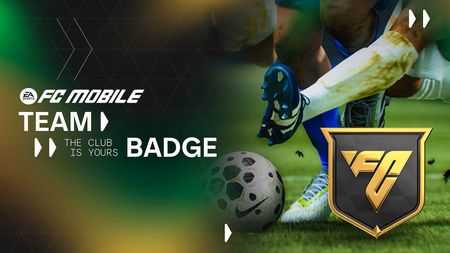
Get ready to make your squad stand out with the all-new Team Badge feature, introduced as part of our exciting FC Mobile 26 Update! Badges add new strategic elements to the game by enhancing player attributes and boosting your team's OVR. Earn Players Items, complete levels and groups, and elevate your team to new heights! How do Team Badges Work? Level up your Badge level by earning Player Items, the higher your Badge level is the greater the attribute boosts you receive. Additionally, you can complete Groups to gain additional boosts to Attributes. Head over to the new Badges section on the homescreen to browse through the different Badges. Each Badge can provide increases to Player Attributes and Team OVR for a limited time by increasing your Badge level and completing Groups. Check them out to see which Badge fits your team the best. In addition to earning boosts by completing Groups, you’ll also unlock extra Group Rewards to help you build your team. How to Equip Badges Each Badge has to be equipped to receive their boosts. Each of your lineups can have their own selection of Badges, that means that you can set up Badges that match your playstyle per lineup. To equip the Badges, go to Club > My Team and select the lineup that you would like to add Badges to. Tap on the Badges underneath your Team’s Coin value, then tap on the badge that you want to add to your lineup, and tap on “Equip”. The badge and its boost are now active on your lineup. Now you can see the attribute boosts being reflected on all your Player Items! Transform your gameplay with the strategic power of Team Badge! Make sure to follow us at @EASFCMOBILE on Instagram, Facebook, X, YouTube, Twitch, and WhatsApp to get the latest updates! The Club is Yours, Anywhere.233Views0likes0CommentsFC Mobile 26 Update - Patch Notes
Hello FC Mobile Community, We’ve been listening closely to your feedback, and the FC Mobile 26 Update brings gameplay improvements, new features, and fixes! Here’s what’s new: Gameplay Improvements Kickoff Rush: Defenders now react faster, reducing easy goals right after kickoff. Long balls still work in the right situations, but attributes, speed mismatches and positioning play a bigger part. Through Passes: Lofted passes are now more accurate when played by high-attribute passers, but harder to pull off at longer distances. Crossing & Headers: Cross accuracy depends more on attributes and defensive pressure, while headers better reward positioning, timing, and jumping ability. Referees: Small bumps are no longer auto-fouls. Referees are now better at letting the game flow without cheap free kicks. New Formations You asked for more tactical variety, so we’ve added 7 new formations including 4-2-1-3, 4-1-3-2, and 3-4-2-1. These are available in Head-to-Head, VS Attack, and Manager Mode. Match Presentation New menus, HUD, and scoreboards. Updated pre-match and post-match cutscenes. More camera angles for immersive gameplay. Revamped Matchmaking Lobby: See your captain and your opponent’s before kickoff, select kits to avoid clashes, and enjoy new walkout sequences. Read more in the Gameplay Deep Dive! Team Badge System A brand-new feature! Earn and equip Team Badges to boost attributes across your lineup. Fill badge slots to match your playstyle and earn rewards for completing collections. Read more in the Team Badge Deep Dive! Rank Up Improvements We’ve streamlined how Rank Ups work: New Rank Up Currency replaces old Rank Up Items. Training Levels are now separate from Rank Ups, so you can train players to Level 30 without needing Gold Rank. More flexibility to build your best squad for H2H, VS Attack, or Manager Mode. Star Heads & Celebrations Over 100 new Star Heads added, improving player likenesses. Endrick’s signature handshake celebration. Commentary & Audio New Turkish and Polish commentary teams. Updated sound effects and music for events and match flow. Other Updates Player Compare tool for side-by-side stat comparisons. Improved FCMTV streaming with fullscreen support and varied rewards. Notable Fixes and Improvements Manager Mode (MM) We’ve improved tactic management so that your saved tactic automatically resets when entering a Manager Mode match. We’ve improved halftime behaviour so that pitch logos now correctly switch sides in Manager Mode. We’ve improved match setup by ensuring the tactic name is displayed when starting a Manager Mode match. Locker Room We’ve improved 3D player rendering to prevent faces from turning dark when zooming in and out. We’ve improved Locker Room stability so that rapid changes are properly saved. We’ve improved Locker Room defaults so that multiple balls are no longer auto-selected when entering. We’ve improved avatar display so that Appearance and Number settings correctly show when the Away kit is selected as the Home kit. We’ve improved kit number assignment so the 3D avatar updates correctly when selecting an occupied number. We’ve improved Locker Room performance to reduce lag when scrolling through the ball list. Division Rivals (DR) We’ve improved rank adjustments so players are relegated by 5 ranks instead of 10 after season reset. We’ve improved profile accuracy so users see the correct DR current season division. VSA / H2H We’ve improved UI consistency by ensuring the Division Cup image displays correctly in H2H. Gameplay / UI We’ve improved crest placement so that both devices no longer display team crests in the same pitch position during friendly matches. We’ve improved HUD consistency by restoring the pitch score overlay during gameplay. We’ve improved match intro visuals so that team lineups are positioned correctly in Scouting Camp. Leagues We’ve improved history tracking so viewing your own history from another account shows accurate data. Trade Market We’ve improved text display so values over nine digits no longer overlap in the claim screen. Skill Games We’ve improved HUD visuals so the green mask no longer appears on the score counter in the 3-star skill game. This update is all about improving gameplay, giving you more tactical depth, and expanding the ways you can build your squad. We’ll continue listening to your feedback to make FC Mobile the best football experience on mobile. Make sure to follow us at @EASFCMOBILE on Instagram, Facebook, X, YouTube, Twitch, and WhatsApp to get the latest updates! The Club is Yours, Anywhere.327Views1like0CommentsFC Mobile 26 Update - Gameplay Deep Dive
Gameplay Deep Dive Hello FC Mobile Community and welcome to the FC Mobile 26 Update Gameplay Deep Dive! We’ve improved the gameplay experience by honing in on critical community feedback over the past months. Special thanks to those who participated in the Gameplay Beta and Limited Beta over the past months, the feedback you provided was incredibly valuable and helped bring this update to life! Overall, the FC Mobile 26 Gameplay Update focuses on improvements and balancing to: Kickoff Rush Through Passes Crossing Headers Referee Logic Let’s get into it! Passing You Asked: Kickoff Rush We know how frustrating the Kickoff Rush can be in Head to Head matches. We’ve reduced the effectiveness of Kickoff Rush by rebalancing the long lofted through passes. That being said, if there’s a mismatch of speed between a CB and ST, and the long ball is played by a highly-rated passer, there’s still the potential for Kickoff Rush to catch defenders flat footed. However, the distance of the pass and attributes of the passer will better reflect the outcome and success of these long through balls. We will continue to monitor community feedback on Kickoff Rush post update, and look to adjust accordingly, so keep the feedback coming! Balancing Lofted Through Passes We've fine-tuned the accuracy and travel time of Lofted Through Passes to better reflect Long Passing attributes. Now, defenders will have more time to react to long Lofted Through passes, ensuring more consistent and attribute-driven outcomes across all scenarios. The further and higher the pass, the greater the accuracy error, promoting strategic decision-making. Mid to Long distance Lofted Through passes now have a longer travel time and lower accuracy, based on your player’s Long Passing attribute Crossing and Headers In order to diversify attacking play and options to score goals, we reworked our Crossing and Header systems. These will create more variety in how you play, as crossing will feel more effective and headers will feel more responsive. Crosses Cross accuracy is now more heavily influenced by player attributes and the defensive pressure on the crosser. A defender who is tightly marking your player will significantly affect his accuracy. This means that getting into space and a good crossing position will positively impact the cross quality. We adjusted this to encourage smart decision-making in the final third and to reward the combination of player attributes and positioning, without re-introducing overpowered crossing. Headers We’ve improved header battles to prioritize physical attributes, offering more realistic outcomes and rewarding positioning. Further tuning has been applied to adjust header accuracy in contested scenarios, emphasizing the importance of positioning and timing. Header success and header accuracy are now more connected to the attributes of your player, the jump, his initial position, and the player contesting the aerial battle. Far more factors play into the outcome of a header, meaning they feel more rewarding. Referees Improved Referee System We've improved Referees’ decision-making, by investigating and improving situations, where incorrect fouls were called from light and non-tackle collisions, as well as making sure that attackers are more grounded during their shot attempts. Overall, Referees have been tuned to feature more realistic collision detection. Small bumps are no longer automatic fouls, and doing a skill move into defenders won't guarantee you a foul. Football is a physical game, and the latest gameplay improvements aim to highlight that, while keeping the Referee’s decision-making accurate and fair. We will continue to monitor community feedback on the Referees post update, so keep the feedback coming! Shooting Shooting has been adjusted to better reflect player attributes, positioning, weak foot, and swipe inputs: Shot accuracy is reduced when you shoot while turning away from goal, rewarding better skill and positioning. Basic shots from low attribute players are adjusted to better showcase their attributes. Gesture shots follow swipe input more accurately to improve responsiveness. We slightly reduced the amount of Shot Error on 3 and 4-star Weak Foot players. We increased the impact of the Curve attribute on Finesse Shot trajectory and outcomes. We addressed an issue where your player would use the incorrect foot when taking a finesse shot, leading to curling the ball away from the goal when going far post with a shot. Balancing VSA Chance Generation: Optimized chance generations towards the end of a VSA match after the first 10 chances to ensure better balance. Tuned Good Chances to better reflect their quality and be consistent (issue with some good chances being harder than they should in certain scenarios). Dribble Boost: Improved agility and responsiveness during jog dribble to help you navigate tight spaces with better control when using high-rated dribblers. Driven Ground Trap Error: Reduced for smoother build-up play. Ball Visibility Toggle: Toggle this button to change the ball to a simple white colour for accessibility and visibility. Defending Improvements: Defender deceleration and tackling are more closely tuned to defender attributes, making duels and defensive recoveries feel more authentic. Auto tackles have also been adjusted to give you more control on your defensive actions. Attribute-based Deceleration will ensure players will decelerate faster or slower based on their Acceleration attribute, in order to create a better balance against dribblers and better respect attribute impact in this duel. We improved an issue where your Defenders would launch unrequested auto tackles far away from the dribbler, putting you into a tough situation. Improved attribute impact in Jostling situations to ensure physically and strong players are more impactful. Goalkeepers: GK behavior has been tuned to feel less overpowered, creating more realistic and balanced save outcomes. CB Passing: Center backs now have weaker short passing, adding risk when using them in build-up play. New Formations Test out new tactical setups, including the highly requested 4-2-1-3 and 4-1-3-2, giving you more flexibility in Head to Head, VS Attack, and Manager Mode matches. Full list of new Formations: 4-2-1-3 4-1-3-2 3-1-4-2 3-4-2-1 4-4-1-1 4-3-2-1 5-4-1 Match Presentation New Look and Feel New Menus, scoreboards, HUD, buttons Updated pre-match and post-match cutscenes New Player Item animations for goal celebrations New pre-match camera angles Matchmaking Lobby See your captain and your opponent’s captain Select your home/away kit to avoid kit clashing Customized walkout before the match New Star Heads The newest update includes over 100 updated Star Heads. You can now see improved likeness for certain players in the game. Notable players with newly-updated Star Heads: Premier League Ethan Nwaneri Ayden Heaven Rodrigo Martins Gomes Hugo Ekitiké Romain Faivre Serie A Jay Idzes Stanislav Lobotka Johan Vásquez Niccolò Pisilli New Celebration Endrick’s Signature Handshake Along with all these updates, we’ve fixed a number of minor issues and improved general connectivity stability! We’ve focused hard on making sure it meets the community’s expectations. Make sure to follow us at @EASFCMOBILE on Instagram, Facebook, X, YouTube, Twitch, and WhatsApp to get the latest updates! The Club is Yours, Anywhere.184Views0likes0CommentsHow to Change Your Username in FC Mobile
Here are the steps to help you change your username in FC Mobile. Update your EAS FC Mobile username From the Home screen, tap on your current username to open your Player Profile. Select the pencil icon next to your username. In the popup, type your new username (avoid personal info). Tap Confirm — this consumes one Rename Card. It can take up to about 30 minutes before other players see your new name. Getting & Using Rename Cards You get one free Rename Card the first time you change your name. You can also buy more cards in the Store using FC Points. You can only purchase one new Rename Card every 30 days. Limitations If the “change username” option is greyed out, it usually means: • You’ve already used your free card and don’t own a paid one. • You changed your username too recently — there’s a 30-day waiting period. You cannot change your username without a Rename Card. The only alternative is creating a new account, but that means losing progress and past purchases unless linked.364Views0likes0CommentsFC Mobile Anniversary - Player Vote Now Open!
Year 2 of the Anniversary Event is coming to EA SPORTS FC™ Mobile this September, and we want you, the community, to help shape it. That means designing and submitting your best Kits, Balls, and Boots, voting on your favourite players, and helping select your favourite nostalgic song for the Soundtrack. Voting for Player Items is now open! 👉 Vote Now!!210Views0likes0CommentsFC Mobile Limited Beta is now live!
Hey everyone! Our FC Mobile Beta is now live, and you can find the dedicated Beta section of our forum here. Please post there for anything Beta related. The EA SPORTS FC™ Limited Beta is coming to Singapore, Malaysia, Canada, Romania, Argentina, and Colombia! We’re opening up a Limited Beta for EA SPORTS FC Mobile on Android. In this Beta, you’ll get to experience new features and improvements like; Team Badge, revamped matchmaking lobby, refreshed and enhanced visuals, new formations, and gameplay refinements! Participation Period: The Beta will be available August 19th UTC and closes September 11th UTC. How To Join The Limited Beta is only available on Android in the Play Store in Singapore, Malaysia, Canada, Romania, Argentina, and Colombia. To download the app, follow the instructions below: Open the Play Store on your Android device. Search for “EA SPORTS FC Mobile Limited Beta”. Tap on the “Install” button to download and install the app. Gameplay Changes Improved referee mechanics Balancing lofted through passes Crosses and header accuracy adjustments Kick-off rush improvement FAQ How do I participate in the Limited Beta? The EA SPORTS FC™ MOBILE BETA is available for download in Singapore, Malaysia, Canada, Romania, Argentina, and Colombia through the Google Play store on your Android device. Can I play the Limited Beta in the current game? No, the EA SPORTS FC Mobile Limited Beta is a separate app to the main game. This is another app that you will need to download and install through the Play Store in order to play. Can I link my account? All login methods will be disabled except GUEST. Account linking will be unavailable and all progress will be gone once the Beta period has ended. Does my progress in the Beta carry over? Progress and account information will not carry over from the Beta to the live game. Can I make purchases for money in the Beta? No, in-game purchases are disabled in the Beta. There will be no rewarded videos or offer walls to participate in for extra currency. Feedback and Bug Reports We would love to hear your feedback about the new features, and the updates to gameplay! Head over to the Beta Forums to share your feedback. Stay tuned to our official Twitter, WhatsApp, and Instagram channels for upcoming news! Limited Beta on iOS Invites to the Limited Beta on iOS will be shared in a limited capacity, more details will be shared on EA SPORTS FC™ MOBILE social accounts. To get started you will need to check that you meet the iOS device requirements and install the Testflight App. TestFlight is a platform developed by Apple that allows users to test beta versions of apps. Download and install Testflight through the App Store. Tap on the invitation link using your iOS device and it will redirect you to the Testflight App. Tap "Start Testing" to join the Beta program. Find FC Mobile Limited Beta and tap to install. Once the installation is complete, you can open the Beta app like any other app on your device. A limited number of users are allowed into the Beta and spots can fill up quickly. If the limit has been reached you can expect to see a message upon accessing the link letting you know that the Beta is no longer accepting new testers. _______ Requires persistent internet connection, acceptance of (i) Pre-release Feedback Agreement (Open) (https://tos.ea.com/legalapp/PRFA/US/en/open/) and (ii) EA's User Agreement (terms.ea.com), and acknowledgment of EA's Privacy & Cookie Policy (privacy.ea.com). You consent to any personal data collected through your use of EA's services being transferred to the United States, as further explained in the Privacy & Cookie Policy. Age restrictions apply. You must be 13+ and 16+ in Romania. Gameplay progress, progression, characters, character data and/or any other value or status indicators achieved in the EA SPORTS FC Mobile Limited Beta will not transfer to EA SPORTS FC Mobile main game. EA SPORTS FC Mobile Limited Beta is pre-release software, may contain errors/defects and is provided “as is” without any express or implied warranty. See you on the pitch, – The EA SPORTS FC Mobile Team431Views0likes0Comments[Info] Handicap, Momentum, Scripting, DDA
Hey everyone, Similar to previous years, posts referring to Momentum, Scripting, Handicap, DDA or Dynamic Difficulty Adjustment are not permitted on EA Forums as they are not relevant to the series. These are not used in EA SPORTS FC Mobile and any topic referencing Scripting, Handicap, DDA or Dynamic Difficulty Adjustment will be removed. Feel free to check out more information around Fair Play & Dynamic Difficulty Adjustment here. Violation of this rule may result in a sanction against the account in the form of warnings or suspensions. Thank you for your understanding.627Views3likes0Comments