Battlefield 3 Russian Language Solution.
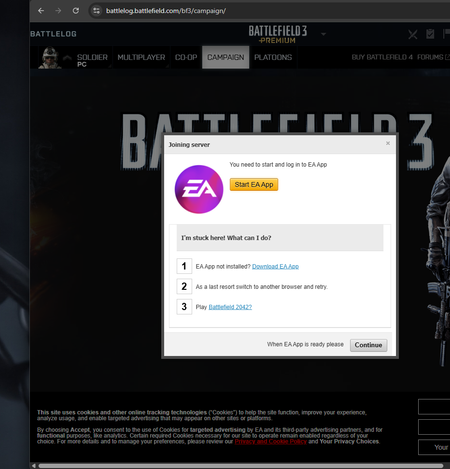
Hello everyone. I recently contacted EA support. And I wanted to pass along word. If you are wanting to play bf3 and notice you only can select Russian language that EA support can resolve it. When I look on EA App and selected bf3 it showed that it was Battlefield 3 extended edition. That one is in fact for Russians only. The one you want that lets you select English and other languages is Battlefield 3 Limited Edition. Make note to tell EA support/chat that you want the Battlefield 3 Limited Edition.
“Gameplay Enhancements,
I have received a 3-day ban in Battlefield 6 for the second time. The reason given is “Gameplay Enhancements,” but I have never used any cheats, hacks, or software that provides an advantage. I have not done anything that would give me an unfair benefit. The first time, I read that XP farming lobbies could cause issues, but I didn’t do anything like that either. This time, I received another 3-day ban, and then I noticed that the 3-day ban was automatically increased to 6 days. Isn’t that ridiculous? You get banned for no reason, and then EA basically says, “Wait, let’s add another 3-day ban” :D I contacted support and talked to live support. They told me that the TOS team would provide information within 10 days. Waiting 10 days for a 3-day ban is honestly absurd. It has already been 1.5 days since I contacted support, and I still haven’t received any response. Thank you, EA. Everything is perfect as always.Solved188Views0likes8Comments
BF3 Crashing on launch and stuttering
Hello, I wanted to play BF3 on my computer and every time i try to launch it it crashes, when it DOES get into the game, it always stutters, I have an Intel iris xe as the GPU,Intel i7-1360P as the CPU,16GB of LPDDR5 ram (single channel) and the current GPU driver im using is Dell's 31.0.101.4255, It always shows a Blank/White screen before closing, i launch it from battlelog and not steam, Can someone help me fix this problem?
Battlefield 3 (Game license is invalid) 2026
Hi All, I am having issues with BF3, the game was purchased on 2024 and I played a little bit, after 2 years I downloaded to play the game but having issues, when I try to open the game I get the following error: "Game license is invalid The app couldn't read the game's license file, so we suggest relaunching the game in online mode. If the problem continues, try clearing your cache." I have cleared the cache multiple times which didn't help to fix the issue, after contacting EA tech support they suggested to clear cache one more time, where it helped to fix the issue, but when I open the server or even campaign from the battlelog I was getting kicked out from the game with the following the error message "Failed to launch game An error on our end caused the launch to fail. Try again a little later." Continuing troubleshooting with EA tech support they suggested to follow these steps below: "Thank you for waiting , Here's a suggested troubleshooting process to follow: Clear your temporary files: - Press the Windows key and "R" simultaneously. - In the new window, type or copy & paste: "%temp%" (without the quotes) and press "ENTER". - Your Windows Explorer will open the "C:\Users>your user name<\AppData\Local\Temp" folder. Delete all files and folders within it. - If some files or folders cannot be deleted, reboot your system and try again. Download "Revo Uninstaller" from this location (choose the freeware version or the Portable version). Run "Revo Uninstaller" and uninstall Battlefield 3. - At the end of the main uninstallation process, Revo will prompt you to select a cleaning method. Choose "Moderate" and click "Browse". - If you see the message "Remaining registration content found," select all and click "Delete," then click "Next". - When the "Remaining Data and Folders" message appears, select all and click "Delete".Run "Revo Uninstaller" again and uninstall EA Desktop. - At the end of the main uninstallation process, choose "Moderate" as the cleaning method and click "Browse". - If you see the message "Remaining registration content found," select all and click "Delete," then click "Next". - When the "Remaining Data and Folders" message appears, select all (except for the "Origin Games" folder) and click "Delete". Restart your PC and reinstall the newest version of the EA app from this location. Reinstall Battlefield 3 and perform a test to check if the issue has been resolved Please follow these steps and see if it helps, however if you still face any issue please contact us again and take this case 249090619 as reference we will assist you further with this." After following these steps, I got back to the previous problem with "Game license is invalid....." And now they are going to transfer it to the game team with the following statement: Thank you we have now recorded all the details for this and will be sharing this with our team so that they can check this and help you for the same, As the in-game team does not have the option to contact the players directly for issue that was reported has been logged for investigation. If this is identified as a known issue, updates may be shared in-game and through our official social channels." So I am stuck here and I want to play BF3 honestly, Please advise..
False PunkBuster GUID Global Ban after 3 years of absence (BF3 & BF4)
Hello EA Community and Support Team, I am writing this post because I am completely at a loss and need some advice or help from the Community Managers. I haven't played the game in about 3 years. Recently, I wanted to jump back in for a round of Battlefield, only to find out that I have received a global GUID ban from PunkBuster that affects both Battlefield 3 and Battlefield 4 on my account. I have been playing shooter games for as long as they exist and I have never used a cheat in my life. In fact, I have a long history in the community and used to be an admin on some of the most well-known servers across multiple games, including official admin duties for Battlefield 3 and Battlefield 4. My stats are completely transparent. I have played over 7,800 hours in BF3 and more than 1,000 hours in BF4 without a single issue. My BF4DB profile is 100% clean with a 0% cheat score. Account Details: In-Game Name: Pr-Guard GUID: 5b8eff45 BF4DB Profile: https://bf4db.com/player/522373658 Since I am completely clueless about what caused this, I can only guess that it might be a false positive related to the official software/driver for my Patriot "Viper Gaming Mouse" which I installed after freshly reinstalling my Windows 10 OS. However, this is pure speculation on my part as I am completely at a loss. I have already tried to submit a ticket to Even Balance, but they are completely unresponsive. Is there any way an EA Community Manager can forward this case or pass my clean history to Even Balance? Any help or advice would be greatly appreciated. Best regards, Pr-Guard168Views0likes3Comments
[HAZE] MANTEL CORPORATION is recruiting!
MANTEL is a HAZE (2008) themed platoon for BF3, BF4, and BFH. We're on PC, PS4, and PS3 (will be explained shortly). The PS3 version of BF3 was brought back online by some very passionate fans, and requires changing your PS3 DNS settings. If you have questions, please talk to me @ Liquid_Jimbo on Discord. We're not a sweaty platoon (at least I'm not, I don't believe sweating games like a job is fun and worth my time, certainly not sweating games older than 10 years), we play for fun and tbag everyone just because we can. We're real meat eaters, button pushers, MGE sigmas, etc. Of course, spawn-camping is fake and cringe at MANTEL. All the teamwork strategies, meme strategies, and meme load-outs can be found at MANTEL CORPORATION. Playing the objective is what MANTEL does best, even if some recon mains across the map click on our foreheads every-time we deploy. I've started hosting small scale, very scuffed tournaments monthly. You can find us through the following links: BF4/BFH Battlelog: https://battlelog.battlefield.com/bf4/platoons/view/1734585623908644876/ BF3 Battlelog: https://battlelog.battlefield.com/bf3/platoon/3823539016607223822/ Platoon Discord: https://discord.gg/hg5zpB6Ne9