
1 year ago
Battlefield 2042 Crash Drx Error
Since the new update the game crashes at random times no specific map or action. After every crash i validate the file via steam and there are 3 files missing after each crash. Sometimes the game Cra...
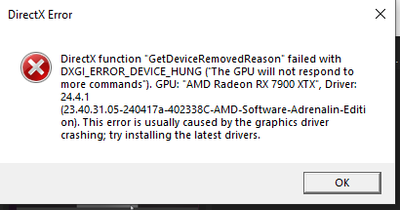

No need to be sorry. Most people wouldn't think of that.
While I'm not sure what you have installed on drive G and drive H, you generally need to have at least 10% free space on all drives. It can cause all kinds of weird behavior, including crashes. So, you may want to free up some space on those drives.
If you look in the Diagnostics section of the DXDIAG report, you will see multiple applications having issues. Getting those addressed may lead to your resolution.

@DarthFDGG and H are just my nvme game drives and that's probably not the problem but i try to put the game on a ssd an clean the drives a bit :d i let u know if it worked
all the Errors are just from my vpn and some windows temp stuff thats not important :7
Yesterday i created a "Support Ticket" i hope they can fixe the game since the new update 7.2 the game crashes faster :D so im now 100% shure Dice needs to fix the game.
@BlackVipaDE wrote:
i hope they can fixe the game since the new update 7.2 the game crashes faster
You created your post before 7.2 was released. Perhaps, you meant to say you are hoping the 7.2 release addresses your issue.
@DarthFDG 7.2 made the Problem worse

@BlackVipaDEHey man , can ya tell me what trouble shoot ya all did , in detail please !
Maybe there is a fix to solve youre issue !
Cheers
ps did ya boost system with adrenalin ? lower the boost clocks and trey again !


