EA_Leeuw Community Manager
Community ManagerCommunity Manager
@CJ-MaXTeR wrote:
Deactivating "ReBAR" in BIOS could help with this problem... (it helped me)
you should also check if your cpu is stable, i also have the 13900k and its a *... try for example downloading prime95 and run it with the max heat option... it should NOT crash!
Hope this helps
Just wanted to quote this. Resizable BAR, or ReBar for short, can indeed sometimes cause issues.
Gigabyte has shared a good article about what ReBar is: https://www.gigabyte.com/WebPage/785/NVIDIA_resizable_bar.html.
I tried this and now the battlefield wont even boot up where it at least got to the lobby before. Now it just crashes on load

Use HWINFO64, enable SENSORS ONLY , and check for temps and Mhz thats being displayed for all youre core/threads please ! (during Bf2042 in game)
Update us !
PS some system info would be nice, Thanks
Hello!
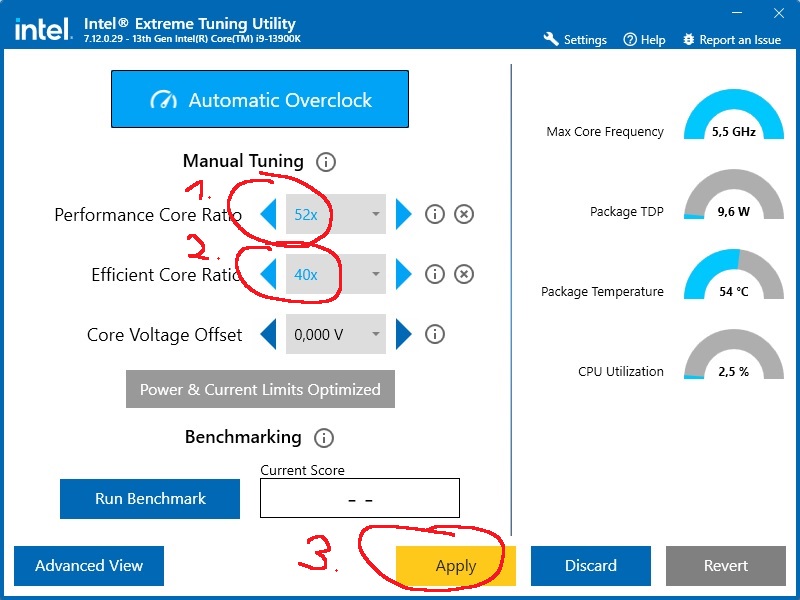
I've been struggling with that issue and I've tried a lot of recommendations but this is what solved it on my computer (CPU 13900k, MB MSI PRO Z790-A WIFI, Video card MSI GeForce RTX 4080 Suprim X and RAM G.Skill Trident Z5 RGB DIMM Kit 64GB, DDR5-6000):
Underclock the CPU slightly.
I used Intel Extreme Tuning Utility for the ease of use. You'll find a brief explanation in those two pictures that I attached.
I hope it works for you. I recommend to work your way up by adding more clock once you've found a working clock speed for Battlefield 2042.
This has been the one thing that has worked for my issue that started last week. i9-14900k, 32gb ram, 3080 FTW, I would get blue screens or directx out of memory errors. Reloaded everything, using Intel Extreme Tuning Utility was the only thing that made things work, I knocked the performance core ratio down to 56x vs 57x and everything has been great.

I have the exact same issue with similar specs.
14900KF 3.2
4090
I have also:
Updated BIOS
All drivers
All Windows 11 updates
No overclocks
Still am having this bug. I think its a Battlefield 2042 issue, not a hardware issue. BF2042 use to work great.