Forum Discussion

Re: Losing all keyboard and mouse input

Replying to the first EA Post here ... 

It is annoying as * that the problem still exists ... 7 Months later ... 

I do not understand how it can happen that an issue which is caused by bad programming and affects people with USB DACs / Audiointerfaces / Headsets or is caused from a faulty implementation of the Origin Overlay ( or a combination of both ) is still not further investigated / solved.

If the solutions for an issue that is only happening with THIS game ( and no other ) is to unplug / replug the keyboard or to disconnect the USB Audio Device OR to remove files from the Origin / game installation, the GameDevs should do something about this. 

This is one of the longest topics for an issue regarding BF2042 ... come on ... at least give some response that you are working on it ... or that this will be fixxed ... 

Last Post from an EA Employee was in DECEMBER! 

12 Replies

  • Just thought I'd update folks here on my situation.

    Sad to say that removing the XBox apps hasn't worked for me.  Must be something else on my system because I removed the one Xbox game I installed, and I removed all xbox apps using the instructions at this link:  https://www.thewindowsclub.com/how-to-uninstall-xbox-game-bar-on-windows-pc and I still get the issue.  Not too surprising since I had no Event ID 157 messages in my System log anyway.  After removing all the Xbox stuff, it does seem to freeze inputs a little less often though.

    So frustrating.  I'm glad for you guys who figured it out on your systems.  Have fun with the game and I'll keep hoping.

  • waffllly's avatar
    waffllly
    3 years ago
    @SkykingUS-Eh Something you could try is to have the Windows Event Viewer running and when you encounter the input issue in game, take a look at what error comes up on your system, then go from there. Sorry to hear you're still getting the issue :c
  • SlipperyLiz4rd's avatar
    SlipperyLiz4rd
    Seasoned Hotshot
    3 years ago

    @SkykingUS-Eh

    Do you have a USB headset or headphones attached to the system? I have followed this thread for a while and participated a few times and this seems to be a common theme. I have the issue myself and the only thing that fixes it for me is removing my USB headset. I don't think all USB headsets have issues, but some certainly seem to.

  • SkykingUS-Eh's avatar
    SkykingUS-Eh
    3 years ago
    @SlipperyLiz4rd I have a USB soundcard that I plug my wired headset into and use for all my system audio (the Soundblaster GC7). I guess if I don't see any specific events in the log, I could try that but it would really suck if I have to switch to motherboard audio for just this game every time. Honestly, I'm not sure I would play at all if I had to do that every time. Worth a try though - thanks for the reminder.
  • Anliuk's avatar
    Anliuk
    3 years ago

    Hi everyone !

    I've had this frustrating issue for a few weeks.
    After reinstalling the game, uninstalling the xbox app, doing chkdsk, the issue was still present.

    I finally managed to fix this bug:

    • In the device manager start with show hidden devices in the tab view from the top menu
    • Then expand storage controller
    • You will see "Xvdd SCSI Miniport", disable this device.
    • Restart the computer.

    I hope this will work for you too, see you soon on the battlefield !

  • @Anliuk Thanks for the suggestion. I have not played in a few days but I'll try your fix as well and report back.
  • SkykingUS-Eh's avatar
    SkykingUS-Eh
    3 years ago

    Finally played a few hours over the past two days.  Sadly, none of the fixes worked for me.  I disabled the Xvdd SCSI Miniport.  I even removed my USB soundcard and played the game off my motherboard audio.  Also still have all the Xbox software removed.  No luck for me.

    I did keep event viewer up on my 2nd monitor while playing and there are no new events in the system or application logs when it happens.  Basically, the event log just records the loading of the easyanticheat service when I start the game, and its removal when I end the game, but there are no messages in between.  I think I give up on this for now.

    Fortunately for me, the pausing/freezing only happens about 2 or 3 times per 2 hour session now so it's not at bad as it once was.  When I get too tired of it, I'll just go back and play Rainbow Six Siege and keep my fingers crossed that some future patch will fix this horrible bug.  Very disappointing.  Glad for everyone else though who has it figured out for their systems.

  • SimRok's avatar
    SimRok
    3 years ago
    Spoiler

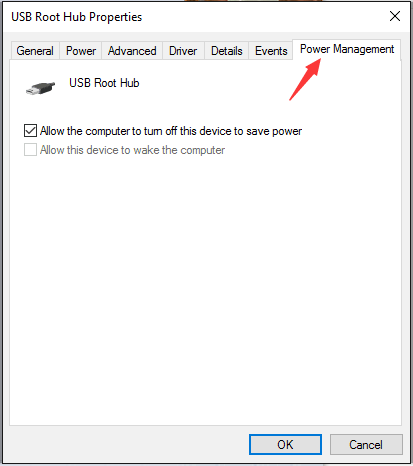
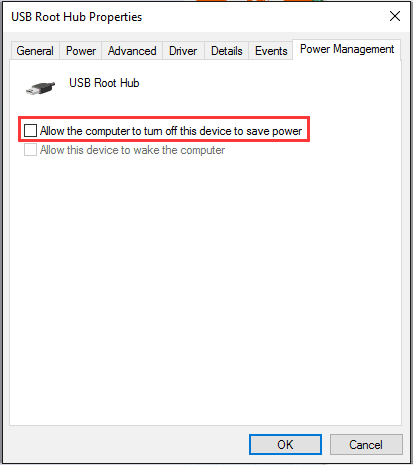
    Check your power management settings

    In order to save power, by default, Windows switches your USB controllers off when they’re not in use, and switches them back on again when they’re needed. Unfortunately, sometimes this approach doesn’t work as intended, and Windows fails to switch your USB controllers on again.

    To rule this out as the cause of your USB woes, just stop Windows from ‘managing’ power to your USB controllers and devices:

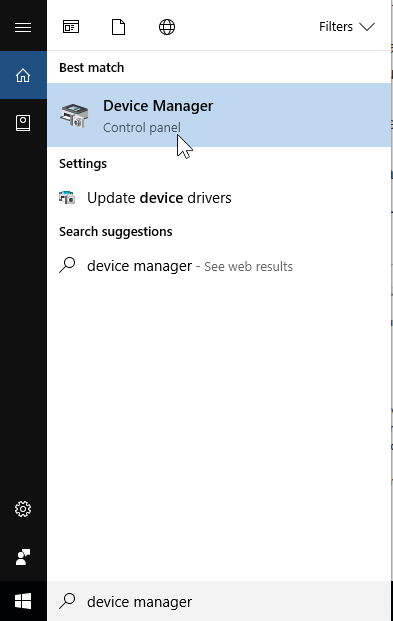
    1) Open Device Manager (type “Device Manager” in the Windows search field)

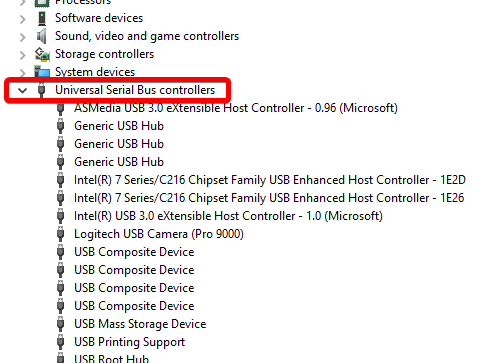
    2) Expand the Universal Serial Bus controllers branch

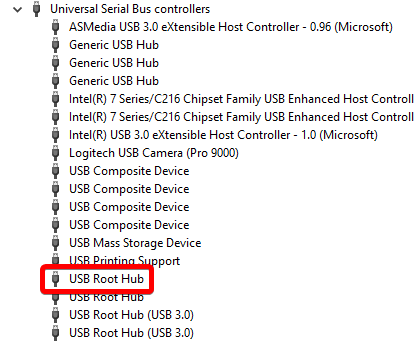
    3) Double-click the first USB Root Hub device in the list (if you see only one USB Root Hub device, that’s fine)


    4) Click the 
    Power Management tab

    5) Un-check the Allow the computer to turn off this device to save power checkbox, and click OK.

    6) Repeat steps 3-5 for each USB Root Hub device in your list of Universal Serial Bus controllers

  • DigitalHype's avatar
    DigitalHype
    Seasoned Ace
    3 years ago

    The problem was fixed when I disabled the in-game origin overlay under BF2042/game properties/ uncheck "Enable Origin in Game for Battlefield 2042"

    Keep in mind, disabling the overlay in Origin settings does not work. It's still enabled for the game, until you specifically uncheck it for that game properties.

    It turns out that in-game voice only works with origin overlay enabled. That got me wondering if the problem is related to the in-game voice chat. To test, I re-enabled the origin overlay, and then disabled voice chat in the game. Voila! The problem is gone.

    This might explain why the problem has started more recently. They only recently added in game voice feature.

  • Shotgun_Tim's avatar
    Shotgun_Tim
    3 years ago

    nope didn't work at all. You seemed so confident though. It did last only like a min though. lol

Featured Places