Forum Discussion

38 Replies
 witchpon25304 years agoNot applicable
Hi
I'm having same problem, no fun anymore, how did you get to talk with the agent, I want to do the same for the refund this is wasted of time trying BF2042.
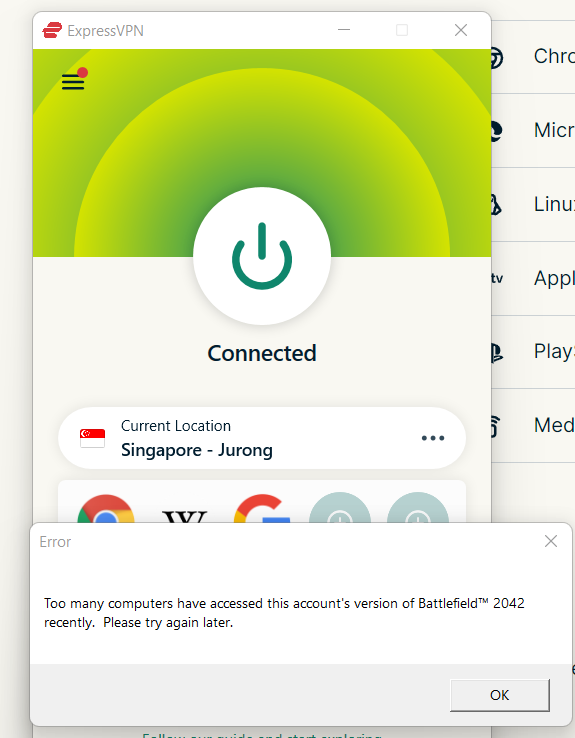
I tried numerous way to fix cannot connect to origin server, and now I found a solution to use the VPN but then this "Too many computers have accessed this account's version of Battlefield 2042" happens, it is unfair. h0lck4 years agoNot applicable@EA_Atic i was trying to play on Origin got this error and also bought a EA PLAY pass with different account a got same error...
 solarizde4 years agoNot applicable
@witchpon2530you can open a chat request at help.ea.com but they script you through to alot of things like disable UAC, rebooting PC, reinstalling Origin and so on.
After more than 32h have passed since the first Try it is still not working for me so I went through all this support thingy again, without much help at the end it still doesnt work.
Ashu (13.11.2021, 16:01:53): How may I help you today?
marco (13.11.2021, 16:02:21): I still can't play BF 2042. Still Origin is telling me there are too many tries to play the game from my account. Waited 24h and still the message.
marco (13.11.2021, 16:03:23): Already talked to support yesterday, they told me to wait and try again later. But I already waited >24h after first time getting this message but still unchanged. How long should I wait until the pre order early access is over?
Ashu (13.11.2021, 16:04:18): Alright! So you are unable yo play BF2042 and you have already waited to for 24 hours.
marco (13.11.2021, 16:04:24): yes
Ashu (13.11.2021, 16:04:31): Please do not worry, I will surely try my best to help you with it.
Ashu (13.11.2021, 16:04:35): To begin with, may I know the email linked to your EA Account?
marco (13.11.2021, 16:04:44): XXXXXXX
Ashu (13.11.2021, 16:06:14): Please confirm the platform you are using to play the game.
marco (13.11.2021, 16:06:58): currently PC, Steam; but also tried PC Origin directly, same outcome.
marco (13.11.2021, 16:09:48): To add to this; I first bought the preorder weeks ago on Origin, after I cant play yesterday I went through it with support and refunded. I tried again today and bought on Steam in hope it will work but the block seems to be account wide no matter if origin or steam.
Ashu (13.11.2021, 16:10:58): Alright!
Ashu (13.11.2021, 16:12:50): Please confirm your Steam username.
marco (13.11.2021, 16:13:10): XXXXXX
Ashu (13.11.2021, 16:14:22): Thank you!
Ashu (13.11.2021, 16:15:39): Are you using cloud gaming services?
marco (13.11.2021, 16:16:02): no
Ashu (13.11.2021, 16:16:41): Okay!
Ashu (13.11.2021, 16:17:43): Have you tried any troubleshooting so far?
marco (13.11.2021, 16:17:57): What exactly?
marco (13.11.2021, 16:18:29): I reinstalled the game, moved from origin to steam, after not working on my desktop tried on my laptop but all the same outcome.
Ashu (13.11.2021, 16:19:10): Okay!
Ashu (13.11.2021, 16:19:49): Please try to clean Origin cache using below shared link:https://help.ea.com/in/help/faq/clear-cache-to-fix-problems-with-your-games/
marco (13.11.2021, 16:22:00): I will, but don't think this is the solution because the message is server side and I already reinstalled before and removed everything inc. installing on an other computer. But I will give it a try now.
Ashu (13.11.2021, 16:22:52): As I have checked there are some suspicious activity on your EA Account and we have to secure it.
marco (13.11.2021, 16:23:47): ok, went through the guide but didnt worked. Still getting the same message.
Ashu (13.11.2021, 16:24:17): Let us first secure your account.
Ashu (13.11.2021, 16:24:41): It seems someone tries to gain access to your EA Account.
marco (13.11.2021, 16:25:02): ok but it's fine I also activated 2 factor auth and changed the primary email yesterday with your colleague.
marco (13.11.2021, 16:25:29): The only one accessing the account here is me from a different IP because Im currently in XXXXX.
Ashu (13.11.2021, 16:26:41): Alright!
Ashu (13.11.2021, 16:27:28): Is UAC enabled on your system?
marco (13.11.2021, 16:28:33): yes set to "notify me only when applications try to makge changes to my computer (default)"
Ashu (13.11.2021, 16:29:50): Alright!
Ashu (13.11.2021, 16:30:29): Please use below shared link and disable the UAC:
https://www.lifewire.com/disable-uac-in-windows-10-5113191
Ashu (13.11.2021, 16:31:02): Then please clean boot your system using below shared link:https://help.ea.com/in/help/faq/how-to-clean-boot-your-pc/
marco (13.11.2021, 16:32:29): ok this will take a minute
Ashu (13.11.2021, 16:33:34): After it please restart your PC to save the changes. It should be fixed after it. Please try to play the game after some hours of restarting the PC.
Ashu (13.11.2021, 16:34:01): If still you face any issue you can immediately contact us back and we will help you accordingly.
Ashu (13.11.2021, 16:34:04): Please let me know if there is anything else I can assist you with.
marco (13.11.2021, 16:34:31): maybe wait and we see if it works. I have this chat open on the laptop so no need to reopen a new ticked
marco (13.11.2021, 16:35:10): so, pc did a clean boot and let me try again. But as said, I think it is 100% server side locked account not my PC in issue
Ashu (13.11.2021, 16:36:16): As I said you have to try after some ours of it to launch the game because the hacker tried it multiple times.
marco (13.11.2021, 16:37:25): I already waited 24hrs
marco (13.11.2021, 16:37:44): there is NO hacker this is me trying to play the game from XXXXX and your system thought it is a hacker but it is not
marco (13.11.2021, 16:37:59): Tried again and of course even after clean boot I receive the same error
marco (13.11.2021, 16:38:08): This is so frustrating
Ashu (13.11.2021, 16:38:21): No, as I said there were suspicious activity on your account.
Ashu (13.11.2021, 16:38:48): Let me check it with my team if they can help you from there end.
marco (13.11.2021, 16:39:01): What suspicious activity? There was NO hacker it was me first trying from my laptop and now from my Gaming Desktop.
marco (13.11.2021, 16:40:16): Yesterdays chat help told me "wait over night and try tomorrow morning it is fine, we unlocked you and tomorrow you can play" but NO I CANNOT.
marco (13.11.2021, 16:41:33): This anti hacking system is just faulty to sensitive. If you look at the commuity help forums dozend of people have the same problem. Even waiting 72hrs will not fix it because they got locked again and again.
marco (13.11.2021, 16:42:08): So frustrating, you pay $80 for accessing a game on early access and guess what, you cant play.
marco (13.11.2021, 16:43:51): So again, I setup 2FA on my Account, have it locked to my email and Authenticator App even there is any suspicous person trying to log into my account it is not right to punish me, your paying customer, for this. There is no high chance anybody could breach into my account. It is just the system going wrong on me and blocking me a legimate customer instead of that "hacker" is at best questionable.
Ashu (13.11.2021, 16:45:52): The team is looking into your problem, please bare with us.
marco (13.11.2021, 16:48:59): ok, thanks. I wait. Please let them disable that "Account Protection" I'm often traveling in EU, lving in Germany working in Sweden so if it is IP based it will happen again.
marco (13.11.2021, 16:49:24): I have a secure password and authenticator 2fa so not much risk here.
Ashu (13.11.2021, 16:53:31): Please restart the platform you are using to play and then try to launch the game as we have updated some setting from our end.
marco (13.11.2021, 16:53:43): thank you, give me a minute
Ashu (13.11.2021, 16:53:49): Sure!
Ashu (13.11.2021, 16:57:19): Are you able to launch the game now?
marco (13.11.2021, 16:57:54): unfortunately same error again
marco (13.11.2021, 16:58:30): "Too many computers have accessed this accounts version of BF 2042 recently"
Ashu (13.11.2021, 16:59:04): Okay! I will share this case to the specialized team and they will look into the issue.
Ashu (13.11.2021, 16:59:19): Please try to launch the game after 4 to 5 hours.
Ashu (13.11.2021, 16:59:26): Please let me know if there is anything else I can assist you with.
marco (13.11.2021, 16:59:41): ok waiting again. Thanks
Ashu (13.11.2021, 16:59:57): I hope it will be fixed soon.
marco (13.11.2021, 17:00:09): Please ask them to turn of this stupid account hacking protection on my account. It is really cost me so much time, not worth it at all.
Ashu (13.11.2021, 17:00:43): I will mention it but I am not sure if they can do t because it is related to account security. '
marco (13.11.2021, 17:00:44): Next week I will be back in XXXXXX on my Home Desktop and dont want to go through that again 🙂 AxelStellar4 years agoNot applicable
@EA_AticI have tried with both Origin and EA Desktop several times. The behavior is the same.
 DrHonHon4 years agoNewcomer
Marking this as I have the same problem. Might let the game cool off for a week or 2
- solarizde4 years agoNot applicable
Finally I can play.
Seems like the conversation I posted here before helped to escalate it, or it just took more time.
 Cleverstorm4 years agoNot applicable
@solarizdeHow long does it take since your last launch?
 OJUNDIO4 years agoNot applicable@EA_Atic On Origin same issue can't access the game "too many people bla bla bla" I pre ordered this game months ago to be left out and can't play
- OJUNDIO4 years agoNot applicable@solarizde I knew contacting support would be useless they're not working on it if they where we would've been able to play after the supposed changes they made
 Cencho4 years agoNot applicable
As many others, I also have this issue.
I ordered a hardcopy of BF2042 which I received today. My internet at home is crap to say the least so I decided to download it at work.
Got the download all sorted out, copied to a USB and when I got home I copied the game to my home PC and imported the game via Origin.
After trying to launch it I got the popup error: "Too many PC's tried to access this game. Try again later.".
This is seriously annoying for many many reasons.
- Primary one being that the game is tied to MY EA account not the PC I'm downloading/playing the game on.
- Second reason which doesn't apply to me but does to quite a few others I'd assume is that some people have both a gaming PC and a gaming laptop. They might want to play it on the go somewhere or at home.
This system is completely useless and arbitrary for no reason whatsoever. Other clients don't have these kinds of systems in place - namely Steam, GOG and Uplay.
If by the end of the day you at EA want to keep this system then I'd suggest you implement it in a way that doesn't check the PC but the user logged into Origin on that PC - the hash or however you do it.
Second option is how GOG does it - offline installers. Have a separate download option for an installer which we can download anywhere and then install on the PC we want.
The second option would be my preffered way if you're insisting on keeping this system because in case of file corruption I can just reuse the it to quickly reinstall the game.
The best overall option would be to remove the system and implement the offline installer as well in my opinion.
The offline installers can be encrypted and only usable when you're logged into Origin or the new EA app.
This issue made me quite mad as I was looking forward to playing some BF2042 and unwind during the weekend. But now it seems I'll only be able to play the game after the 24 hours or however much it takes for the PC checking to reset.
EA, this is really bad user/customer experience - I myself am willing to wait it out but many others are not (it's also bad for your overall business...).
Hope this reaches someone who listens to feedback and can ACTUALLY do something about it (support apparently cannot).
EDIT:
I bought a hardcopy because I collect boxes for those wondering.
I also don't have a DVD drive anymore so I couldn't install it with that anyway.
Featured Places