Forum Discussion

Re: EA app doesn't install in choosen directory

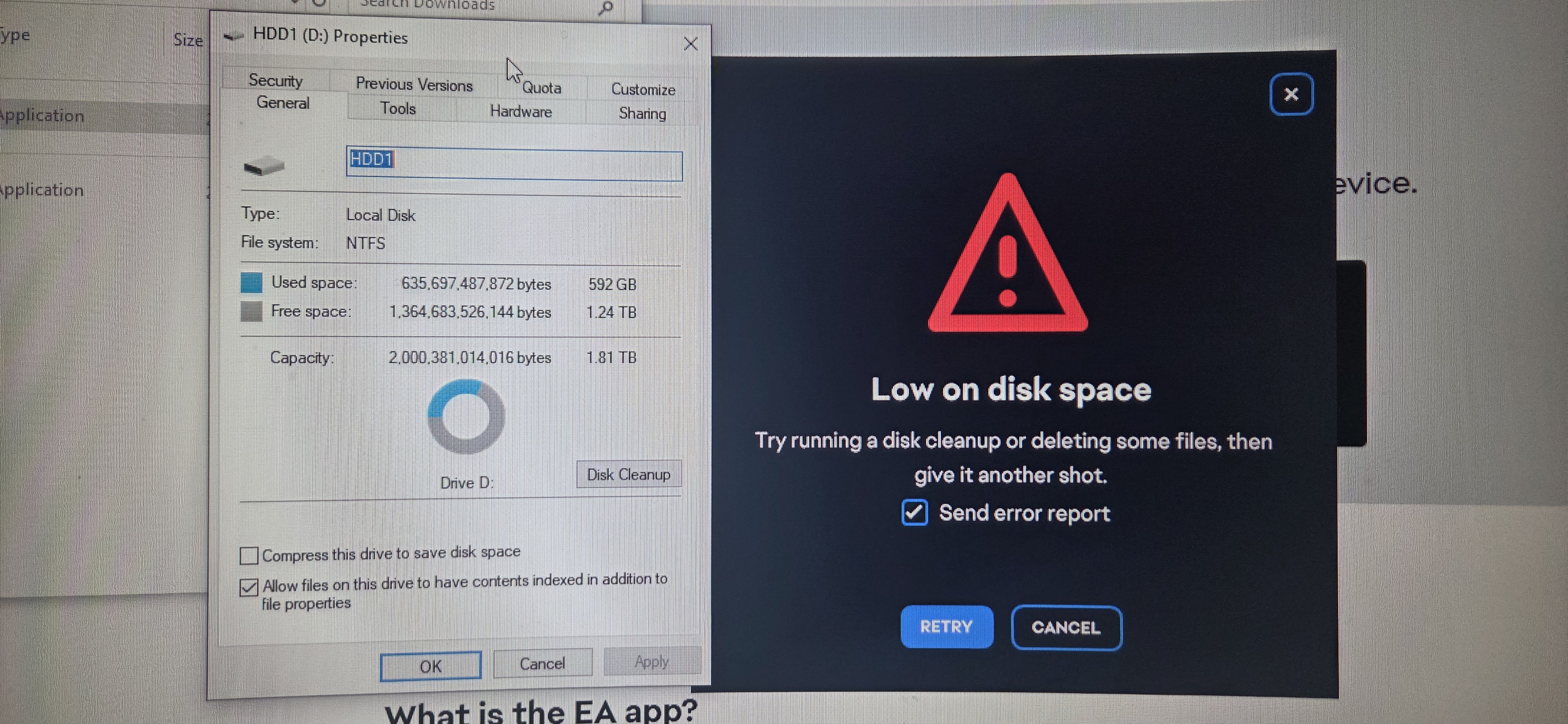
Im trying to download this **bleep** app to my D drive so I can download the game to my D drive with 1.8tb of free space. Im in a chat right now with a dedicated member of your team trying to walk me thru how to download the files to my D drive using the powershell window. I typed in the .\EAappInstaller.exe /i DefaultInstallFolder="D:\Games\EA App" command but its saying it is not a recognized as the name of a cmdlet, function, script file, or operable program.


Please help me get this wack app and game downloaded on my D drive so I can play it with my family.


CM edit: Changed title to better reflect the issue.

9 Replies

  • Boosted_JDM_EK's avatar
    Boosted_JDM_EK
    New Novice
    21 days ago

    The dedicated team member from customer support said they cant help me so hopefully someone here can. My C drive is hella small and only used for my system files and is almost full. Every other game I own can download to my D drive just fine but the EA app wont even though it asked me what drive I want it downloaded to in which I go thru the process of picking my D drive with the ea app installer it still forces itself to try and download to my C drive.  Literally the Battlefield 6 game itself is currently downloaded to my D drive but wont run because I cant download this wack ea app. 

  • Boosted_JDM_EK's avatar
    Boosted_JDM_EK
    New Novice
    11 days ago

    Bueller?

    Bueller? 

    Anyone from EA?

    Or are yall shut down like our " government "?

  • EA_Rtas's avatar
    EA_Rtas
    Icon for Community Manager rankCommunity Manager
    9 days ago

    Hey there! Appreciate the frustration and I'll see if I can get you sorted here.

    You should be able to simply change the install location for downloaded games in the EA app by going to settings:

    Then clicking "Download" to bring up the Download settings:

    Once in the download settings page you should be able to edit your install location and choose a folder within the drive you want to install your games on to:

    Can you please give this a try and let me know if you are still unable to change your install location.

  • Boosted_JDM_EK's avatar
    Boosted_JDM_EK
    New Novice
    6 days ago

    Thays not what i need help with........ I have the game itself downloaded to my D drive. But the app wont download to my D drive. Even after I select the D drive before the install. And now that I dont have enough room on my C drive to download the lame app I cant even play the game… the app couldnt update because of low space on my C drive so I deleted it and tried to re-download it to my d drive and it refuses to. And since then ive had to update system files and there isnt enough room to download the app at all now on my c drive.   When I download the file and try to install it on my D drive when it asks where I want to download it wont and it still forces itself to try and download to the C drive.  

  • EA_Rtas's avatar
    EA_Rtas
    Icon for Community Manager rankCommunity Manager
    5 days ago

    Ah, I understand what you're trying to do now, appreciate you clarifying it Boosted_JDM_EK​ 

    So unfortunately the EA app can only be installed on the C drive, it can't be installed on other drives, only the games can have their installation directory changed to a different drive.

    Considering this is specifcally about the EA app, I'm going to go ahead and change the title to reflect your issue and move this to the EA app boards. 

  • Yairsabag's avatar
    Yairsabag
    Rising Novice
    3 days ago

    EA_Rtas​ 

    Hi, I am very disappointed with the situation. After the recent update, my Battlefield 6 license is still not recognized. Multiplayer and Portal are not working, and I keep getting errors in the EA App. I have already contacted support multiple times and completed all troubleshooting steps, but the issue is still not resolved. This is not fair to paying customers. Please have a supervisor or technical team review this urgently.

  • Boosted_JDM_EK's avatar
    Boosted_JDM_EK
    New Novice
    1 day ago

    That is absolute trash.. Where does your company get off on forcing me to download an app to only one driver? At no point when buying this game was I informed I HAVE to download the app or game to a specific driver. It literally asked me what driver i want to download the app too. Other wise i would not have bought the game thru Ea.. When I buy something I should be able to install it where ever I want in my pc. NEVER again will I buy a EA game. Not that you or your company will care now that yall have my 200$ from the game and skins ive bought because I got to play the game for only 3months time.

  • Yairsabag's avatar
    Yairsabag
    Rising Novice
    1 day ago

    EA_Rtas​ 

    I’m very disappointed with the service and support experience. I’ve been trying to resolve an issue where Battlefield Multiplayer and Portal are not working, but I still don’t have a proper solution. The response has been slow and not effective so far. As a paying customer, I expected better support and faster resolution. I hope this issue will be seriously reviewed and resolved soon.

Featured Places

Node avatar for EA app Technical Issues & Bugs

EA app Technical Issues & Bugs

Having issues with the EA app? Join us to report bugs, and find help with downloads, DLCs, purchases, and login errors.Latest Activity: 35 minutes ago
8,807 Posts