CPU Utilization at 100 percent no matter what
 5 months ago
bbd44d408533bada I see 3 issues with your HWiNFO system summary screenshot.
First issue is SMT is disabled on the CPU which is reducing CPU performance by around 25%.
Core is showing 6/6 in HWiNFO and it should be showing Core 6/12. We need to figure out why SMT is disabled in motherboard BIOS settings. There's a BIOS setting called 'SMT Control'. Set it to 'Auto' and then check HWiNFO Core and see if it says Core 6/12 instead of Core 6/6.
Is I Ryzen Master software or Asus software installed on the computer? Maybe they're disabling SMT.
SMT Control is on page 57 of motherboard BIOS user manual.
I've attached high resolution screenshot at bottom of this post.
https://dlcdnta.asus.com/pub/ASUS/mb/13MANUAL/E25269_AMD_800_Series_BIOS_manual_EM_WEB.pdf?model=TUF GAMING B850M-E WIFI&Signature=vAYlo4E-vhRzXyGQR22VU~swuMUDoQJLwHGyZlysTkH6SMHiekeMa42SBNQFQQaNad4Kl8AC5OC0TkppSIkzpzlQPOggE5iO84O5fHWMNxKFpDlJLRo2Ypu0KcxuJmMuo9MVP1xz0gnrihoM5-r~tEEGM-k9AOEZ3tQ9xYdpf~V4oUjYtJvpPUaL5Bu79hSEpGkG8VGsa1TZM4rytmeMCAZxduqIeBHJPi0-5I4Qb3RuxGuWSrDAoX9XgwSEfZMtZocVJdiypUHoM6OsRac8D9eiP3GTh3fz98Uhk42QuhV3ENBTQaDuGGlpOZ-3T9Qd0RxUHjLyqgfzWnWU7kx4ng__&Expires=1765068788&Key-Pair-Id=K2ITB7O97XKKCX
Second issue is the memory is in single channel mode, instead of dual channel mode. Dual channel has double the memory bandwidth and boosts CPU performance.
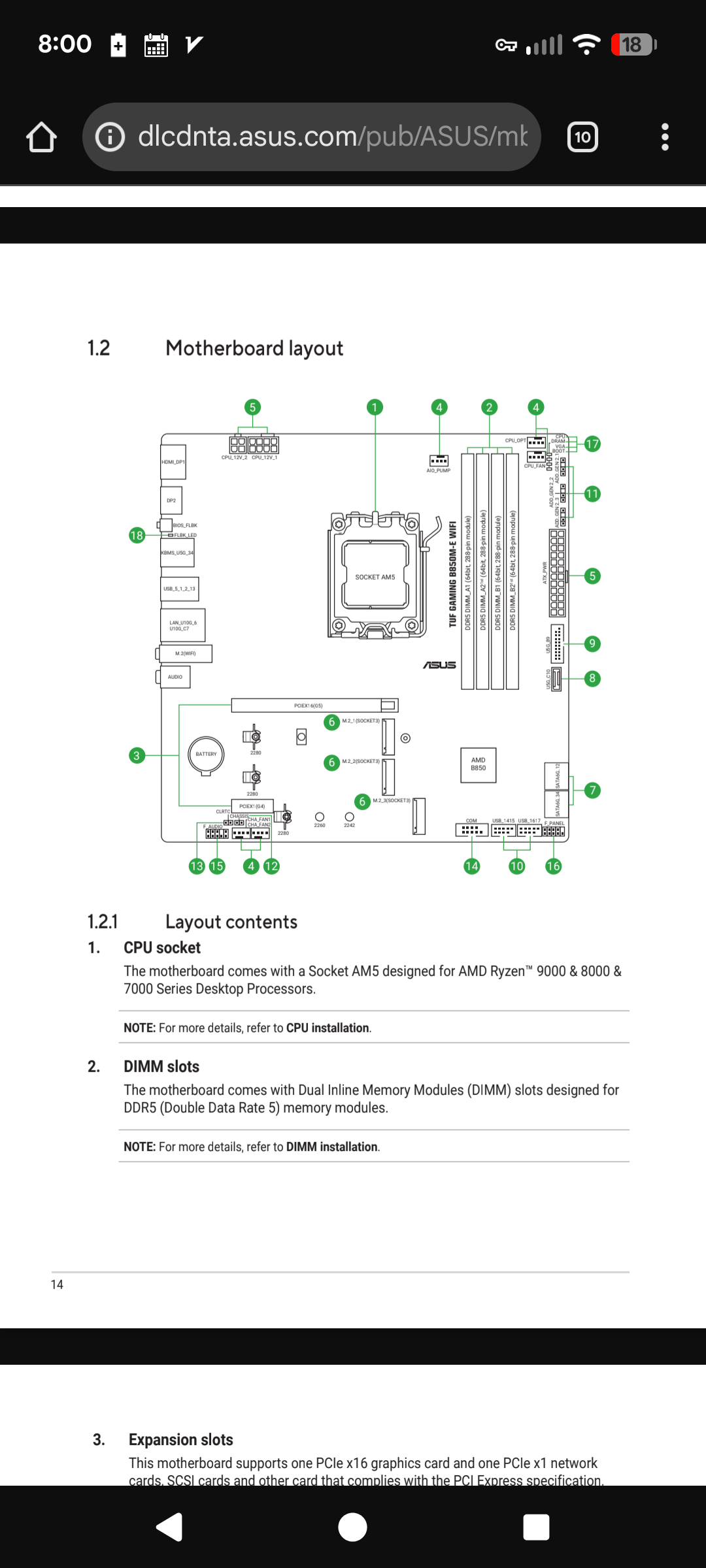
Page 14 and 25 of the motherboard user manual shows the proper motherboard memory slots to use. Install memory in slots A2 and B2.
https://dlcdnta.asus.com/pub/ASUS/mb/SocketAM5/TUF_GAMING_B850M-E_WIFI/E26935_TUF_GAMING_B850M-E_WIFI_EM_V2_WEB.pdf?model=TUF GAMING B850M-E WIFI&Signature=UhhrzC0NrE90ybcyDRwR9yGt2iyxIIbgLJk6o3XLfxqrachw7dzOEZZKHbQGHJhxLFOOcke9NVMBPmj3skKTbTqocrAUiNZeQQAA4Gtrneel8z5IaD8Bgl~22R~uxE8M1W19UccETBeo6e29~T0Z-nRTGleUmWdPgiL0z-VsHZ3tt2OvMFhpppXtgjcyOUNjGlRkbRPoznNMSnfsnAXkwe6-fF-EGvNEnye~IVrbW2w6BBfitusclCbFdhlNqbwK-i6kU-C5EfSLF6aSO0-znF238Br3Uz~GTC5ywHfsr065FwJUHW-tNa1k2XTs7pf8~d2CE~EozvlquXGJngcgKw__&Expires=1765069780&Key-Pair-Id=K2ITB7O97XKKCX
The third issue is EXPO memory overclocking isn't enabled in motherboard BIOS settings. Try enabling EXPO I memory overclocking.
Sometimes EXPO memory overclocking can cause crashes. If you start experiencing crashes then personal message me and we can troubleshoot memory overclocking crashes.
Page 17 of Asus motherboard BIOS user manual has AI Overclock Tuner EXPO I setting.
If I don't reply to your post then personal message me. Sometimes the forum fails to notify me when someone replies.



.png)
.png)
.png)