I have a Ryzen 9600x, and 9060 XT 16 gb. I have updated all my drivers for GPU, and motherboard. Before the REDSEC update I wasn't having this issue, CPU was sitting between 70-80 percent i believe with GPU sitting at 100 percent. CPU is now always at 100 percent utilization, and GPU is around 70 percent. I try to play at 1440p with custom graphics settings, most of the CPU intensive tasks i switch to low, most on medium. I have tried switching to 1080p, and no change. CPU is always doing 100 percent, and will stutter quite a bit, although I do have kind of high latency with my wifi sometimes. Is the CPU always being at 100 percent normal? Could the CPU being at 100 percent be causing my network issues with the rubberbanding?
I have tried user.cfg fix that people have talked about online, no change. For adrenaline settings I've tried "global experience" with FSR off, and "Quality" with FSR/anti lag on, no changes with any of these settings.
I don't know if you saw my other post, but there was a "turbo" x3d mode that was turned on. That was why it was showing only 6 threads. Fixed that issue, Installed RAM in correct slots. EXPO I was already set in BIOS. Here is some update screenshots. Seems to run pretty smooth, but still at 100 percent, and a little bit of lag, although I'm not sure if that's just my wifi latency. Thank you so much for all your help.
bbd44d408533bada I see 3 issues with your HWiNFO system summary screenshot.
First issue is SMT is disabled on the CPU which is reducing CPU performance by around 25%.
Core is showing 6/6 in HWiNFO and it should be showing Core 6/12. We need to figure out why SMT is disabled in motherboard BIOS settings. There's a BIOS setting called 'SMT Control'. Set it to 'Auto' and then check HWiNFO Core and see if it says Core 6/12 instead of Core 6/6.
Is I Ryzen Master software or Asus software installed on the computer? Maybe they're disabling SMT.
SMT Control is on page 57 of motherboard BIOS user manual.
I've attached high resolution screenshot at bottom of this post.
Second issue is the memory is in single channel mode, instead of dual channel mode. Dual channel has double the memory bandwidth and boosts CPU performance.
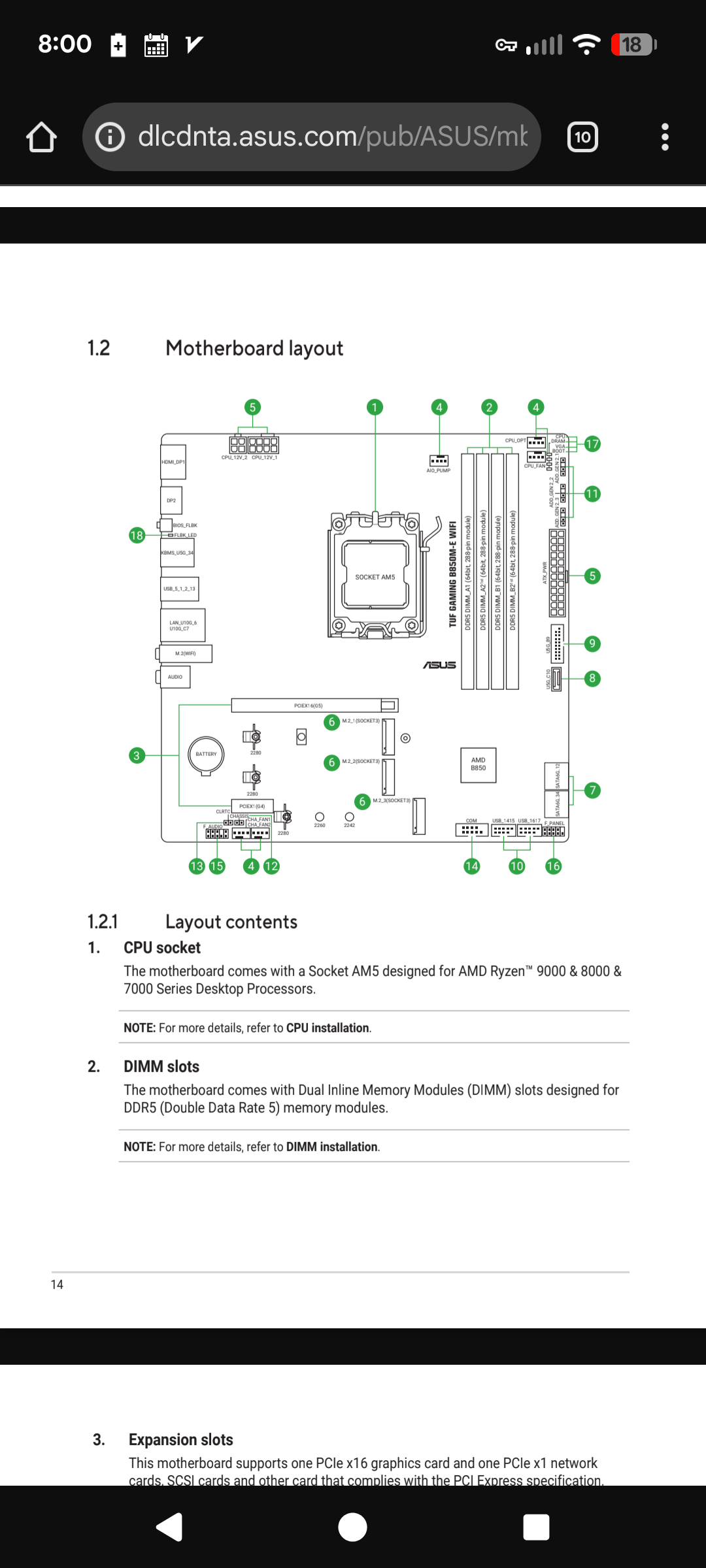
Page 14 and 25 of the motherboard user manual shows the proper motherboard memory slots to use. Install memory in slots A2 and B2.
The third issue is EXPO memory overclocking isn't enabled in motherboard BIOS settings. Try enabling EXPO I memory overclocking.
Sometimes EXPO memory overclocking can cause crashes. If you start experiencing crashes then personal message me and we can troubleshoot memory overclocking crashes.
Page 17 of Asus motherboard BIOS user manual has AI Overclock Tuner EXPO I setting.
If I don't reply to your post then personal message me. Sometimes the forum fails to notify me when someone replies.
I googled why my processor would only have 6 instead of 12 threads. Found a setting in BIOS called turbo that was turned on. It now shows 12, but performance seems about the same? Here are some screen shots.
or maybe it's better now? Honestly this is the first time I've gotten into PC gaming, and I upgraded my old PC just to play BF6. Might just call this good and run an ethernet cord. Or do you think my processor is still hitting 100 percent and causing lag? Thanks in advance for all your help!
bbd44d408533bada Simultaneous Multithreading (SMT) appears to be disabled on the CPU. The top green bar in your screenshot is only showing 6 cores and 6 threads.
Please download HWiNFO and post a screenshot of your System Summary so we can verify if SMT is disabled or not.
Thank you for the reply! I actually took this screenshot after i deleted the user.cfg. I double checked again, and it's not in the file. Here are the new screenshots for FSR and anti lag turned off. Thanks again for your help!
Having issues with Battlefield 6? Join here to find help with connectivity, performance issues, crashes and more.Latest Activity: 10 minutes ago7,698 Posts








.png)
.png)
.png)