Forum Discussion

K4YBEL's avatar
K4YBEL
Seasoned Rookie
6 years ago
Solved

BF4 Battlescreen no longer working when joining servers that support it.

HI All,

The Battlefield 4  'Battlescreen' has stopped working from about a week ago.

This is the same on all browsers, both IE 11, and Chrome, (as well as on multiple devices, both PC's and tablet).  Anyone else had the same issue?

The Battlelog plugins wont (and don't) help, as they are no longer supported, being NPAPI plugins (not PPAPI.  NPAPI plugins have not been supported by Chrome for quite some time now, and I do not believe they are supported by Firefox either.   Edge soon wont either (If it hasn't already).  I tried anyway out of frustration - no difference as I suspected.  That was the only option official EA support provided, so Im presuming this is only affecting me?

Just as an FYI: both 'True Player Count' and 'Better Battlelog' extensions stopped working (approx) the same time.

Anyone else witnessing these issues?  Any idea's?

Thanks

  • Chrome no longer asks for permission to override the ban of mixed content (secure HTTPS and insecure HTTP on the same page). This used to happen thru the triangle in the right edge of the address bar.


    Now if you want to allow it, you need to go manually change it in the settings:

    1. Go to:

    Chrome Settings

    -> Privacy and security

    -> Site settings

    2. Check that "Insecure content" at the bottom is set to "Insecure content is blocked by default on secure sites".

    You do not want to change this global setting, but rather retain security on all but the sites you have selected manually!

    3. To make an exception for Battlelog, click "View permissions and data stored across sites" at the top.

    4. Type "battle" in the search box at the top.

    5. Select the site "battlefield.com", then from the subselection "battlelog.battlefield.com".

    6. At the bottom, set "Insecure content" to "Allow".
35 Replies

Replies have been turned off for this discussion
  • I tried the solutions, different browsers but I cant get the battlescreen working.... HELP PLEASE

  • oleg2335's avatar
    oleg2335
    New Rookie
    3 years ago

    I think we are done for, I tried absolutely everything, to no avail.

  • K4YBEL's avatar
    K4YBEL
    Seasoned Rookie
    3 years ago

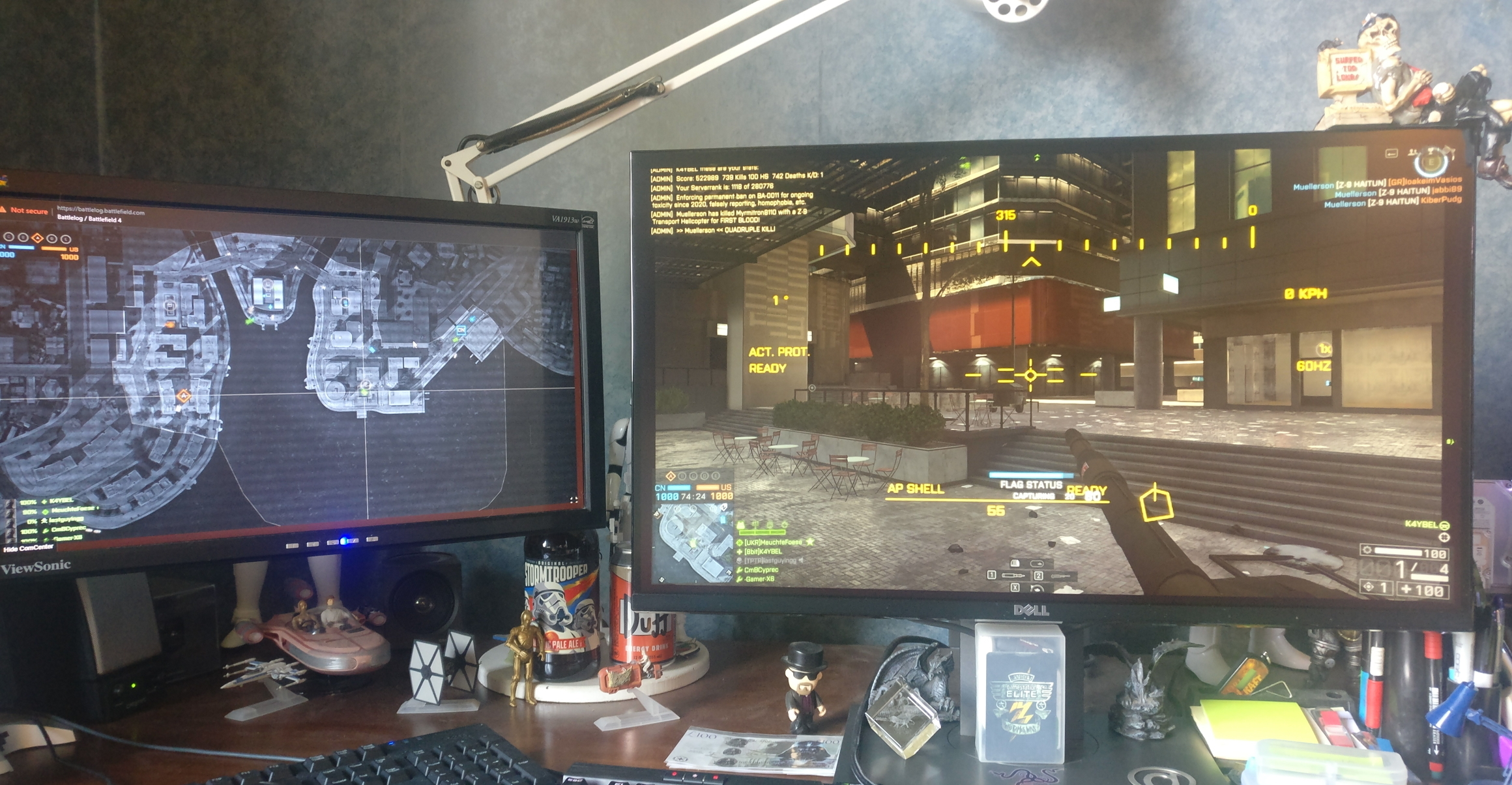
    It is definitely still working, this is me in a match just now... (see attachment 1). That's my 'HQ' PC (an old PC specifically set-up to display the Battlescreen), with me logged into the BF Battlelog, and it is displaying the Battlescreen of the server I am currently playing on.

    Second screenshot is the BattleLog running on my main PC. I do this simply to prove they are both still working, and in the latest version of the Chrome browser.

    I have the 'Better BattleLog' and 'BattleLog BF4 Player Count Checker' extensions installed. You can see this in the second screen shot - where it shows the player numbers (If the server is spoofing a higher player count) this extension states 'SPOOFED' and shows the actual player numbers. 'Better BattleLog' has a number of nice tweaks you can apply to the BattleLog page. Personal choice whether u want to use these or not, wont have any effect on the Battlelog/Battlescreen page ability to load.

    Process to use is:

    1. Load BF BattleLog page on your gaming PC/Laptop and login (http://battlelog.battlefield.com/bf4/)

    2. On the PC/Laptop you want to display the Battlscreen on, open the Battlelog page and sign in.
      > NOTE: If displaying the Battlescreen on a different PC/Laptop, go into the BF4 Battlelog settings on the one YOU SHALL BE GAMING ON and ensure the "Automatically open Battlescreen on this device/browser" is DE-SELECTED. Then on THE PC TO DISPLAY THE BATTLESCREEN ON ensure 'Automatically open Battlescreen on this device/browser" is SELECTED. See attachment 3 for my BF Settings on my gaming PC (with it de-selected).

    3. On you gaming PC/laptop click on the Multiplayer tab.

    4. Select the match you wish to join, the click on 'Join Server'.  Battlefield 4 should launch and join the match.

    5. The Battlescreen should then automatically kick in on the other device, once you've joined.

    I don't have any other weird or 'special' settings other that.  Hope it helps...

  • oleg2335's avatar
    oleg2335
    New Rookie
    4 months ago

    I think back then it wasn't working for me because I was trying to do it from my ipad not a secondary pc it probably still works off laptops and such thanks for the detailed description.

  • Hi everyone,

    I've locked this thread as it hadn't been active for a few years until recently.

    However, anyone who wants to continue the discussion is most welcome to create a new thread.