DX Error "GetDeviceRemovedReason" Still Happening...
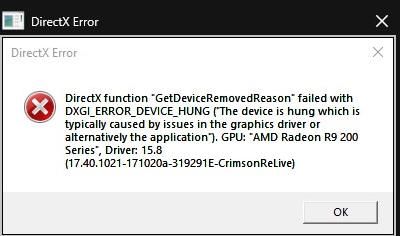


@stevie_mCtowell Hello,
Can you please try to reset your settings to default by deleting PROFSAVE_profile file in Documents>>Battlefield 4>>Settings folder? Then try to play with default settings some time.
Also, similar issue can be caused if your graphics card(s) is OverClocked so try to reduce the frequency. Test the game with enabled V-Sync in Video Settings. If you enabled Mantle API in video settings, try to disable it.

@IIPrest0nII wrote:@stevie_mCtowell Hello,
Can you please try to reset your settings to default by deleting PROFSAVE_profile file in Documents>>Battlefield 4>>Settings folder? Then try to play with default settings some time.
Also, similar issue can be caused if your graphics card(s) is OverClocked so try to reduce the frequency. Test the game with enabled V-Sync in Video Settings. If you enabled Mantle API in video settings, try to disable it.
Hi, i havent altered the PROFSAVE_profile file, but will try deleting it, all game settings are what it defaults to anyway, the ultra preset
the GPU's are not overclocked, and have been working well in BF4 since release, even when i did have them overclocked.
if i was running mantle i wouldnt be getting a DX error now, would i? ;-P
i am considering enabling mantle though, but heard amd have stopped support for it, so thought it might actually be more of a problem on a brand new OS.
i am reluctant to go with vsync on, too many horror stories of massive input lag, but i guess i can give it a go
thanks for your reply

 EA Staff
Hey @stevie_mCtowell,
if you should still be running into any issues after deleting your settings, please also consider setting up a new Windows User Account (make that an admin account) and launching the game from there. Here's how you do that. Some lines in your DxDiag suggest it might be an option to resolve this issue.
@EA_Joker wrote:Hey @stevie_mCtowell,
if you should still be running into any issues after deleting your settings, please also consider setting up a new Windows User Account (make that an admin account) and launching the game from there. Here's how you do that. Some lines in your DxDiag suggest it might be an option to resolve this issue.
thanks for your reply @EA_Joker i havent tested the other things yet, i am apparently already logged in as admin
i am the only person that uses this machine
EA StaffHey @stevie_mCtowell,
even if you do have a Windows Admin Account and it's the only one on the PC, just try setting up another one, there's no harm, you can remove it later on. If it works fine, you can technically, transfer your data over to the new account, if not - you ruled one more thing out.





