Forum Discussion

billysue03's avatar
7 years ago
Solved

Battlefield V won't load (PC)

I've been playing Battlefield V since it has launched without issue. After the latest update I click "Play" in the Origin client- a black dialogue box pops up as though a windowed version of the game it going to launch. It stays up for 3-5 seconds and crashes/disappears. 

I have updated windows, updated geforce drivers, reinstalled Origin and nothing seems to be making a difference. Would appreciate any additional thoughts/input. 

Thank you!

  • billysue03's avatar
    billysue03
    7 years ago

    Thanks for the help here- after turning off the Overlay, cleaning out the Cache and using CCleaner I was able to get things working again. 

6 Replies

  • Hey @billysue03,

    Thanks for the information you've provided.

    Can you try these steps please?

    1. Turn off the Origin in-game Overlay, and any other Overlays you might be using such as Discord, Nvidia GeForce Experience, etc.

    2. Clear Origin Cache: https://help.ea.com/en-us/help/faq/clear-cache-to-fix-problems-with-your-games/

    3. Launch Origin and Battlefield V as Administrator

    4. Clean Boot: https://help.ea.com/en-us/help/faq/how-to-clean-boot-your-pc/

    5. CCleaner: https://help.ea.com/en-us/help/pc/how-to-use-ccleaner-to-fix-pc-issues/

    Let us know if this helps.

    Thanks 🙂 


  • @billysue03 wrote:

    I've been playing Battlefield V since it has launched without issue. After the latest update I click "Play" in the Origin client- a black dialogue box pops up as though a windowed version of the game it going to launch. It stays up for 3-5 seconds and crashes/disappears. 

    I have updated windows, updated geforce drivers, reinstalled Origin and nothing seems to be making a difference. Would appreciate any additional thoughts/input. 

    Thank you!


    Some basic information would help us help you. What are your PC specs, OS, which version of DX are you running for BF5 and do you get any error message or error code when this happens?

  • billysue03's avatar
    billysue03
    7 years ago

    Thanks for the help here- after turning off the Overlay, cleaning out the Cache and using CCleaner I was able to get things working again. 

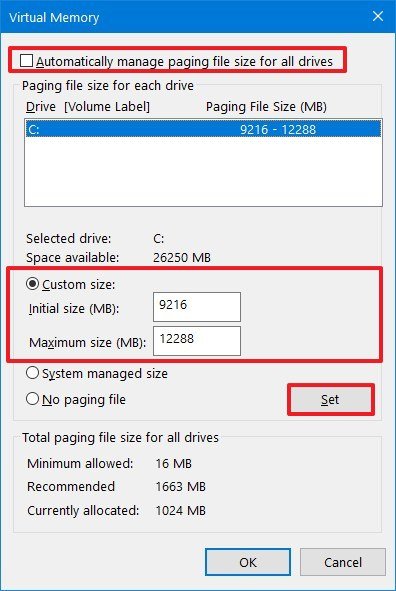
  • Something that worked for me and solved this crashing problem right away was: https://www.windowscentral.com/how-change-virtual-memory-size-windows-10 managing your virtual memory. Honestly I've tried ecerything before that, nothing work, all those reinstall the game, repare files fron origin, reinstall origin and so on... Then someone came up with that solution on discord and changed my lfe! Hope that works for me, and hope EA see this thread and give users that solution as well, because so far they don't help much!

    • Click on the link and follow the steps, enter the values manually (minimum and maximum) then apply settings 
    •  
  • CptDrunkDonkey's avatar
    CptDrunkDonkey
    6 years ago

    @iluminatethesky 
    so yes i did all of these following commads you mention and non worked and the problem is the same as the one taht started this tread so help?

  • Hi, got to Nvidia control panel,

    goto 3d settings,

    click adjust 3d settings with preview,

    click use my preference emphasizing: Quality.


    Goto Display:

    Change Resolution, goto 3.

    apply the following settings, CLICK use Nvidia color settings.
    Goto Adjust desktop color settings, 2.

    choose how color is set. click Use Nvidia settings.
    Make Sure you apply settings then come out and restart your pc.
    The BFV game will now load & so will XCOM2.
    ENJOY!

    Kind regards,

                          Ken Digweed.

Featured Places

Node avatar for Battlefield V

Battlefield V

Join the Battlefield V community to learn all you need to know. Find game information and updates, talk tactics and share Battlefield moments.Latest Activity: 2 hours ago
15,753 Posts