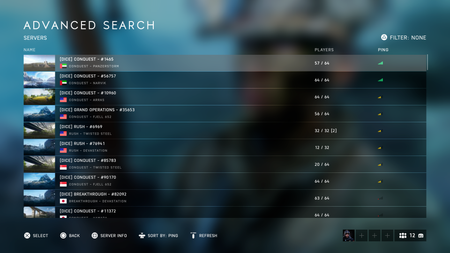
latency issue with BFV Europe Servers on PS4


 Community Manager
Thank you for alerting us, @amirholmes
Does it improve if you reboot your network and power cycle the PS4? We'll make sure the team is aware of these reports, hoping to hear this helps get around that for you going into the weekend.
Connectivity Troubleshooting Steps
https://help.ea.com/en/help/faq/connection-troubleshooting-basic/
Reboot the power to the modem/router
PS4:
Power Cycle

I forgot to say that i did all of that, hard report for all the devices by unplugging them for at least 10 minutes, I even did "rebuild database" from the playstation safe mode .. double checked that the ports are working fine via Port Forward software for ports configuration and the screenshots were after I did that ..
I just started the game now and the servers ping sign is back to green and the latency right now in the game 112ms, still higher than my normal rate but better than 304ms ofc.
This is another server and the latency is back to the normal range
Community ManagerThanks for getting back to us. Any way you can run a UO Trace and attach the results in here so we can see what path your connection is taking to our servers? It's located in the connectivity troubleshooting steps I previously linked above.
that's it




