Forum Discussion

44 Replies
 EA_Shepard2 years ago
Community Manager
Hey everyone,
I wanted to jump in on this and let you know that this is being reviewed by the team. All of the feedback around this has been forwarded on. As with any issue, updates to a game do not always get pushed as quickly as we would like them to.
As of now, there has not yet been an update on this specific issue. So what now? Well, I have put together a list of steps that have helped resolve these issues for players. Many of these you may have completed, and they may have not worked. That’s okay. There may be some here that have not been tried and they are a good point of reference to mark off as tried and did not work.Let’s run through the basics, shall we?
Launcher- Repair/Verify your game based on which client you are launching from
- EA App - Repair (My Collection > Tile Dots > Repair)
- EGS - Repair (Library > Tile dots > Manage > Verify)
- Steam - Verify in your library
Windows
- Run the System File Checker tool then Check for Windows and GPU updates
- Default your game to the high-performance GPU, AMD Settings | Nvidia Settings | Windows Settings
- Guide for Troubleshooting Graphics issues
- Install/Repair your VC++ files for the game (Microsoft VC++ Link)
- Put your device in a Clean Boot then launch the game
- Try the Game in different Compatibility settings
- Remove any over-clocking or undervolt settings or software and check if the issue continues.
- Check for other applications that may be limiting EA App or Game performance
- Connection and Advance Connection Guides
- Untick the options in LAN Settings (make sure nothing is checked under Proxy Server)
- Change DNS settings (You can use the public Google DNS primary: 8.8.8.8, secondary: 8.8.4.4, unless there is a different DNS you would rather use)
- Try a new user account
- Reset Windows Host File
- Change UAC Controls
Registry clean-up
One thing I would like to try is to install CCleaner (it's free) from here- Clear your registry first.
- Run cleaner
- Check fix all
- Back up no
Once you mark off each one, another good way to get that fixed is to simply install another EA title you have as it also updates the same files and checks if you have them running properly.
@EA_ShepardWe all know the work is being done, but its almost May now.
The last patch was in february, why hasn't the team deployed a single patch since, even the last patch in feb was purely gameplay oriented and had nothing to do, with the issues posted.
I am yet, to get into medical bay because of the crashes and the freezes.
Its so annoying, that the game cannot be alt tabbed.
None of the basics mentioned above will help, because this is a well known issue and has nothing to do with the systems, because games that came after dead space, have been working fine since day 1.
Re4Remake for example. I have 5 hours in ds of which 3, were spent troubleshooting.
I have 23 hours in Re4R now, because i can play that game without any frame rate drops or crashes.Dead Space Remake cause BSOD after few minutes of playing.
it's unplayable, BSOD issue appear after some minutes (one to ten) sometimes still on option menu.
Tried to reduce the graphic level, remove RTX, change DLS, with no luck. A lot of hour spent on troubleshooting without any results.
I've played a lot of games with my conf, but this is the only game that cause problem.
Subscribed yesterday to EA PRO for playing this game.
Same issue with the Steam version, played on 1.30h demo.
Latest nvidia driver installed.
I9 10900K
64GB DDR4
Asus Z490E-gaming
Nvidia 4080
- EA_Shepard2 years ago
@Kr1m1nal73 When you crash to the bluescreen, can you provide a screenshot of that error?
Can you attach a DxDiag for me? - EA_Shepard2 years ago
@Kr1m1nal73 Thank you.
Nvidia has updated some drivers, can you please download a new "fresh" install from here
I would also recommend removing all C++ and .NET installs and
- Install/Repair your VC++ files for the game (Microsoft VC++ Link)
- Download and update DirectX
Nvidia
- Try the NVIDIA PhysX Legacy System
- Restart the PC.
- Test.
I would like to see if this helps.
Updated driver with fresh install, same issue.
Repair VC++ and Direct-X, same issue.
Disabled Nvidia overlay, nothing change.
Changed the D3D12Core.dll with another one in \Dead Space (2023)\x64, more stuttering but 10 minutes of play more, I can't tell if it's a coincidence.
I'm tired of testing, I'm already short on time, and I don't want to spend it trying to get something to work that should work fine without any issues.
I subscribed to EA Play Pro only for Dead Space six days ago and I played 1.35h with about 20 bsod.
Is it possible to get a refund of the subscription?
Thank you.
- EA_Shepard2 years ago
@Kr1m1nal73 I understand. It can be frustrating for sure. Refunds are based on different factors for subscriptions than regular purchases. Check here as it will give you all the information you need. If it will not let you do so through the link, you would need to reach out to live support on this so they can take a look at the account with you.
It was a cpu temperature problem (100 degrees Celsius during play), I changed the fan with a more powerful one, now the game doesn't BSOD anymore.
I don't understand why this issue only with this game, but I take note of it.
 hamburgerprime2 years agoNew Veteran
@Kr1m1nal73 I am sorry to hear you had to replace the fan like that. It happened to me with another game when I built my rig. If it starts happening again, I would recommend changing the processor affinity from here which can help that. I am glad that you were able to get that resolved though. I will certainly take note of that and pass it along to the team.
bro seriously is it just me or a mod of ea forum just told us that ccleaner may hwlp with a game... am i dreaming or are these mods aint official ones?
and nothing here is okay , half a year after the release of this game it still does crash very often, still haves the same issues. i was so dissapointed until i saw this cclean stuff , now im just hysterically laughing...
Ok look, you guys keep posting the same troubleshooting steps over and over. The community has said in a clear collective voice, THIS IS NOT WORKING.
The definition of insanity is doing the same thing over and over expecting different results. You've eliminated the individual trouble ticket system in favor of a forum. Problems are compounding and not being solved.
Support needs to fix the issues. I got my refund but it sounds like many are unable to get any refund or solution to a product failing to run.
Do better. This is ridiculous
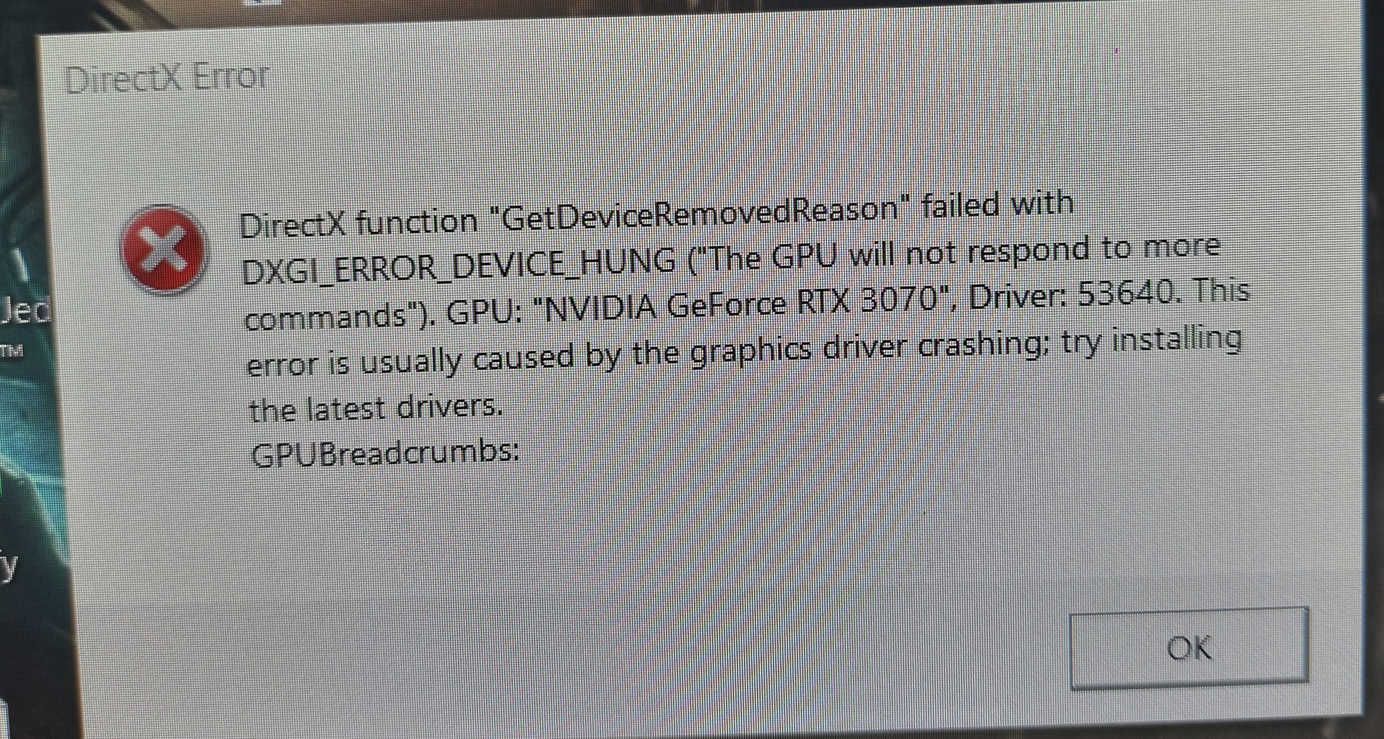
Well... what can I say? The same problem happened now to me too.
The weird thing is: I could play the game several times, with no Problem. I have over 50 hours in this game (yes I am a big fan of the remake) and from one day to another, it is impossible to play it anymore. Sometimes it runs 2 hours, before the game crashs. The next try takes only 5 minutes for crashing... it all started in the middle of June and I dont know why.
After the install of the newest GPU driver for EA's F1 23, the problems started...
Did I reinstalled the driver? -> Yes
Did I uninstalled and then installed the game? -> Yes
Did I repaired the game with the EA Play App? -> Yes
Nothing helps...
Where ist my game installed? -> Samsung 970 Evo Plus 2 TB
Hardware -> RTX 3070, Ryzen 9 3900x, 32GB RAM
OS -> Windows 10 Pro with the newest updates
I just bought the game and the same problem,
4090, newest drivers 5900x.
Been playing diablo 4, hogwarts legacy and the witcher 3 on max no prob.
Also how come the thread is labeled as solved ? Far from it, users been reporting this since january and noone has a fix.
I also ran into the DirectX crashing issue, but only after I upgraded my computer. I played for several hours without any crashes on my 2080 ti and older Ryzen chip, but I getting some occasional stutters which I chalked up to just not lowering my settings enough.
Then I switched over to my new desktop with a 4090 and an i9-13900KF, and right away I started seeing the DX crashes. When the game WAS running, it was a smooth 144fps or more to match my monitor, but then I read in a different thread about these crashes that someone stopped them by lowering their max FPS for Dead Space in the NVidia Control Panel.
I tried that (Control Panel -> Manage 3D Settings -> Program Settings (Select Dead Space) -> Max Frame Rate = 120) and I haven't had a single crash since. Played through the last 4 chapters which took several hours and it was smooth the whole time
Maybe the game doesn't have an intelligent way to limit frames if your hardware is good enough to let it climb well above 120. I'm also not sure what the mechanism for limiting this would be for non NVidia GPUs, but I'm sure it exists.
Hopefully this works for other people too.
I am getting this DirectX Error randomly since the beginning of playing this game. Sometimes I can play for an hour, sometimes it crashes to Desktop every 5 Minutes. I have a razer blade 17 3080ti laptop gpu and a 12th Gen Cpu, none of which are overclocked or overheated (checked with hwinfo) and running win11. I tried pretty much every setting in-game and every performance profile outside the game, nothing helped. I tried an external 1080p TV with vsync enabled, limiting to 60fps with the driver, lowering quality settings, no avail.
Are you gonna patch this EA??
the game has been out what 6 months now??
you cannot be serious, that we have crashes in the game 6 months later?
would you be so kind, get your butt's into gear and fix this?
we pay a lot of money for gaming
so we expect it to work!
I'm glad I'm not the only one having these crashing issues. When I built my PC in early April I wasn't having these crashes. Though I definately wasn't playing the game very much. In the last few days I've wanted to play dead space more (waiting for starfield lol) and all of a sudden I'm getting crashes every 1-10 minutes. Sometime they are as soon as I start the game, sometimes I can play for a bit. The only thing I have found that helps is running the game at 1080p instead of 4K.
I have to say I'm rather disappointed. At first I thought this was new bug, but to find out that this has been affecting some people since day 1 and it still isnt fixed??? This makes the game completely unplayable! Here are my specs if you care. It definitely seems to affect people with high end specs more often.
i9-13900k
RTX 4090
Corsair Vengeance DDR5 CL26 @ 6400MHZ
Aorus Master z790
1000W PSU
No this is a new crash problem we got with the newest nvidia drivers
hopefully they get it fixed soon because we cant freaking play the game!!!
Still no fix... Thank god I borrowed a friend's account to play it and haven't paid money for it. Btw, just finished Callisto. 0 crashes.
Same problem here. This is crazy.
- EA_Shepard2 years ago
Hey Everyone,
Wanted to drop in and get some info on this from everyone. I see a lot of different information from players. Can we please go down the list of steps to see if these will work for you?
Delete Windows Temp Files
Spoiler- First, make sure you close as many programs as you can
- Press the Windows key + R, go into the file explorer
- Type in %temp%, and hit Enter
- Delete everything it allows you to delete
- Reboot the PC
Optional Registry clean-up
Spoiler- install CCleaner (it's free) from here
- Run Registry cleaner
- Click review selected issues
- Do you want to back up? No
- Click Fix all selected issues
DNS Flush
Spoiler- Click the Start button. It’s the Windows logo in the bottom left corner.
- Select Command Prompt.
- To open the command prompt console, you could also simply press the Windows and R keys at the same time and enter cmd.
- You may see a popup asking if you want to allow Command Prompt to make changes to your computer. If you do, select Yes.
- If you are asked for an administrative login at this point, then you’ll need to contact your system administrator to proceed.
- In the command prompt window, type ipconfig /flushdns.
- Press Enter.
- You should see a message confirming that the DNS Resolver Cache was successfully flushed.
Uninstall and reinstall the following as fresh installs and not repaired installs
- Install/Repair your VC++ files for the game (Microsoft VC++ Link)
- Download and update DirectX
Nvidia
- Try the NVIDIA PhysX Legacy System
- Restart the PC
👉Once these are completed and the game is still not working, please post all of the following below. The more information we have the faster the team can run through logs and narrow down what is happening.👈
- EA App/Steam/Epic:
- EA ID/Steam user ID:
- Attach the EA App Error Report ID Here
- Windows OS:
- Windows OS version:
- GPU model and driver version:
- Region:
- Are you using an internal or external drive?
- Are you using an HDD or SSD?
- Date this issue started (is it still happening?)
- Any other errors?
- If possible, share a Screenshot or Clip:
- Attach a DxDiag
 jolly_mayer2 years agoRising Newcomer
Can anyone from EA confirm that someone is working on fixing this problem? There are hundreds of reports. Just a small selection:
- https://steamcommunity.com/app/1693980/discussions/0/3770110614228478057/
- https://steamcommunity.com/app/1693980/discussions/0/3810656958849030603/
- https://steamcommunity.com/app/1693980/discussions/0/3810657379785614453/
- https://steamcommunity.com/app/1693980/discussions/0/3770110614228699510/
- https://steamcommunity.com/app/1693980/discussions/0/3770110614223783524/
- https://steamcommunity.com/app/1693980/discussions/0/3843305417842921158/
I paid 60$ for a product that does not work.
- EA_Shepard2 years ago@inspectormarc Updates for the game are not going to happen as often as we would like them to. In order for the teams to look into specific errors like this after troubleshooting has been exhausted, it's not as simple as just patching it. We need information from players in order to test and update the game or the EA App as needed.
 sYnc_e32 years agoSeasoned Novice
What are you talking about? You have all the information you need. If you need logs from your game, please let us know where can we find them and send them to you. But I doubt you don't have online telemetry built in to the game itself.
It's the same DirectX error / Driver crash that users are talking about in this thread and Reddit, Steam, and who knows where.
It's been like this for months. I can't finish this game. You sold me an incomplete product that I've payed 59.99 EUR for, and I can't refund it because it started crashing since Chapter 6, so I'm out of the refund window. There hasn't been an update to this game since February.


Featured Places