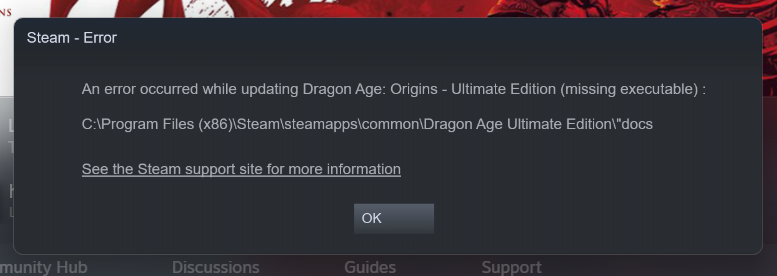
Missing Executable
Okay, so here's the sitch.
During the Steam sale my friend got all the Dragon Age games + DLC. We regularly share libraries, so I downloaded DAO. I was super excited, downloaded a few cosmetic mods for character creation, and dove in. Except my game kept crashing during the middle of character creation. At this point I had gotten rid of a few mods, ran the chargen thing, and it was still crashing. So while I'm trying to launch it from Steam, I get a popup that says "view support information", which then leads to another popup that says im missing an executable in the docs section of my game, which from what I can tell, is just all the readme's from way back when this was still a dvd game. I've literally searched EVERYWHERE for something to fix this, and everyone says that I need the cd key, so I can just run it through origin. However, of course, my game doesn't have one with it. I've also verified my files, reinstalled the game, tried to run it through DirectX 9, and a million other things. So if anyone can help me with this, I'm literally begging you. I've attached a screenshot of the error below.
The crashes are related to an NVIDIA Driver DLL.
Download the latest driver for your Intel APU and NVIDIA GPU from DELL.
- Follow this manual to the letter to cleanly uninstall all NVIDIA components.
- Follow the manual to cleanly uninstall all intel components.
- Install the Intel driver > Restart the Computer.
- Install the NVIDIA driver > Restart the Computer.
- Test.