Forum Discussion

Re: EA App won't install

Hi Puzzlezaddict, The x64 version installed fine, but I ran into a problem when I tried to install the x86 version. I got the same error message that I got when I try to install the EA App. 

I took a clip of it if that helps. I tried clicking OK a couple of times, but that caused the error message to come back. So when I clicked cancel, the installer aborts the App installation.

I appreciate any other suggestions you can give me.  

19 Replies

  • puzzlezaddict's avatar
    puzzlezaddict
    Hero+
    3 years ago

    @spankenstein89  Please run a couple of basic checks of your Windows system files:

    • Hit Windows key-X
    • Choose either “PowerShell (Administrator)” or “Windows Terminal (Administrator),” whichever option is offered
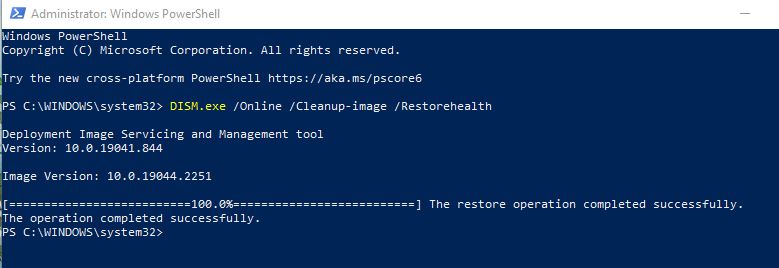
    • Inside the window that appears, copy and paste “DISM.exe /Online /Cleanup-image /Restorehealth” without quotes, and enter
    • The system will start validating soon. If it throws an error, please list it here
    • After it reaches 100%, hit Windows key-X again
    • Again, choose “PowerShell (Administrator)” or “Windows Terminal (Administrator)”
    • Inside the window, copy and paste “sfc /scannow” without quotes, and enter
    • Post the message you receive here

    Restart your computer, hit Windows key-i, select Update & Security, and click the box to check for updates.  If any install, restart again afterwards.

    Try again to install the x86 runtime, and let me know what happens.

  • spankenstein89's avatar
    spankenstein89
    New Adventurer
    3 years ago

    Hi Puzzlezaddict, sorry it took a while to get back to you. I ran the DISM.exe /Online /Cleanup-image /Restorehealth and the sfc /scannow applications. I re-started, updated, and again tried to install the EA App. But to no avail. The x86 runtime won't install and the installer aborts installation of the EA App. There was no error message after the DISM.exe. 

    Thanks for your help, I do appreciate it.

  • puzzlezaddict's avatar
    puzzlezaddict
    Hero+
    3 years ago

    @spankenstein89  I apologize in turn for the late reply.  I wanted to ask someone else about this error in case I was missing something obvious or critical.  But the error is pretty much straightforward: the installer can't access the location of the .msi file needed to actually install the x86 runtime.  So please move this .msi to C:\Windows and try installing the runtime again.

    You can see the location of the .msi in your screenshot: just open those folders in turn, and if you can't drag and drop the file, copy and paste it.  To open C:\Windows, open a File Explorer and click This PC in the left panel, then double-click the C drive and open the Windows folder.

    If you can't find the folder the .msi is in, try temporarily showing hidden files and folders.  Here's how:

    https://support.microsoft.com/en-us/windows/view-hidden-files-and-folders-in-windows-97fbc472-c603-9d90-91d0-1166d1d9f4b5

  • spankenstein89's avatar
    spankenstein89
    New Adventurer
    3 years ago

    Okay this isn't as simple as I thought it was going to be. I don't really know what I'm doing. The c:\program data\package cache folder has lots of package files in it, but none of them has an msi file that starts with 37B55901... This is why the installer can't find the file because it's not there? I'm sorry if I'm making this harder than it has to be. 

  • spankenstein89's avatar
    spankenstein89
    New Adventurer
    3 years ago

    I'm including a clip of my Package Cache folder. The file that the installer is looking for isn't in it. Could this be the problem? Where would I find that specific file?

  • holger1405's avatar
    holger1405
    Hero+
    3 years ago

    @spankenstein89 

    If you go to the side @puzzlezaddict linked you should see this:


    If you click the x86 link the "VC_redist.x86.exe" should be downloaded to your PCs "Download" folder, is that right?

  • spankenstein89's avatar
    spankenstein89
    New Adventurer
    3 years ago

    I tried that already Holger. I followed the link and tried to download the x86 file but when I tried to install it I got the same error messages that I got when I tried to install the EA App. 

    Thanks for writing, I appreciate your help. 

  • holger1405's avatar
    holger1405
    Hero+
    3 years ago

    @spankenstein89 

    NP, my post was about to make sure we are all on the same page.

    Did you tried to run the "VC_redist.x86.exe" as Administrator? (Right click the exe > Run as Administrator.)

  • spankenstein89's avatar
    spankenstein89
    New Adventurer
    3 years ago

    Yes Holger, I've tried running VC_redist.x86.exe as Administrator. I get the same fault every time. The installer is looking for a file that doesn't seem to be in my Package Cache folder. 

    If I were to guess, the VC_redist.x86.exe app is trying to update a file that isn't there in the first place. But I'm just guessing, I have no idea. Thanks for writing. I appreciate it. 

  • holger1405's avatar
    holger1405
    Hero+
    3 years ago

    @spankenstein89 

    Did you run the "VC_redist.x86.exe" and looked right away in the "C:\ProgramData\Package Cache" folder?

    What virus scanner do you use?

    There are blue screen errors in your DxDiag. When did they occur and what were you doing at that time?

  • spankenstein89's avatar
    spankenstein89
    New Adventurer
    3 years ago

    Yes Holger, I looked right away after installing the x86 runtime. That file it's looking for isn't in there.  I use Windows Defender for a virus scan. My computer crashes periodically causing the blue screen errors. It doesn't always happen, but when it does, it happens when I come back from sleep mode. My internet connection is down and my computer just crashes and re-loads. I don't know what's causing it. It happens at least twice a week. It's happened while I've had The Sims 3 open, so maybe it corrupted some Sims 3 files. 

  • holger1405's avatar
    holger1405
    Hero+
    3 years ago

    @spankenstein89 

    Then I would recommend a Windows repair installation, also called a in-place upgrade.

    Here you will find an Microsoft Video Guide about it.

    Here is the Website to create the Install medium.


    This is normally a very safe process, but you should make a full backup of all your important data anyway. (And not just before such on operation.) 😉

    Make sure that "Keep Personal files and Apps" is marked before you click "install".

    I can't guaranty you that this will help, this could also be a hardware error, but neither @puzzlezaddict nor I have any way to be sure about that.
    If you are unsure about a step, ask! 😉

  • spankenstein89's avatar
    spankenstein89
    New Adventurer
    3 years ago

    Thanks Holger. I think it's a software issue, but I'm not sure either. I'll give it a try. If it fixes the crash bug, I'll be happy.  👍

  • intra09123's avatar
    intra09123
    3 years ago
    @spankenstein89 Hiya, wondering if you managed to find a fix for this? I'm having exactly the same issue - the folder that the msi file should be in just doesn't exist in the Program Cache folder.
  • spankenstein89's avatar
    spankenstein89
    New Adventurer
    3 years ago

    No, I haven't found a fix yet. I haven't played The Sims 3 for weeks. The EA App installer should be creating the necessary files for the installation, but for some reason it isn't.  It keeps encountering an error and aborting the install. I'm beginning to think the problem might be with my computer. I'm going to try a Windows Repair Installation to see if that helps. 

  • spankenstein89's avatar
    spankenstein89
    New Adventurer
    3 years ago

    Okay, it took a while, but I finally did a Windows repair installation. It seems to have worked.  I re-installed the EA App, and this time it installed correctly.

    However, the repair installation removed all programs except for those that came with Windows 10, including the Sims 3. So now I have to install The Sims 3 again, plus my expansion packs. 

    So thanks for your help, I appreciate it. 

Featured Places

Node avatar for EA app Technical Issues & Bugs

EA app Technical Issues & Bugs

Having issues with the EA app? Join us to report bugs, and find help with downloads, DLCs, purchases, and login errors.Latest Activity: 3 hours ago
8,783 Posts