Forum Discussion

Re: EA Desktop asking to download already installed and played games

In case you weren't able to fix this problem and for anyone else experiencing the exact same problem (like I did) you can try the following (if on Windows):


DISCLAIMER:
I am in no way affiliated with EA!

You do all of this at your own risk. I can not guarantee this will work for you and also can't say for sure you will keep your save files when doing this. Proceed with caution and make sure you understand these steps and follow them precisely before continuing!


Navigate to the installation folder of the game in question. There you should have a folder called "__Installer". Open it to find several files including "Touchup.exe", "Touchup.dat" and "installerdata.xml". Touchup.exe seems to be some kind of setup.exe and Touchup.dat might provide the setup with all the information necessary but I'm not sure about that.

Inside this folder you need to hold down Shift and right click on an empty area. Make sure to not click on a file or else you won't get the desired menu.

After shift + right clicking you should see a menu with one of the options being "Open PowerShell here" or similar. Click on it to start PowerShell which is a newer version of the Windows CommandLine.

Inside PowerShell enter the command

".\Touchup.exe install -repair -locale <locale> -installPath "<path to your game>" -autologging"

and replace <locale> with your desired locale code (e.g. en_US) and <path to your game> with the path your game files are already in (e.g. C:\Program Files\EA Games\Jedi Survivor).

Make sure to enter the full command without quotation marks at the start and end but to put the game path inside quotation marks (e.g. "C:\Program Files\EA Games\Jedi Survivor"). Double check the full command (it should be something like .\Touchup.exe install -repair -locale en_US -installPath "C:\Program Files\EA Games\Jedi Survivor" -autologging) and then hit Enter.

You won't see anything happening except maybe the windows loading circle but in the background EA's Touchup.exe will repair/re-verify your existing game files and after fully closing and opening the EA App your game should hopefully show up as installed. In case it doesn't the file "installerdata.xml" I mentioned earlier might give you some clues about what went wrong.

This also works if you can't start the download of a game you already downloaded but the EA App doesn't recognize because you don't have enough space on your hard drive to download the whole game again - which is what happened to me with Jedi Survivor (I simply didn't have another 150 GB of free space to start the download so the EA App would verify my existing files).

Hope this helps 😉

10 Replies

  • @crosser0987 I feel you. Got Jedi Survivor as a birthday gift and was able to play a whole lot of 5 hours since then.

    Spoiler: Rant about EA App, Jedi Survivor, day one patches and DRM

    Spoiler
    First I had to download it (12-13 hours), then I had to download another 130GB day one "patch" which meant I had to uninstall and reinstall because I didn't have enough space (another 12 hours) then I could play - two days later. Then I was naive enough to try and start the EA App under linux which was a different hell in its own and when I finally was able to at least start the app my game wasn't recognized as being installed. Then after a lot of research and exploring I managed to have it show up by using Touchup.exe only to have it crash without an error after the intro movies. So I settled for playing it under windows for now and when I had time to do so (last tuesday evening) and of course after using Touchup again to have it show up I was greeted with another "patch" I couldn't download because there wasn't enough space so I had to wait another 12ish hours. And finally yesterday evening I wasn't allowed to play because apparently starting the same game on the same computer, with the same account and the same IP and MAC address but under another OS counts as starting it on too many computers in a short period.
    About an hour ago I couldn't log in because EA's account servers apparently were down (so according to the app of course my PC could not connect to the internet) and when I was able to log in again the game's library page showed an error instead of the actual library page and I couldn't start the game. But thank god for quirky loading texts while the app tries to figure out if the installed game it recognized could actually be started.
    Right now I'm repairing the game once again because it crashes without an error message or maybe doesn't even start - I don't know because there is no feedback.

    So, long story short: Glad I could help.

  • virtualbalboa_gg's avatar
    virtualbalboa_gg
    Rising Hotshot
    2 years ago

    Careful with your ranting. Mods are getting angry that losers like us aren't just rolling over and taking it.

    Just remember this treatment next time you want to spend money on a game.

  • ohrevoo2's avatar
    ohrevoo2
    2 years ago

    Hello @castorfieber, i wanted to ask you about this since it seems  that you helped alot of people.
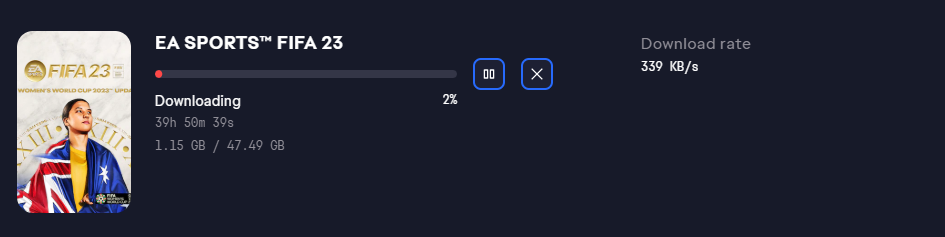
    Basically my internet su**s and i waited for over 36 hours for fifa 23 to fully download, after those 36hours and finally finishing the download, it randomly just started downloading the whole thing again from 0% even tho when i check ea games folder its 47.49gb like the app says it should. i tried clearing cache, downloading other games etc, etc, i tried the touchup thing but it just says "The term '.\Touchup.exe' is not recognized as the name of a cmdlet, function, script file, or operable
    program." 

    I just dont have another 36h of slow internet and time for the download to finish...

    Is there any chance that you might know a solution?

    *the 82% download picture is from earlier today when it had only 2h left to download, while the 2% download picture is from about 1h ago when i got back on my pc to play the game just to see that its redownloading*

  • PvT_Fox122's avatar
    PvT_Fox122
    Rising Rookie
    1 year ago

    @castorfieber thanks a lot, did a Windows reset to freshen up my pc and for what ever reason, EA app would not recognize BF2042 on my external drive and wanted to do a 40gb repair, did this and I only had to do a 4gb update that I knew it had to do anyways, did it with my other games and instantly was able to play them

Featured Places

Node avatar for EA app Technical Issues & Bugs

EA app Technical Issues & Bugs

Having issues with the EA app? Join us to report bugs, and find help with downloads, DLCs, purchases, and login errors.Latest Activity: 2 hours ago
8,807 Posts