Forum Discussion

RaffKidzor's avatar
9 years ago

really low FPS (unplayable)

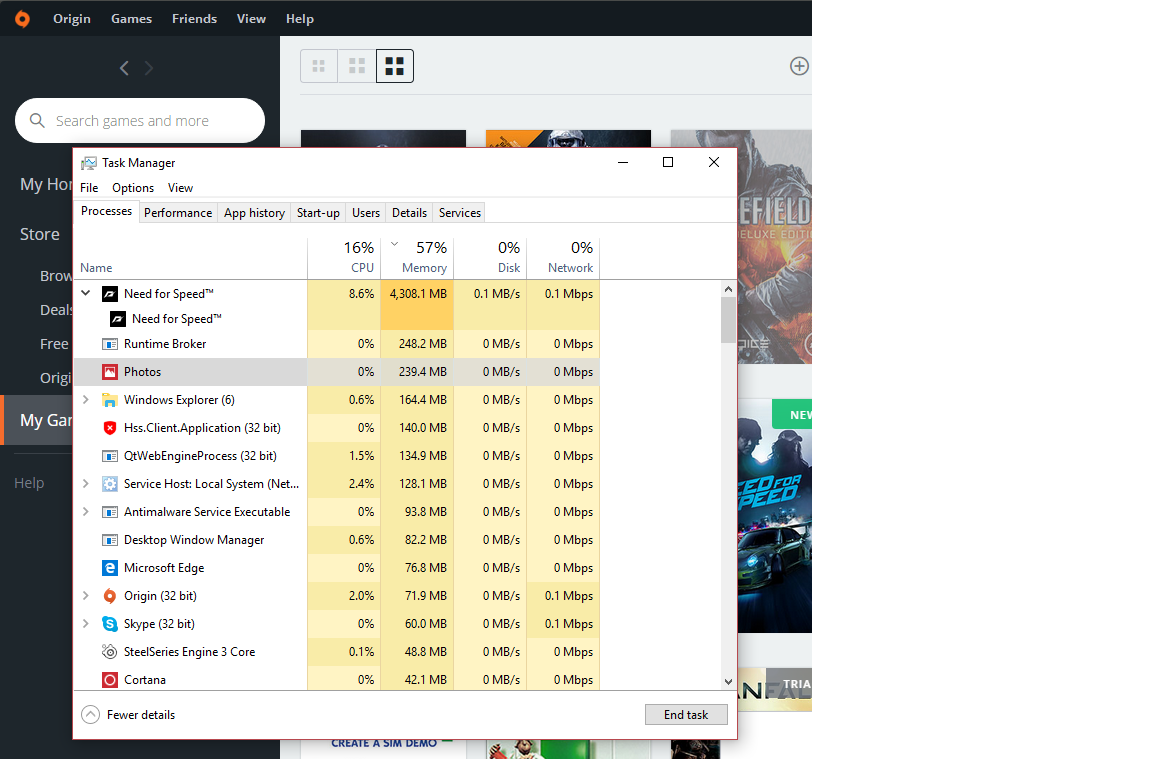
Hi, after I downloaded and install the game gets intro and when first time driving the car it's really LAG with med settings on 1080p aand it's pretty much unplayable. I don't think my rig would be lagging on that settings and I'm on the NVidia latest driver for my gpu and seem no problem on FPS playing other games. then I found this on my TASKBAR which says hmm really it takes up to 4GB ? I think I found the problem for my fps drop. any solutions? origin in game already off.

specs:

i7 3820 3.2ghz

asus gtx 680 2GB

16GB DDR3 ram 1.6 mhz

3 Replies

  • EA_Barry's avatar
    EA_Barry
    Icon for Community Manager rankCommunity Manager
    9 years ago

    @RaffKidzor

    Your machine may be defaulting to your Intel video processing on your CPU rather than your GTX 680.

    1. Open the nvidia Control Panel
    2. Click Manage 3D settings
    3. Click the Program Settings tab
    4. Click the Add button
    5. Select the game from the list or click browse and navigate to C:\Program Files (x86)\Origin Games\Need for Speed\NFS16.exe
    6. Select NFS16.exe and then Open
    7. Customise individual settings if you like
    8. Exit nvidia control panel and try playing.

    Try this procedure and let us know if you are able to play with expected performance, thanks. If your issue persists then posting your Dxdiag report will be helpful:

    https://help.ea.com/en-us/help/pc/how-to-gather-dxdiag-information/

  • thank you for your reply,

    already did that but it seems the problem still happening.

Featured Places

Node avatar for NEED FOR SPEED™ Franchise Discussion

NEED FOR SPEED™ Franchise Discussion

Have you played any other Need for Speed games in the franchise? Tell us about your experience on the community forum.Latest Activity: 2 days ago
30,479 Posts