Forum Discussion

Re: Multiple Saves, CC, MODS, and More

@stbnchristine And @SheriGR

thank you! Now let me see if I understand this correctly. 

For the the game I want to play CC/MOD free I should remove it from the sims folder to a safe place and label it so I know it is the CC/MOD free game. This allows the game to generate a new dimes folder in which I can enable MODS/CC content. Then when I want to switch them move this folder to a safe location and label MODS to keep them separate. Then start the game to generate a clean game, then move the “clean” game back into the folder to ensure all cc and mod content has been cleared? 

5 Replies

  • stbnchristine's avatar
    stbnchristine
    7 years ago

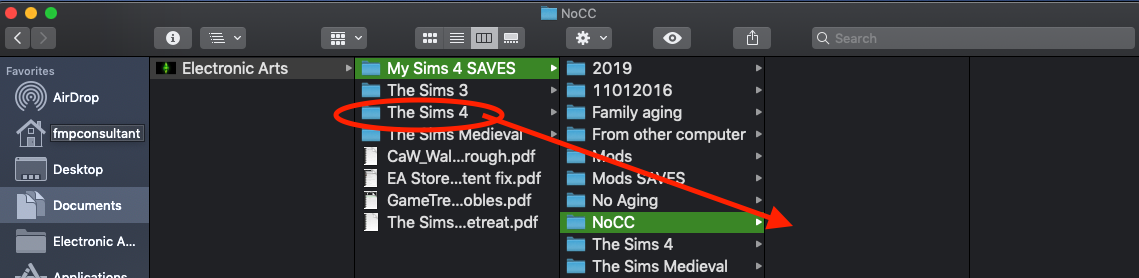
    @candiecoatedivThat is the idea.  Just make sure you move "The Sims 4" folder.  Check out the attached picture... a picture is worth a thousand words.

  • candiecoatediv's avatar
    candiecoatediv
    Seasoned Ace
    7 years ago

    Okay. I only have one folder The Sims 4. This is the folder I’m moving correct? 

  • stbnchristine's avatar
    stbnchristine
    7 years ago

    Yes move it somewhere else and then launch the game from origin and the game will build a new The sims 4 folder.  Then click the three dots at the top and select game options. Choose the other tab and check enable custom content and mods.  Apply the changes and quit the game.  Add cc/mods to Mods folder and launch.  Now you have a Mods game to use and your old NoCC game is safe to use when you want.