[ARCHIVED] How to use Mods/CC on PC


Hello all.
I've just gotten a new gaming laptop a week ago (Acer Nitro with Windows 11 in case it's important) and I just installed Sims 4 on it. I've played this before on my previous computer with mods and had 0 issues.
However, sims 4 just won't acknowledge any mods I download at all. I unzip them and put them in the correct folders and make sure they're enabled in the game. But no matter what I try, the game refuses to acknowledge their existence. Onedrive was causing some issues with downloading some mods to the computer, and I've since unlinked Onedrive as that's where all the files were default downloading to. But even when I download directly to the computer now, nothing will be shown in the game.
I'd love any tips and advice on how to work through this.

@Donix135 I've merged your post with the master thread for issues related to installing or using mods. Please see the first post on page one.
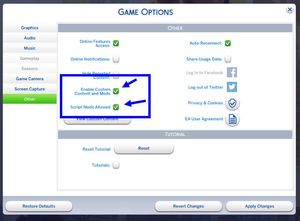
In your particular case, I'd say the first step is to confirm that Sims 4 is reading the folder where you've added the mods. Here's how:
https://sims4.crinrict.com/eng/2018/07/how-to-find-your-user-folder/
The game could be reading a different folder than you expect and therefore ignoring your mods completely.

Hello, I have been having same problem, I have already tried everything in the first post of this forum, as well as verified that I am placing my CC in the correct destination folder and none of my CC will show up in game, including the ones I downloaded yesterday. I have attached a picture of my mods folder, I dragged out one of the items from my sub folders to see if that was the problem and it still does not show up. And all of the mods in the sub folders are .package and are all unzipped.
its because they were all short cuts, I figured it out 🙂