Forum Discussion
luthienrising
3 years agoHero+
@BeeInAMechaOkay. There are a number of things possible, but what I'd suggest is this:
- Start in Electronic Arts > The Sims 4, and drag the whole Mods folder to your desktop so it's gone from there.
- Delete the file called localthumbcache and any last exception files.
- Make a new, empty folder called "Mods"
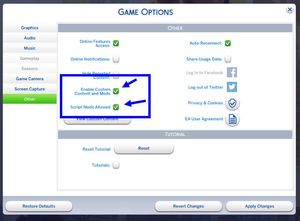
- Start Sims 4, check your Options > Other settings, then exit the game. Sims 4 will now have seen your new, empty Mods folder.
- Add mods back to the *new* mods folder in small batches. Your goal now is to figure out what was stopping all the mods from showing.
3 years ago
Hello again!
I tried that, but it didn't work. Thank you though! If it makes any difference, I'm playing on a Mac.
- luthienrising3 years agoHero+
Okay, @BeeInAMecha! Lets look at some other reasons no mods might appear.
- One is to make sure they're in the right Mods folder: The one in Electronic Arts > The Sims 4.
- Two is to make sure that you don't have all this connected to iCloud.
- Three is to make sure there's not a second folder called "Mods" inside The Sims 4 folders anywhere.
- Four is to make sure that all mods that use a file ending in .ts4script are no more than one folder down inside Mods. So, you can put all the files for those script mods just in Mods, or in something like Mods > CreatorName, but if they're any deeper than that, the game can't see them.