Forum Discussion

BreBre092705's avatar
BreBre092705
New Novice
2 years ago
Solved

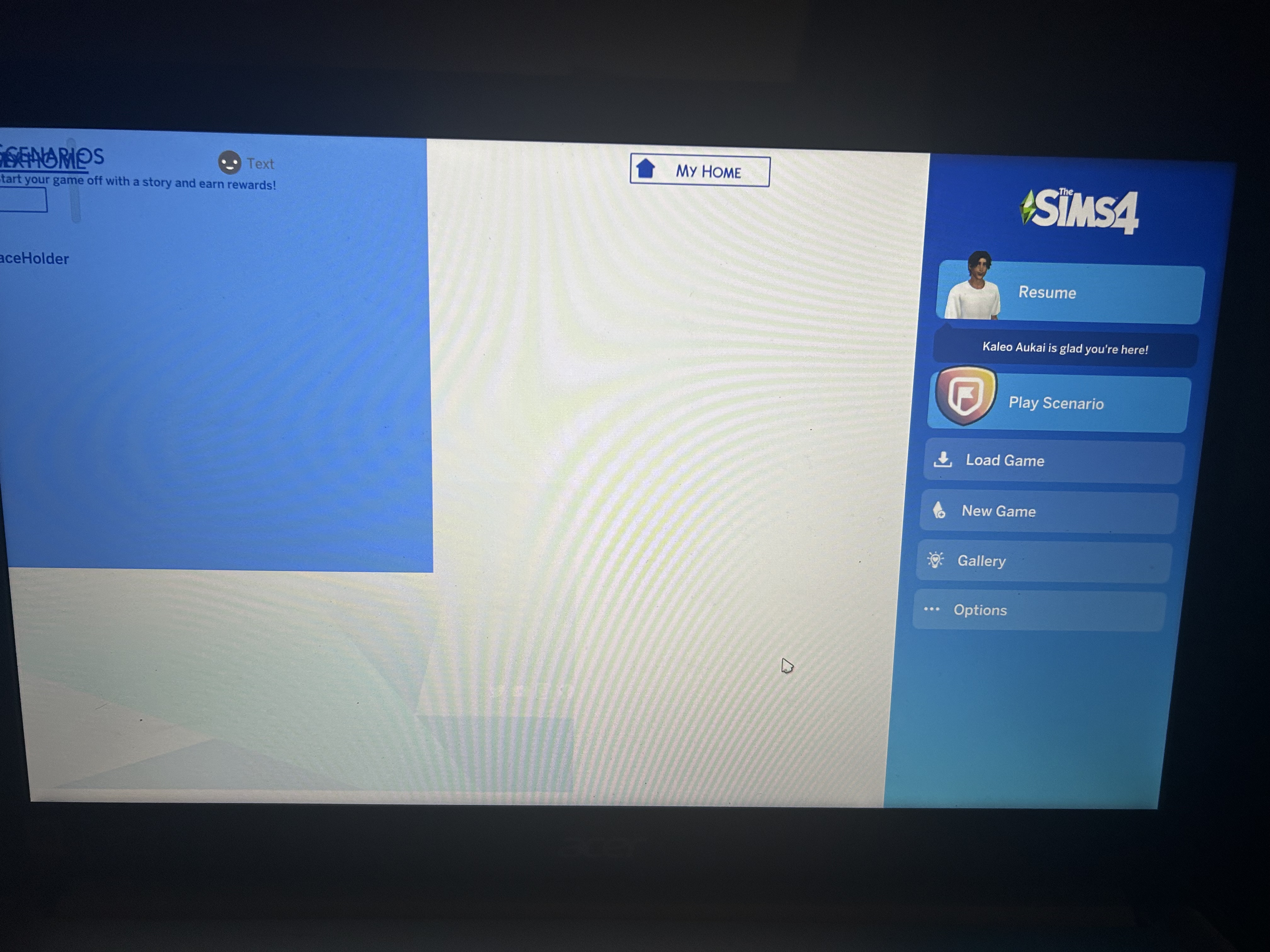
[Home page UI with 1.109] My Sims 4 updated and now my game is completely broken

So my Sims 4 updated today, and when I started the game up, it looked like this (see attached file). I cleared the cache, uninstalled and reinstalled the game, and even repaired it but it still looks like that. Please help me. I have no idea what to do and I just want to play the Sims 😭

[renamed to gather related posts - Luth.]

  • luthienrising's avatar
    luthienrising
    2 years ago

    @BreBre092705 @BrownBekka Thanks for narrowing this particular UI issue to Color Sliders! It doesn't usually break the start page. That means 15 Clubs Per Sim is likely doing the same. I'm going to use this thread to gather related ones.

    Known causes of this issue:

    • thepancake1 and MizoreYukii – Color Sliders for Hair, Clothes, & Accessories – BROKEN; remove this
    • King Zace – 15 Club Per Sim – UPDATED

39 Replies

  • I cannot get my game to start up past the main menu. Everything is crammed into the left corner. nothing happens when I press the game to start it up. I do have mods. I have no duplicates and have updated everything I can think of. I'm almost sure I forgot something. Any solutions? The game does run without mods fine. So I know it has to be a mod

  • I can't get past the main menu. I cannot click, cannot use the keyboard, I have to restart my computer to open the game, and already deleted all my script file mods (diverant sims, ww, mccc), but cannot turn off cc since I can't access that menu. I have uninstalled then reinstalled but the same screen shows up. I have tried lauching from both ea and steam and don't know what else to try to fix this. I did attempt to use curseforge but it did not say what cc was out of date since none was downloaded through it. Help

  • mcrx21phandoms's avatar
    mcrx21phandoms
    2 years ago

    None of my mods or cc is in that list, and mods are the only reason I play at all. Testing vanilla did work, but now I have no idea which mod/cc was broken. I turned cc back on (mods have all been deleted) and it broke again so I'm just going to have to go through and re add all cc one by one until it works with mods. Thanks for the pointers on testing vanilla 

  • mcrx21phandoms's avatar
    mcrx21phandoms
    2 years ago

    edit: it was either littledoxy or more traits in cas, all my other cc is working well & my few mods are up to date to reinstall also 🙂

  • Product: The Sims 4
    Platform:PC
    Which language are you playing the game in? English
    How often does the bug occur? Every time (100%)
    What is your current game version number? ⸱〱⸹〲⸷〱〲
    What expansions, game packs, and stuff packs do you have installed? cats and dogs
    Steps: How can we find the bug ourselves? I have no idea
    What happens when the bug occurs? Main menu screen is weird
    What do you expect to see? well a normal main menu screen
    Have you installed any customization with the game, e.g. Custom Content or Mods? Not now. I've removed them.
    Did this issue appear after a specific patch or change you made to your system? No

    Please help me, I have tried to uninstall sims and install again. Nothing has worked

  • crinrict's avatar
    crinrict
    Hero+
    2 years ago

    HI @c00lsoulz 

    looks like one or more of your mods are still active.

    Please move your mods folder to the desktop, delete Documents > Electronic Arts > The Sims 4 > localthumbcache, repair your game and then try again on a backup of your save to see of you can duplicate the issue on a game with no mods.

Featured Places

Node avatar for The Sims 4 Mods & Custom Content

The Sims 4 Mods & Custom Content

Find tips, tutorials and troubleshooting for mods and custom content, and The Sims 4 patch files here.Latest Activity: 10 months ago
16,425 Posts