[MOD RELATED] Sims disappeared from household/Blue flashing square on map


Product: The Sims 4
Platform:PC
Which language are you playing the game in? English
How often does the bug occur? Every time (100%)
What is your current game version number? 1.59.73.1020
What expansions, game packs, and stuff packs do you have installed? Expansion Packs: all except Island Living; Game Packs: Dine Out, Parenthood, and Vampires; Stuff Packs: Laundry Day, Movie Hangout, Toddler, Romantic Garden, and Spooky Stuff
Steps: How can we find the bug ourselves? Play or load the game, go back to the household you last played with, and hover over the household to see if the Sim(s) in that household will appear or not.
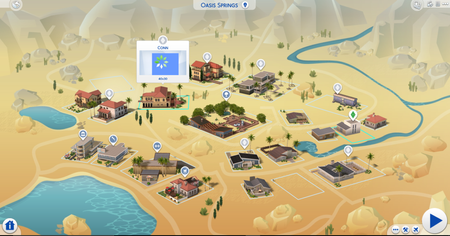
What happens when the bug occurs? Either the hover preview will be stuck on the loading circle, or it will show an entirely different household than the one that actually lives there. In addition, you will not see the Sim(s) from that household above the description box on the left side of the screen.
What do you expect to see? Preview of the Sim(s) when one hovers over the household + the Sim posing above the description box.
Have you installed any customization with the game, e.g. Custom Content or Mods? Not now. I've removed them.
Did this issue appear after a specific patch or change you made to your system? Neutral/Not Sure
I just purchased Discover University yesterday for the sale that's been happening for the season, and I was getting ready to age up one of my Sims so she'll be able to go to Britechester in the fall. At some point, my game was being slow after a couple of Last Exceptions that I had received, and then Windows gave me the option to either wait for the program to respond or to close the game altogether. As I already waited for some sort of response, I closed the game and went back to open it up. However, every time I go into this particular household, the preview for my Sim never shows up. It's either stuck on a loading screen, or it shows an entirely different household other than my own. It doesn't even show a preview of my Sim above the description box that you typically see on the bottom left hand corner. To make matters worse, every time I press the play button, I get no response, and I am unable to play with that particular household. As my Sim is a part of a family that currently lives in Newcrest, I decided to play with her mother and see if I could summon the buggy Sim to their house and maybe even add her back to the original household. However, she did not appear anywhere in my contacts, and she disappeared from the family tree as well.
I was told to make a copy of the save file, put it on my desktop, and then recover the save file that I was currently playing with to see what happens. It worked for a good half an hour, but then when I tried to get my Sim to plan her outfit for a social event, it took me to CAS to an entirely different Sim. At that point, I clicked the X, and it took me back to Manage Worlds, where the glitch/bug continued to happen. I still have both the original save file and the recovered save file on my laptop, and I removed all of my CC/mods to see if the problem still persisted. Sadly, even without CC and mods, the glitch still became a problem. I even repaired the game in Origin to see if anything different would happen, and there was still no luck.
I'm wondering if other people have come across this issue in their games, as it could be an EA-related issue. I know one other person has had a similar problem, but I wanted to bring awareness to it, because I am at a crossroads as far as what to do next.
For further clarification as to what my issue is, here is a video of the glitch happening as I load up my game.