[MOD RELATED] Sims disappeared from household/Blue flashing square on map
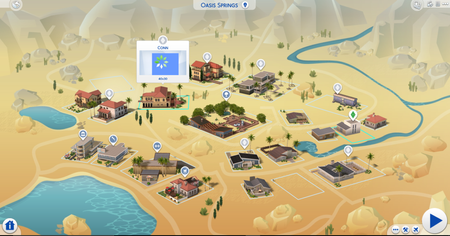


So, I've been using the sims 4 for a while now and i haven't had a problem with my game until i gotten the latest update which is the update of February 5, 2020 so first i was presented with the error 123:9d5d0e8f:b1d3c02d so i went through my mods folder and deleted some off them then when i tried to play the sims 4 again i was hit with error code 102:e0b0ddcd:cad16618 and i was like dang bro my life sucks so i updated all of my script mods and tried to play again but error code 102:e0b0ddcd:cad16618 didn't want to leave yes I've tried the restraining order but nope still their but i also found out that i had more issues like the fact that i cannot see or play other household and a flashing blue icon square will appear with the sims loading circle and also if i click on a household i created and try to see what other households look like it will show a image of my sims that created from a different household as you will see in the image I've created the household king but not the household lobo but it shows my sims from household king as the image of sims for household lobo. Despite all these issues I found out that if i remove my mods and saves folder the everything works fine but i would like to keep my sims that I've created and also the mods and cc i have downloaded (I have 10,916 items of mods and cc combined yeah...ALOT) So does anyone know how to fix this because i am confusion (also sorry for any typing errors some off my keys dont work so have to use the on screen keyboard)

@KawaiillamababyLike you already noticed this is a mod related problem.
I advice you to take out your entire mod folder and move it to (for instance) your desktop. You also should delete your localthumbcache.package file from the '\Documents\Electronic Arts\The Sims 4' folder. The game will make a new one as soon as you start again.
Now for the most laborious bit:
Use the 50/50 method to replace your mods. I.e. replace 50% of the mods back into the game and test if everything works alright on a fresh (vanilla) game.
If so store these mods in a folder you name good mods or something like that. Best store them outside the game folder.
Repeat the proces with again 50% of the affected mods on your desktop and so on and so on, until you can pinpoint the culprit (outdated or broken) mod.
Check with the creator of this mod if there is a newer version available. If not than delete it completely.
Good luck.






