Forum Discussion

larissashere's avatar
larissashere
Seasoned Newcomer
6 months ago

Re: after update black screen

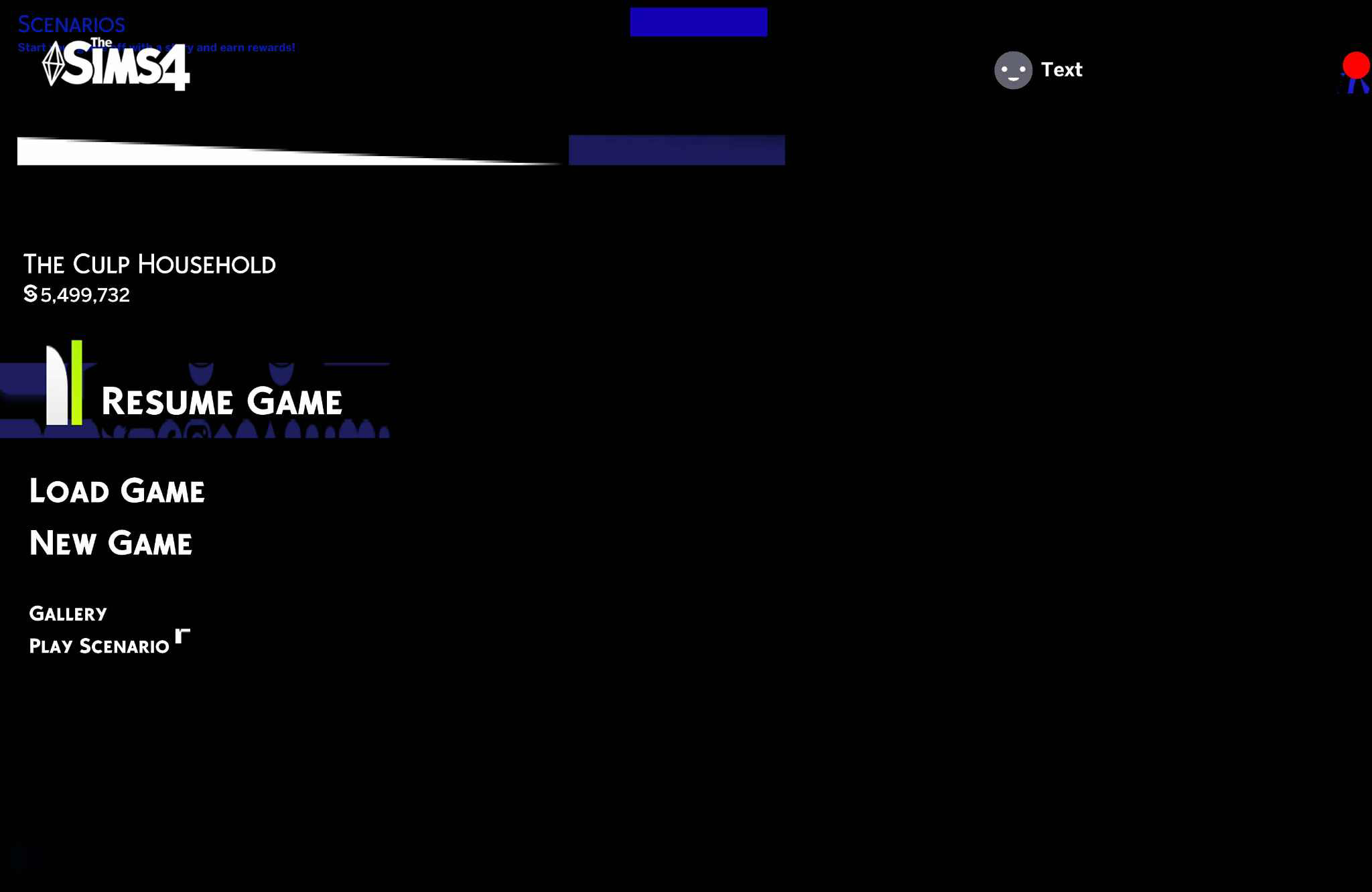
Hello! My problem is just as the title says, my sims 4 has a black starting screen and the texts look very odd and when i load into the game it automatically puts me in the manage worlds screen and I dont know what mod or cc is doing this! please help!

18 Replies

  • kyliforniaaa's avatar
    kyliforniaaa
    Seasoned Rookie
    6 months ago

    mine just stays stuck right here and refuses to close


  • kyliforniaaa's avatar
    kyliforniaaa
    Seasoned Rookie
    6 months ago

    mine just sits here and refuses to close. i cant click nuthinnnnn

  • WinkMakesSims's avatar
    WinkMakesSims
    Rising Novice
    5 months ago

    I didn't download any weird mods/cc and I haven't downloaded UI mods and stuff like that.

    First it was my CAS UI not showing up, and now this.

    I can't click anything at all, I still need to turn it off via task manager, I doubt anyone else is having this problem and if you are and you somehow fixed it, tell me how.


  • Teycorngamer101's avatar
    Teycorngamer101
    New Novice
    5 months ago

    I'm also having this issue, tried to update mods, remove possible broken mods, remove my mods folder then re add it, un-install my game etc. Nothing will work and I'm not sure what to do tbh.

  • Thatsroughbuddy4's avatar
    Thatsroughbuddy4
    Seasoned Newcomer
    5 months ago

    Hi, I had a similar problem and for me it was the more traits mod by thepancake1. I just disabled it and it seems to be fine. 

  • christian_39's avatar
    christian_39
    Seasoned Adventurer
    5 months ago

    As with any other update, specially if it touches the UI such as this one (due to pack disabler and a new category for skin details in CAS, I think), any mod that modifies or overrides UI related resources is bound to break and needs to be updated. This is the 101 of script and UI mods. 
    Your error is very likely caused by a UI mod, namely: UI extension cheats, more columns in case, more traits in case, MCC, better build buy, etc. You will need to monitor the broken mods page (this is the old one, new one does not seem to be live yet) and/or try to find the culprit(s) using the 50/50 method.

  • himhimeneko's avatar
    himhimeneko
    Seasoned Newcomer
    5 months ago

    loaded up the game after todays update and when first launched i got the "mods disabled after update you can enable again in the options menu" or something of that sort so i enabled them and i got the "game needs to be relaunched to apply these changes" and once i relaunched i got stuck with a bugged out main menu where nothing is selectable and its stuck with a black and blue screen where all the buttons and text are glitched , not even the options menu is selectable so that i can go back and turn off mods and i have tried deleting mods people have said are causing similar issues, deleting my entire mods folder, and following numerous pieces of advice from forums and other people having the same issues, repairing the game and (obviously) relaunching the game numerous times and nothing seems to be a fix yet

  • Ghoul_Silvrr's avatar
    Ghoul_Silvrr
    Seasoned Traveler
    5 months ago

    Since you reactived your mods after the update. It sounds like you have the simatically menu mod. It was broken for me too but removing it made the menu usable again, remove it from your game and wait for them to update the mod.

  • Dafen0927's avatar
    Dafen0927
    Seasoned Newcomer
    5 months ago

    I just updated the game then the screen was ok before I enabled custom mods.  I clicked the readable texts but didn't worked. I also restarted my mac but didn't also helped. Any idea on how to fix this? 


  • i6i782h0fwlb's avatar
    i6i782h0fwlb
    Seasoned Newcomer
    5 months ago

    i have the same problem, i can’t click on anything (can’t even exit the game) have to restart my laptop to close it :/

  • sophysully's avatar
    sophysully
    Rising Novice
    5 months ago

    A month or so ago,  my documents file had permanently moved to OneDrive.  I had stopped using it until I found a solution to get them all moved back. I lollygagged to say the least. So when the black screen started on my game, I followed the directions on moving mods and CC. It kept NOT working. I woke up with an epiphany this morning. I have not synced my OneDrive after deleting the cache and moving the mods folder. I did so and repaired the game. IT WORKED!

    So if you have all your game files running off your OneDrive, as I do, try it. 1- Move mods CC files 2- Delete cache files 3- Sync OneDrive 4- Repair game.

    I hope it works for you. GL all. 

  • 28848405's avatar
    28848405
    Rising Newcomer
    5 months ago

    If you have a cc main menu or loading screen THATS THE REASON WHY

  • ebonymarionh's avatar
    ebonymarionh
    Rising Newcomer
    5 months ago

    hi guys, i need help and advice my sims 4 game is broken like everyone else’s but i cant play it at all. i cant click on anything when i go to the main menu or anything and idk if its my mods or if its the update 😭 i’ve tried checking all my mods but i cant figure out what one it would be. my screen goes black and green on the main menu and all i want to do is start a new save 😭 pls help 😭😭😭


  • WettNoodle985's avatar
    WettNoodle985
    Rising Newcomer
    5 months ago

    Ever since the new update I can't play. I have mods and CC but everything was fine before the update. Now when it opens it opens to a blank black page with broken widgets. I've tried updating some mods and I've removed some mods, but honestly I have too many mods to be able to remove them all group by group. Has anyone fixed this yet? Or experiencing the same issue? I can't even play, and if i remove all my mods, whats the point in even playing?... My entire world is modded... I don't use game mods, just build and cas. Help! I really want to play... :(

  • Dafen0927's avatar
    Dafen0927
    Seasoned Newcomer
    5 months ago

    did you able to fix yours? I fixed mine. I made a separate copy of the mods folder, deleted the 2024-present mods. Then slowly copying it by batch to the ea mods folder to see which mods are doing the error.

Featured Places

Node avatar for The Sims 4 Mods & Custom Content

The Sims 4 Mods & Custom Content

Find tips, tutorials and troubleshooting for mods and custom content, and The Sims 4 patch files here.Latest Activity: 2 hours ago
16,643 Posts