Forum Discussion

discodogs's avatar
3 years ago
Solved

Sims 4 mods folder not spawning

Alright so I've been fighting with getting mods working on this new computer. The last time I was using Origin instead of EA so keep that in mind. 

My issue is, my mods aren't showing up in game. I've ruled out the game being out of date, I've ruled out incompatible mods, I've ruled out mod formatting/extraction, and I have enabled both CC and script mods in game. I've tried the delete your mod folder-> boot up the game -> new mod folder should spawn thing, because I think my issue is that I'm missing the mods resource.cfg file that I've seen mentioned here? Because when I installed the game the first time there was no mods folder and I had to make my own. So, I deleted the mods folder that I made and booted up the game and no matter how many times I did it- switching the 'enable mods' on and off- I cannot get a mods folder to spawn. I've uninstalled and reinstalled the game and the issue is still there. 

Does anyone have ANY idea what I could do? Thanks

  • CGrant56's avatar
    CGrant56
    3 years ago

    @discodogs 

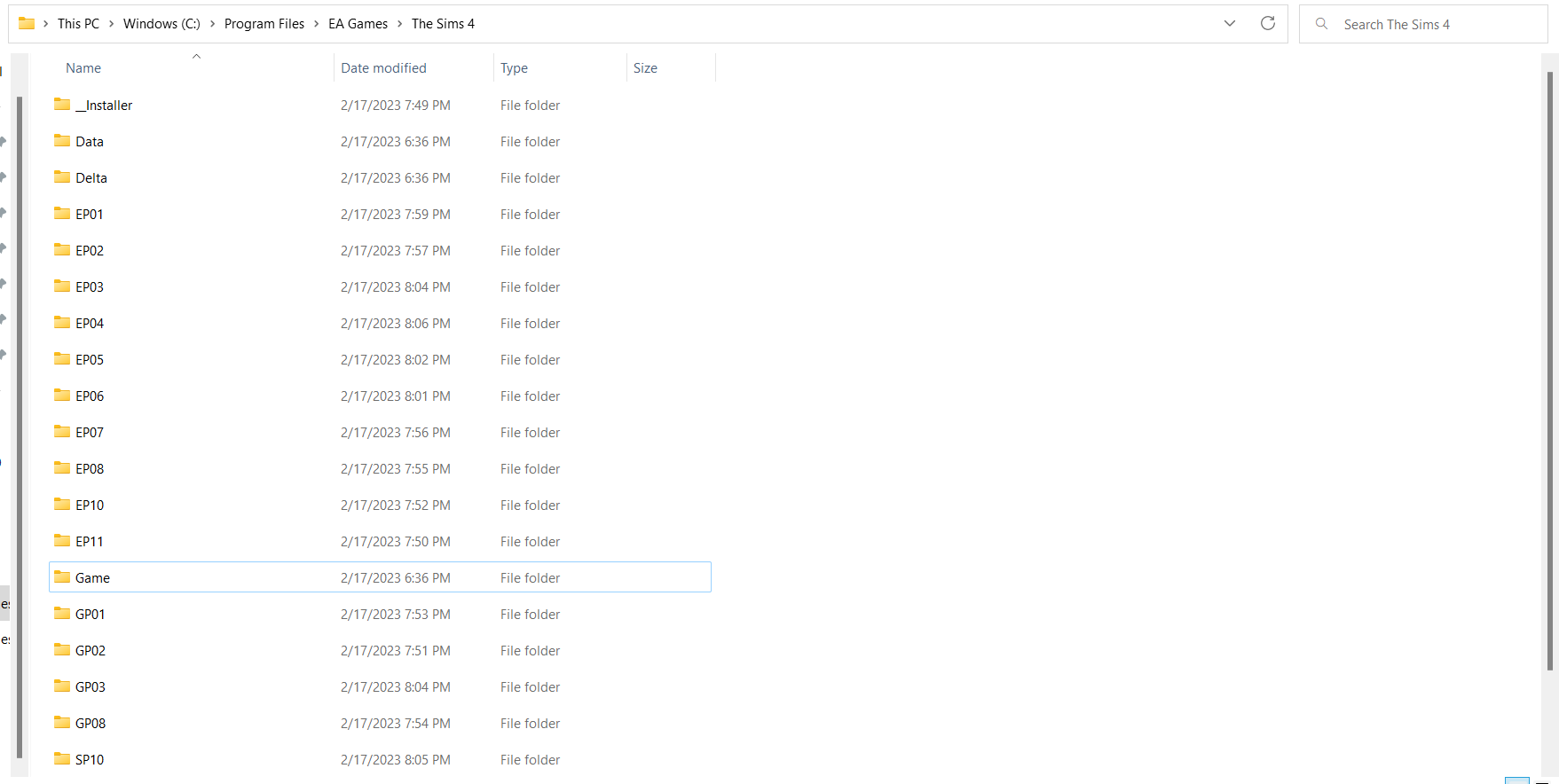
    From your pics, you are showing the program files.   You should not touch those files or folders.  If you have been creating a mods folder there, then it's no wonder that your mods don't show up in the game.  It's the wrong place and the game will never find them.

    Where you need to look is in Documents>Electronic Arts.  There should be a folder there named "The Sims 4".  That is your user folder.  And within it you should find a number of files and folders that hold mods, saves, screenshots, tray, overrides, etc.  The mods folder there should be empty and is where your mods go.  

    So, you probably don't need to reset your user folder yet.  Just put your mods and CC in that Mods folder.  Then start the game to see if they show up in the game.

    Hope this helps.

35 Replies

  • @CGrant56 what if there is no mod folder in the folder of "the sims 4"? if i put a folder called mods in there it doesn't work either. can you help me?
  • CGrant56's avatar
    CGrant56
    Hero+
    3 years ago

    @discodogs 

    From your pics, you are showing the program files.   You should not touch those files or folders.  If you have been creating a mods folder there, then it's no wonder that your mods don't show up in the game.  It's the wrong place and the game will never find them.

    Where you need to look is in Documents>Electronic Arts.  There should be a folder there named "The Sims 4".  That is your user folder.  And within it you should find a number of files and folders that hold mods, saves, screenshots, tray, overrides, etc.  The mods folder there should be empty and is where your mods go.  

    So, you probably don't need to reset your user folder yet.  Just put your mods and CC in that Mods folder.  Then start the game to see if they show up in the game.

    Hope this helps.

  • I'm sorry either I'm doing something wrong or it's just not working, but could you further specify which folder I should rename? I can't find a folder that looks like it contains any of the info that would affect what you've mentioned. Maybe the name is just different on my computer? Additionally, any attempt to rename any folders is being denied because it's 'in use'. The game isn't open, and EA isn't running so I'm not really sure how to bypass that. 

    Thank you so much for replying and I'm attaching screenshots of the areas I'm having trouble with. 

  • @discodogs 

    Have you tried a folder reset by creating a new user folder (The Sims 4).  Just rename your current one and restart the game.  A new one will be created automatically.  You'll have to go through making the sim and placing them and resetting your Gameplay settings in Game Options.  Then save and exit. Take a look at your user folder and see if you have a Mods folder.  If you do, then you can copy or move your Saves, Tray, ConfigOverride, Screenshots, and Custom Music folders from the old user folder to the new.  Then add your mods to the Mods folder.  Start the game and see if your mods and CC show up in game.  They should.  If they don't, then something else is going on.  Your game should not need repair since you reinstalled everything, but you can try doing that if the mods don't show up as well.

    Hope this helps.

Featured Places

Node avatar for The Sims 4 Mods & Custom Content

The Sims 4 Mods & Custom Content

Find tips, tutorials and troubleshooting for mods and custom content, and The Sims 4 patch files here.Latest Activity: 36 minutes ago
16,687 Posts